Turn on suggestions
Auto-suggest helps you quickly narrow down your search results by suggesting possible matches as you type.
Showing results for
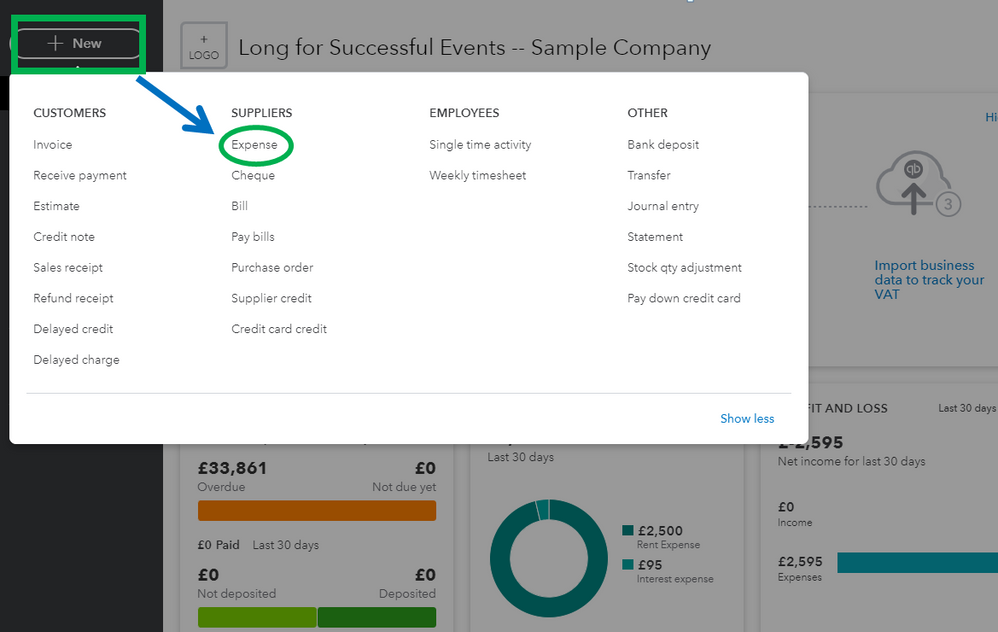
You'll find the plus (+) symbol when entering a transaction in your QuickBooks Online account and I'm here to show how to do it, claypipeM.
To create an expense, you'll have to start by clicking the + New symbol. Another way is to click the Expenses menu on the left menu. Moreover, you can follow the detailed steps below.
Please check this article in case you want to edit or delete an expense transaction: Enter, Edit, Or Delete Expenses In QuickBooks Online.
You'll want to check out these resources for your reference. This will guide you through the basic topics that you'll need to learn in QuickBooks Online: Get Started With QuickBooks Online.
Please let us know if you have any other concerns about expenses. I'll always be around if you need further assistance.

