Turn on suggestions
Auto-suggest helps you quickly narrow down your search results by suggesting possible matches as you type.
Showing results for
SALE EXTENDED 70% OFF QuickBooks for 3 months* Ends 12/8
Buy nowHello there, @ckennedy1. We can perform a few steps to resolve this right away.
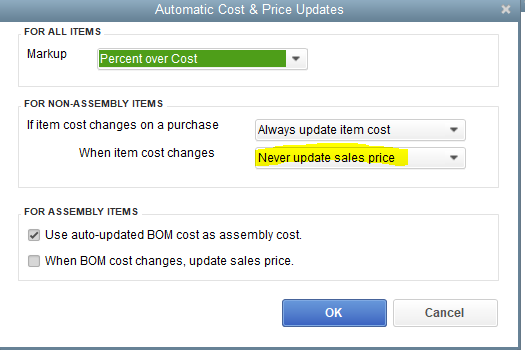
Selecting the Never update sales price option would prevent the price changes when updating the cost. QuickBooks perform based on the selection in the Automatic Cost & Price Updates window.
We can double check and ensure the When BOM cost changes, update sales price box is also not ticked. Then, make sure to click OK to reflect the changes in the system.
If the same thing happens, make sure to download the latest product updates to ensure you have the most recent update of QuickBooks. Once done, run the Verify and Rebuild Data within your company file to fix your current issue. Here's how:

I also recommend visiting the following article to view frequently asked questions regarding the items in QuickBooks: Add, edit, and delete items.
I'm always available to help if you need further assistance about the preference for Automatic Cost & Price Updates within your company file, ckennedy1. Stay safe and have a good one.

