Turn on suggestions
Auto-suggest helps you quickly narrow down your search results by suggesting possible matches as you type.
Showing results for
SALE EXTENDED 70% OFF QuickBooks for 3 months* Ends 12/8
Buy nowHello there, @Lotuspete.
Welcome to QuickBooks Community. Also, I appreciate you for adding a screenshot along with the details you've provided above. It's a big help to identify your concern right away.
Yes, there is an option for you to use a full screen in QuickBooks Desktop. The reason why it appears is that you're utilizing the Top Icon Bar feature or the Show Search field in the Icon Bar is checked, as mentioned by BigRedConsulting .
To change it, follow these steps:
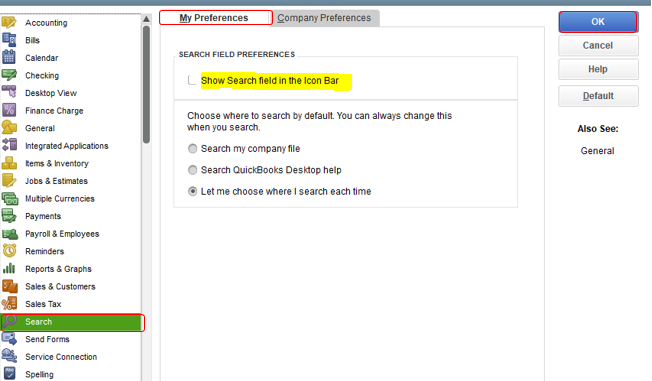
If it still appears, you can also make sure the Hide Icon Bar option is selected under the View menu. Let's take a look at the sample screenshot below.
The icon bar offers quick navigation and access to the most commonly used features in QuickBooks. It helps you access to start any task. Anytime, you can also add or remove icons to customize which icons display on the icon bar. If you consider doing this in the future, select either Top Ion Bar or Left Icon Bar.
Also, you can use this article to learn the keyboard shortcuts for doing things more efficiently in QuickBooks Desktop: Navigate around QuickBooks.
That will do. Please let me know how it goes. I'm here whenever you need help in viewing changes in QuickBooks Desktop. Take care and stay safe always!

