 QuickBooksHelpIntuit
Find your QuickBooks Desktop license info within the software
by Intuit•47• Updated 7 months ago
Here’s how to find important product information for QuickBooks Desktop and connected products.
Find your product number, license number, version, and release
QuickBooks Desktop (Pro, Premier, or Enterprise)
- Open QuickBooks Desktop.
- Press the F2 key.
This opens the Product Information window.
- Look in this window for your product name, product number, and license number.
- Your release is listed at the end of the product name.

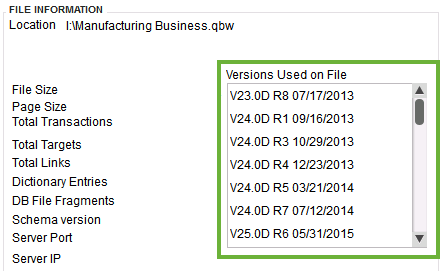
- Your version is in the Version Used on File section. This list is sorted by date, with the oldest version first and the most recent at the end.
How do I check my QuickBooks Payroll subscription status?
- Open QuickBooks Desktop.
- Go to the Employees menu.
- Select Payroll Centre.
- Select the Payroll tab. You’ll see the status of your subscription.
More like this