 QuickBooksHelpIntuit
How to access your PD7A in QuickBooks
by Intuit•261• Updated 6 months ago
Access your PD7A form in QuickBooks to view, print, or archive it for your records.
Here's how:
- Go to All apps
 , select Payroll, then select Payroll taxes (Take me there).
 - Select the Payments tab.
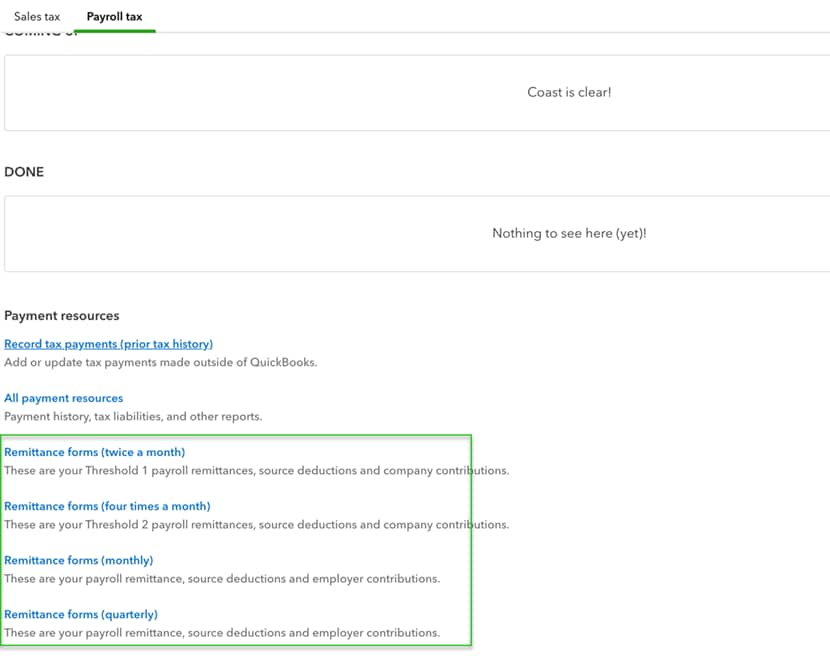
- Under Payment resources, select Remittance forms (monthly) or Remittance forms (quarterly).
- Select PD7A.
- Select the desired time period you'd like to run the report for.
Remittance forms can also accessed at the bottom of the Payroll Tax Centre page.
You can now view and print the form like you normally would or archive the form for later.
More like this
- Remit deductions and contributions to the Canada Revenue Agency (CRA) or Revenu Québec (RQ)by QuickBooks
- Payroll liability amounts do not match the PD7A reportby QuickBooks
- Changing Payroll remittance filing frequency in QuickBooks Onlineby QuickBooks
- How to give your accountant access to your QuickBooksby QuickBooks