Space for pervasive banner when authenticated

Turn tips on or off for sales forms in QuickBooks Online


Learn how to add tips to your payment forms in QuickBooks Online.
With QuickBooks Payments, your customers can add a tip when they pay an invoice. You’ll also have an extra field to track tips on sales receipts. Your customers have the option to tip 5%, 10%, 15%, or a custom dollar amount.
Note: This feature is limited for QuickBooks Online Free and QuickBooks Online Lite. Upgrade your plan to get more features. Go to Settings  , then Subscriptions and billing. Then select Upgrade your plan.
 If you'd like to make it easy for your customers to pay an invoice online, check out QuickBooks Payments rates and apply.
Learn how to:
Turn tips on or off for all sales forms
When you turn on tips, it adds a Tips field to all your Invoice and Sales Receipt forms.
To turn tips on:
Go to Settings
and select Account and settings.Select Sales.
Select Edit ✎ in Sales form content.
Turn Accept tips on.
In Who's receiving these tips?, select an option:
My Team: Select if you use tips to pay your employees or others. this creates a liabilities account for tips.
Just me: Select if you only pay tips to yourself. This creates an income account for tips.
Select Update.
Select Save, then Done.
When a payment with a tip is received, the amount updates with the Tip box below the Total. Payments will be in the full amount of the invoice + tip.
To turn tips off:
Go to Settings
and select Account and settings.Select Sales.
In Sales form content, select Edit ✎.
Turn Accept tips off.
Select Save, then Done.
Manage tip settings from an invoice
You can manage tip settings right in an invoice. This is useful when you want to turn tips on or off for most sales, but do the opposite for specific customers.
Note: This option is only available in the new estimate and invoice layout. Find out which layout you’re using and if the new layout is available to you.
Select + Create.
Select Invoice.
Select ⚙ Manage, then select Payment methods.
Switch Accept tips on or off for this invoice only.
You can also turn tips on or off for all future invoices. Under Accept tips, select Manage settings. Decide Who gets tipped, turn tips on or off, then select Save.
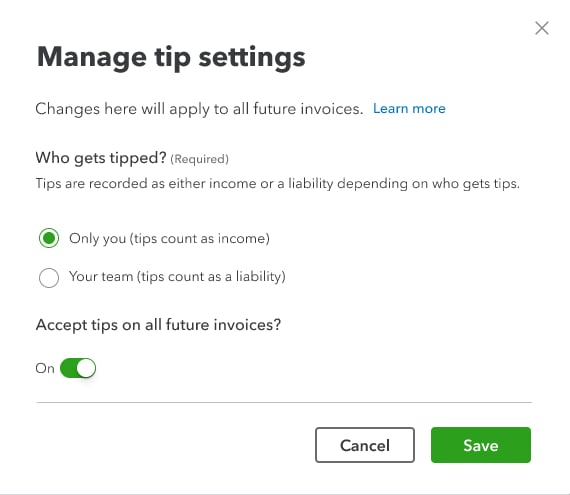
How customers see tips on their invoice
When you email customers an invoice with tips turned on, they’ll see tip options as they enter their payment method.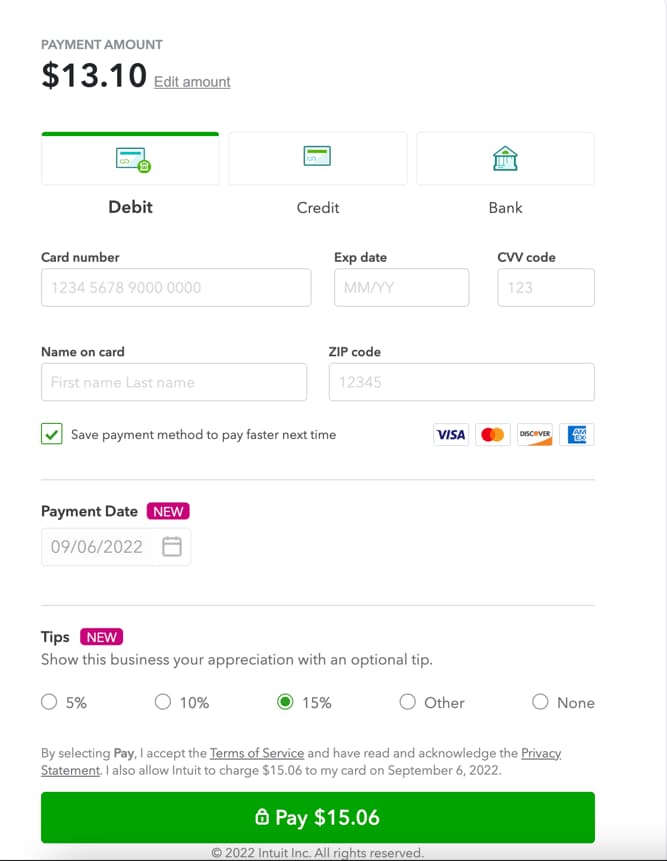
Customers may select to tip 5%, 10%, 15%, a custom dollar amount, or none.
Add tips to a sales receipt
Here’s how to record a sales receipt for a customer who adds a tip to their payment:
Select + Create.
Select Sales Receipt.
Enter the tip value. Note: Tips can be found by the totals/subtotals and aren’t affected by tax or discounts.
Change the tips account
Go to Settings
and select Account and settings.Select the Advanced tab.
In Chart of accounts, select Edit ✎.
Select the account you want for the Tips account.
Note: Tips show on Recurring Invoices with the setting on, but won't show on the Recurring Invoice template. If you choose to set up Autopay, you won't be able to add tips to Recurring invoices.
Sign in now for personalized help
See articles customized for your product and join our large community of QuickBooks users.
Call Sales: 1-800-365-9606




