

- Mark as New
- Bookmark
- Subscribe
- Highlight
- Report Inappropriate Content
Account Management
I can see how the benefit of being able to let your accountant access your QuickBooks Self-Employed (QBSE) account would aid you in keeping your financial data accurate, @Maddie Leicester. That's why I'm here to share further details about this.
When your subscription is paid through a third party (i.e., Google Play), you've purchased the app version of QBSE. Not all features of the app are the same as the browser platform that's why you're advised to migrate your subscription to Intuit. This way, you'll have the option to invite your accountant.
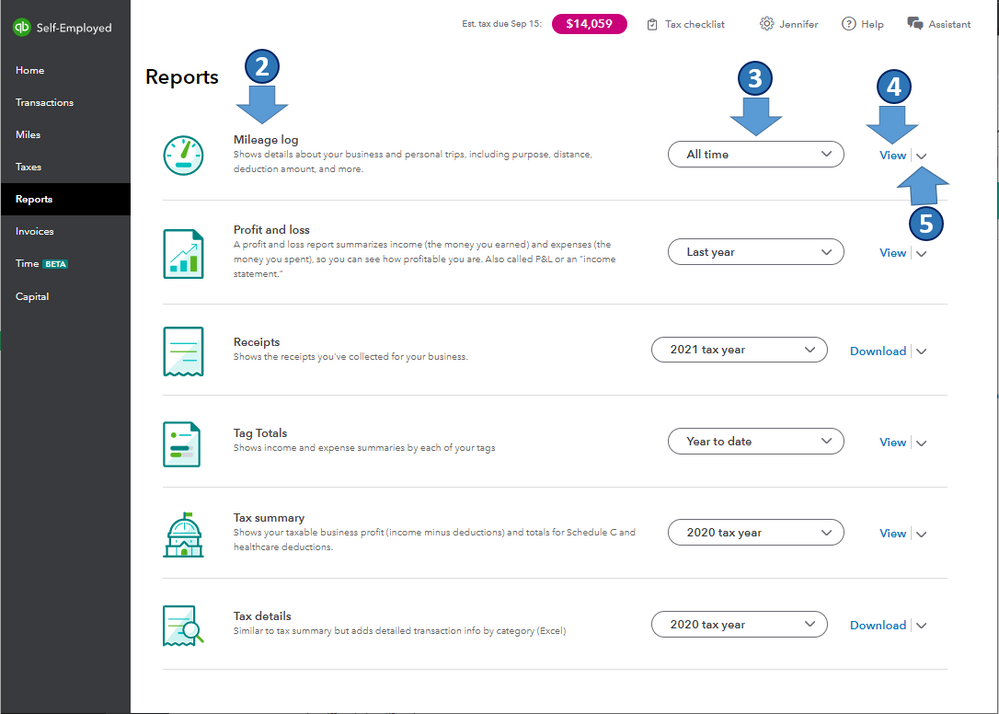
However, you can share reports and other tax info with your accountant, especially during tax season. To do this, you need to download the reports you need by following these steps:
- In QBSE, go to the Reports menu.
- Find the report you want to download.
- Select the period or tax year from the dropdown.
- Select View or Download.
- Select the arrow icon ▼ and then select either Print or Download.
In case you've decided to cancel your Google Play subscription, you can refer to this article for the detailed steps: Cancel your QuickBooks Self-Employed subscription. Then, re-subscribe directly from QuickBooks.
Also, I'm adding this article to further guide you in managing your business calendar, tax reports, and self-assessment return using QBSE: QuickBooks Help Articles. It also includes topics about the system's overview, mileage, and year-end taxes, to name a few.
I'm all ears if you have other account management concerns or questions on tracking self-employed transactions in QBSE. I'm always around to help. Take care, and I wish you continued success, @Maddie Leicester.
