- Mark as New
- Bookmark
- Subscribe
- Highlight
- Report Inappropriate Content
Log off QBSE
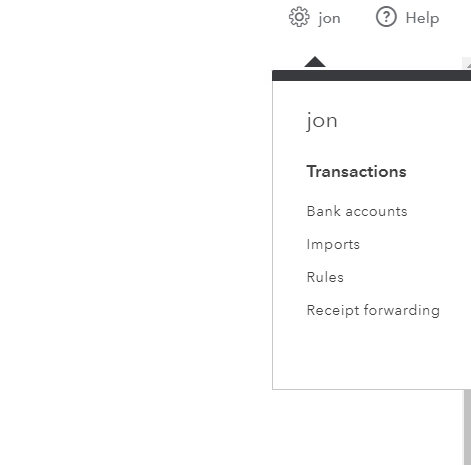
I have been using QBSE for some time, got very used to clicking the cog / setting icong and then logging off.
Today the log off button seems to have disappeared and I can't find one anywhere.
Am I blind or are Intuit now hiding things?
Solved! Go to Solution.


- Mark as New
- Bookmark
- Subscribe
- Highlight
- Report Inappropriate Content
Account Management
Hello prokraft,
Can you please send a screenshot of how the menu displays within your account (of course cutting out any confidential information)?
Thanks,
Talia

- Mark as New
- Bookmark
- Subscribe
- Highlight
- Report Inappropriate Content
Account Management
I'm having the same problem.
- Mark as New
- Bookmark
- Subscribe
- Highlight
- Report Inappropriate Content
Account Management
Same here, something is obviously wrong, as we need a Log Off button.
Surely, it cannot be a too difficult to sort out??
- Mark as New
- Bookmark
- Subscribe
- Highlight
- Report Inappropriate Content
Account Management
My 'Billing Info' has disappeared too.
- Mark as New
- Bookmark
- Subscribe
- Highlight
- Report Inappropriate Content
Account Management
Yes, me too :(
Any chance of a reply from Intuit, surely we cannot be the only ones??
- Mark as New
- Bookmark
- Subscribe
- Highlight
- Report Inappropriate Content
Account Management
They seem to make quite difficult to get in touch with them. I've had a few problems with QBSE. Not happy with it as it seems to take an age for them to do anything.


- Mark as New
- Bookmark
- Subscribe
- Highlight
- Report Inappropriate Content
Account Management
Hello Community Users, We just wanted to pop in and confirm this issue was resolved. For any QBSE users unable to see the sign out option located in the cog in the top right it is worth trying a clear of the cache and the cookies in the browser, also trying minimising the page on the browser incase it is cutting off the full page, or if it is not the page itself, trying in a private/incognito window. This should mean you can then see the full settings screen when you hit on the cog including the sign out option.
Any issues at all please reply to this thread. Thank you.