

- Mark as New
- Bookmark
- Subscribe
- Permalink
- Report Inappropriate Content
Banking
Thanks for the reply, markatmakinity.
First, you need to void the cheque since the payment didn't go through. Then, you'll need to create an expense transaction to record the fee.
- Go to the Expenses menu, then select Suppliers.
- Select the supplier you paid. Then, find and select the cheque.
- Tap More, then select Void.
- Confirm you want to void the cheque, then select OK.
Once done, you can follow JenoP's steps to record the expense transaction.
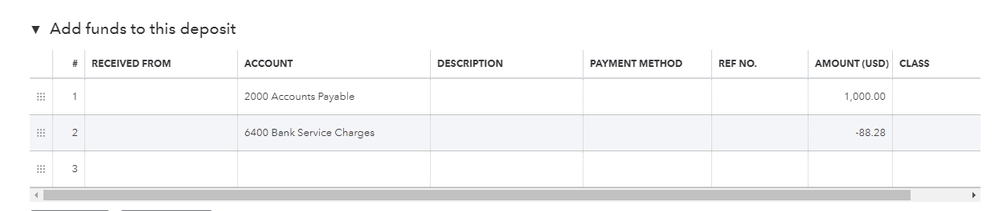
Another way to record it is by creating a bank deposit. From there, we can add both the returned funds and the fee. Follow these steps:
- Go to the + New button, select Bank deposit.
- From the Add funds to this deposit section, you need to add two lines.
- Accounts Payable Account - for the returned 1000 Euros.
- Expense Account - for the processing fee of 88.28
- Add all details required including the bank, supplier, and date.
- Tap Save and close.
This is how it looks like:
If you need to process another payment, simply create a new cheque and the deposit you created will pop up so you can link them.
You may also visit our Help Articles page if you need more references in managing your business.
I'll be here if you need anything else. Take care!
