

- Mark as New
- Bookmark
- Subscribe
- Permalink
- Report Inappropriate Content
Banking
I want to assure you brutewolf, that we take your concerns seriously in resolving your missing transactions. I'll provide you a workaround on how to get this issue sorted.
The possible reason for missing transactions is when the bank connection is not updated. I recommend checking your bank website to see if your bank is under maintenance. If not, I suggest to update it manually so that your bank transactions will sync in automatically with QuickBooks Online (QBO).
Here's how:
- Go to transactions and select bank transactions.
- Select update to refresh the connection.
- Then, go to the for review tab to check the transactions.
This synchronizes all your linked bank and credit card accounts. If QuickBooks retrieves new transactions, you will see an increase in the transaction count displayed on each account tile.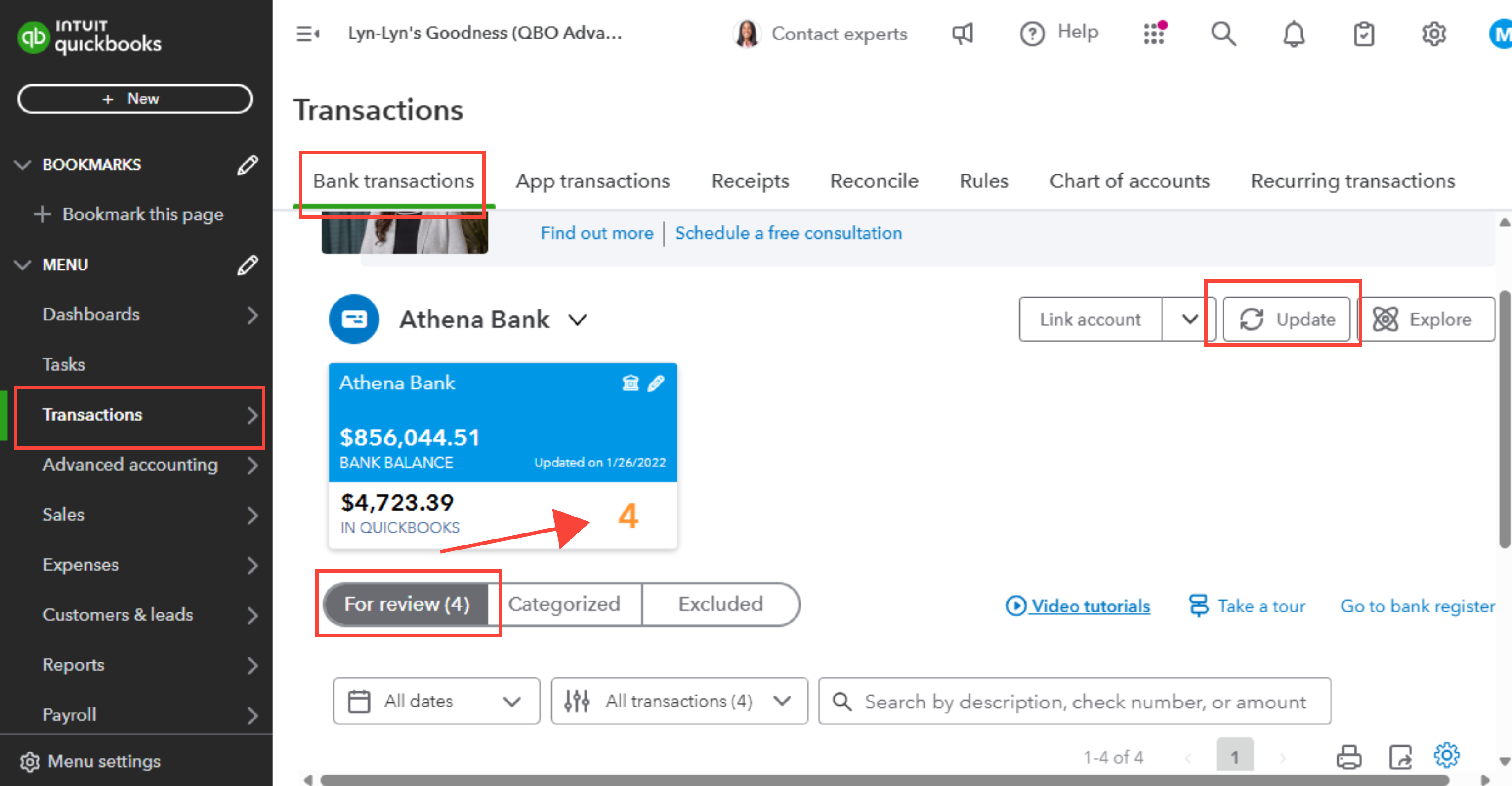
On the other hand, If the issue persist you can manually upload transactions through a CSV file. That way, you can fill in the gaps of missing transactions.
Moving forward, we recommend re-establishing your bank connection to ensure that your transactions are consistently updated in a timely manner.
Here's how:
- Go to Transactions, then select Bank transactions (Take me there).
- Select Link account.
- Follow the steps to connect the account to online banking again.
Additionally, once you have successfully retrieved your missing transactions, you may begin the process of categorizing them accordingly.
Furthermore, we have a team of experts who can offer personal guidance on managing your daily transactions and as well as in teaching the best bookkeeping practices to increase your efficiency. Check out QuickBooks Live Expert Assisted for more details.
Please let me know if you have follow-up questions or concerns with your missing transactions. I'll be right here if you need assistance. Have a great day ahead!
