


- Mark as New
- Bookmark
- Subscribe
- Permalink
- Report Inappropriate Content
Banking
Hello there, gabychy4.
When connecting a bank account, what specific error message did you encounter? And which bank are you trying to connect to QuickBooks Online (QBO)? Please provide any additional details or screenshots to help us provide a tailored answer.
To resolve this issue, start by signing out of your QBO account and signing back in. Then, reconnect your bank account.
Make sure you’re using the correct username and password for your bank account. You can check this by logging into your bank’s website directly. If you can access your account there successfully, use the same login details when connecting your account in QuickBooks Online.
Alternatively, you also have the option to manually upload transactions into QuickBooks Online.
If you have any further questions or need assistance with QuickBooks, feel free to click the Reply button.

- Mark as New
- Bookmark
- Subscribe
- Permalink
- Report Inappropriate Content
Banking
When trying to Connect an Acccount. I show the only account we have but the connect button will not allow me to click it. What do I do.

- Mark as New
- Bookmark
- Subscribe
- Permalink
- Report Inappropriate Content
Banking
Hi there, @JKiser1.
In QuickBooks Online (QBO), once the bank account is already linked, the Connect button will be greyed out. To confirm, go to the Bank transactions page and review the blue tiles. If the account is not showing, it could be hidden. In order to show it, you can select the account cards dropdown and click Show account cards.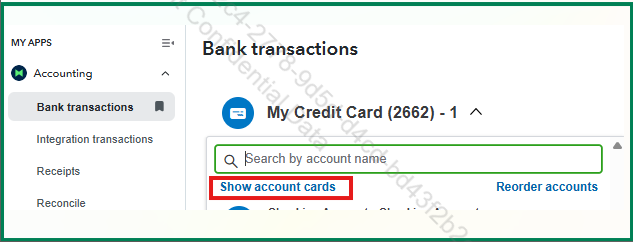
The connected account is also listed in the Chart of Accounts. It will show a two arrows pointing left and right under the Type and Detail type columns. Check the screenshot below: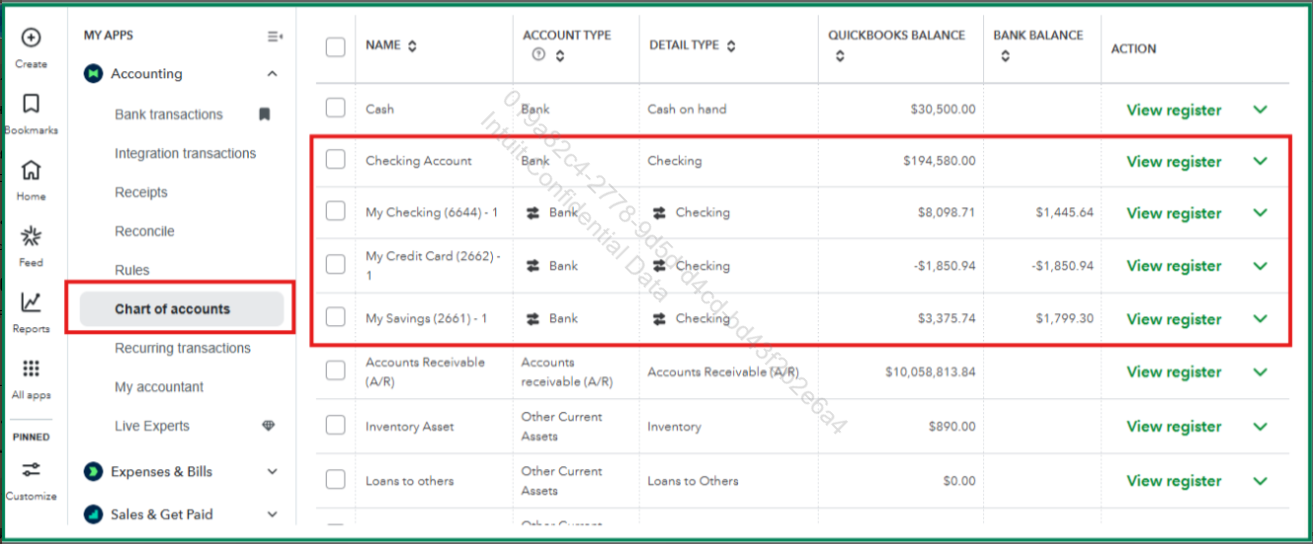
After locating the account with the downloaded bank entries, you can start organizing them for your books. For more guidance, check out this article: Categorize online bank transactions in QuickBooks Online.
Feel free to reply if you need more help. I'm always here to assist!
