

- Mark as New
- Bookmark
- Subscribe
- Permalink
- Report Inappropriate Content
Banking
I can share additional information, @luxurytoyx.
Let's first locate the sales you've initially recorded. Once located, ensure that the information on the sales exactly matches the deposit details.
Here's how to locate your sales transactions:
- Hover your mouse to the Magnifying Glass.
- Click the Advanced Search link.
- Enter the specific details about the sales transactions:
- Choose the Date Range of the transaction.
- Click Apply.
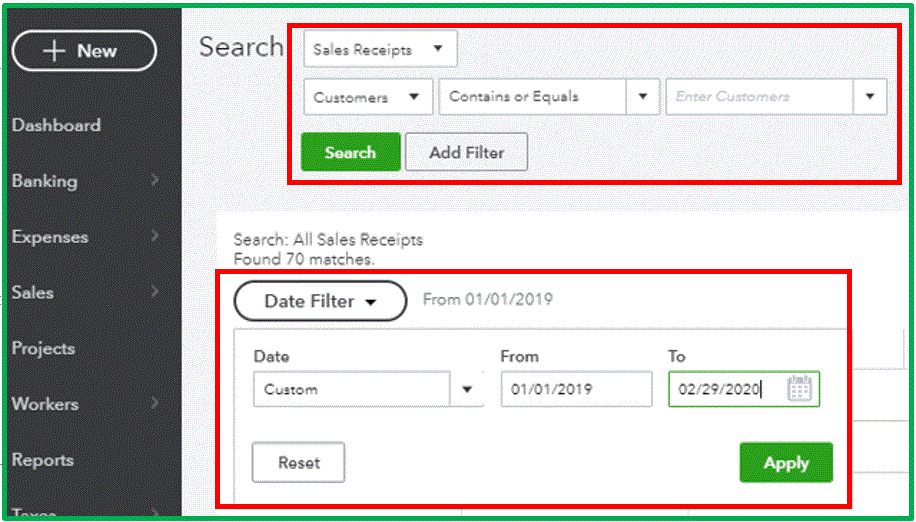
Once you've located the sales transaction, let's make sure that its date and other information matches with the downloaded transaction in your For Review page.

Once verified, select the Find Match option. From here, you can perform resolve difference to add
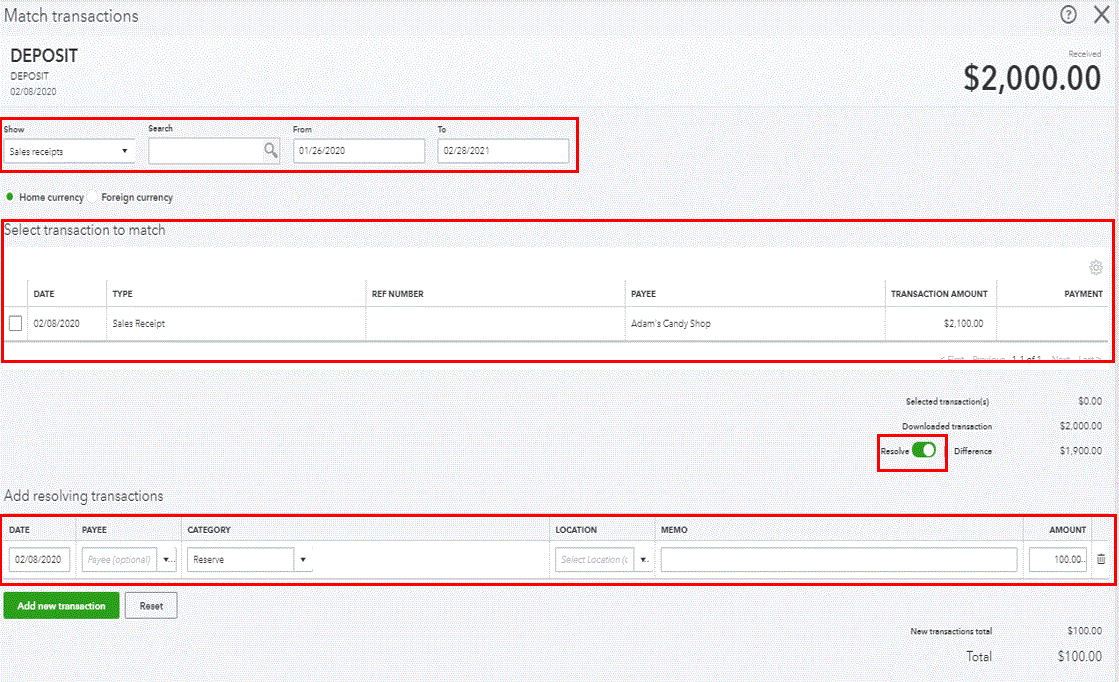
For more detailed insights about managing your downloaded bank transactions, you can read through these articles:
- Assign, categorize, edit, and add your downloaded banking transactions
- Download, match and categorize your bank transactions in QuickBooks Online
Feel free to get back to us if you have other questions. I'm always here to help.
