
- Mark as New
- Bookmark
- Subscribe
- Permalink
- Report Inappropriate Content
How do I delete or edit a memorized transaction?
Solved! Go to Solution.

- Mark as New
- Bookmark
- Subscribe
- Permalink
- Report Inappropriate Content
Banking
- Mark as New
- Bookmark
- Subscribe
- Permalink
- Report Inappropriate Content
Banking
- Mark as New
- Bookmark
- Subscribe
- Permalink
- Report Inappropriate Content
Banking
- alonzo12
- about a year ago
Try writing a check to the same credit card company you used for the CC Refund transaction (for example the transaction name might be American Express). You don’t have to enter anything else. Then memorize the check. QB will say that transaction name is already on the list and asks if you want to replace it. Click replace. The transaction type should now be changed to “Check”. If so, you can now delete the transaction. It’s a goofy method, but it worked for my purposes.

- Mark as New
- Bookmark
- Subscribe
- Permalink
- Report Inappropriate Content
Banking

- Mark as New
- Bookmark
- Subscribe
- Permalink
- Report Inappropriate Content
Banking
If this answers your question please recommend it.
- Mark as New
- Bookmark
- Subscribe
- Permalink
- Report Inappropriate Content
Banking
- Mark as New
- Bookmark
- Subscribe
- Permalink
- Report Inappropriate Content
Banking
- Mark as New
- Bookmark
- Subscribe
- Permalink
- Report Inappropriate Content
Banking
- Mark as New
- Bookmark
- Subscribe
- Permalink
- Report Inappropriate Content
Banking
- Mark as New
- Bookmark
- Subscribe
- Permalink
- Report Inappropriate Content
Banking
- Mark as New
- Bookmark
- Subscribe
- Permalink
- Report Inappropriate Content
Banking
I have Desktop ProPlus 2017 and there are no edit options so that I can delete memorized transactions. How do I delete?

- Mark as New
- Bookmark
- Subscribe
- Permalink
- Report Inappropriate Content
Banking
Thanks for joining in on the thread, cuttingedgetraining.
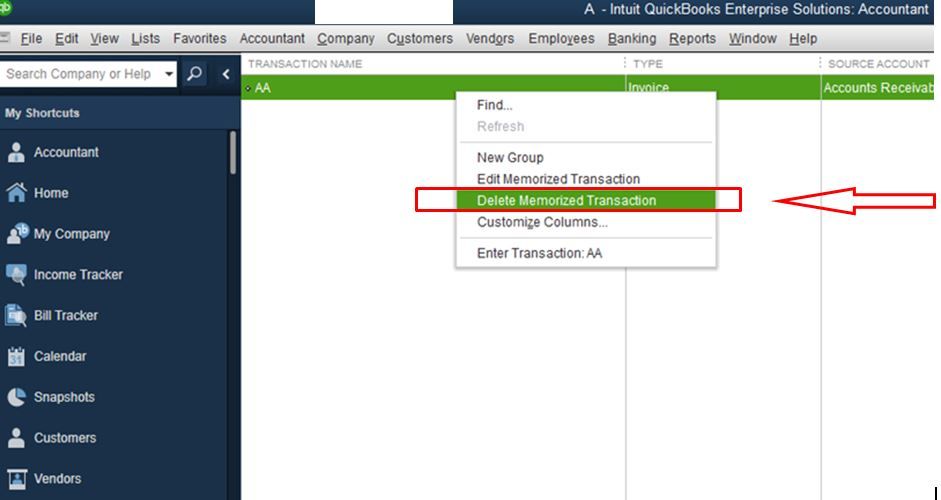
You still need to right-click on the memorized transaction you want to delete. Thus, giving you the Delete Memorized Transaction option to delete it. You can check out the screenshot below for a clearer view.
Let me know if you need more help with this.

- Mark as New
- Bookmark
- Subscribe
- Permalink
- Report Inappropriate Content
Banking
Did you learn how to edit the dollar amount on a Mac in Memorized Transactions if the amount has changed?
- Mark as New
- Bookmark
- Subscribe
- Permalink
- Report Inappropriate Content
Banking
Hello there, @lsimon.
Thank you for joining in the Community. I'd be happy to help and walk you through in editing the amount of a memorized transaction.
To save the changes, you need to replace the transaction.
Here's how:
- Choose Lists.
- Select Memorized Transactions.
- Double-click the transaction.
- Change the amount.
- Click Memorize.
- On the pop-up message, select Replace.
Make sure not to save and close the transaction until you're ready to post it.
I'm adding this article for future reference: QuickBooks Desktop for Mac 2019 User’s Guide.
Also, if you need to reach out for more help, our phone agents will be able to help you get to a resolution quickly.
Here's how:
- Go to https://help.quickbooks.intuit.com/en_US/contact.
- At the top right, select your QuickBooks version.
- Select a topic.
- Click on the Get Phone Number button.
This will guide you update the amount of the memorized transaction.
I'm just a post away if you should have any questions about memorized transactions. I'll be happy to help you out.

- Mark as New
- Bookmark
- Subscribe
- Permalink
- Report Inappropriate Content
Banking
Use Command + D in QB 2019 for Mac
- Mark as New
- Bookmark
- Subscribe
- Permalink
- Report Inappropriate Content
Banking
Spot on! The only way to delete (Not EDIT) a memorized transaction on QB for Mac is to select the invoice and hit Command D. Thank you so much for this tip!

- Mark as New
- Bookmark
- Subscribe
- Permalink
- Report Inappropriate Content
Banking
command D for mac (It is also under the menu - Edit - Delete Memorized Transaction)
- Mark as New
- Bookmark
- Subscribe
- Permalink
- Report Inappropriate Content
Banking
command d for mac (also under the edit drop down menu)
- Mark as New
- Bookmark
- Subscribe
- Permalink
- Report Inappropriate Content
Banking
I cannot find any actual answer to this question of how to change the amount of a memorized transaction. Everyone states, double click and change but the problem is there is not place for the amount when editing a memorized transaction. If I change a past transaction it does not save in the memorized list. The only way I have figured out how to do this is either on the day its supposed to post or post a future one, or delete old and create new. If someone has an actual step by step with images of what they claim is the answer I would love to see it. This is for Mac 2016.
Thanks


- Mark as New
- Bookmark
- Subscribe
- Permalink
- Report Inappropriate Content
Banking
Thanks for visiting us, amgloans.
I understand that we also need to update something on our company data.
Any changes from the old transactions won't reflect on your existing memorized transactions. You'll want to continue doing your workarounds while we're unable to edit its amount.
I'll also send feedback about this to our developers to have an option to edit the amount of all memorized transactions.
Keep on posting if you need more help. I'll be here!
