

- Mark as New
- Bookmark
- Subscribe
- Permalink
- Report Inappropriate Content
Banking
Hi there, @Chessmaven.
I'm here to help you on how to get your credit card transactions to flow in the feeds automatically.
You can connect to the bank feeds through your bank's/financial institution's credentials even though you're using a Credit Card as long as it's supported. If it's not supported, you can manually import the transactions using .CSV file format.
I'd be happy to show you how to do that:
- Go to the website of your Credit Card provider and download the transactions. You can choose to download it using a .CSV file if available, if not proceed to download it via .XLS or .XLSX.
- Open the spreadsheet in an Excel program and convert it to .CSV.
- Open the QuickBooks Online program, navigate to the Transactions tab, and select Banking.
- Choose the account you'd like to upload the transactions to.
- Select the drop-down icon beside the Link account button and click Upload from file.
- Click the Browse button and select the .CSV file you've converted.
- Select Open and click the Next button to map the transactions accordingly. This is how it looks like:
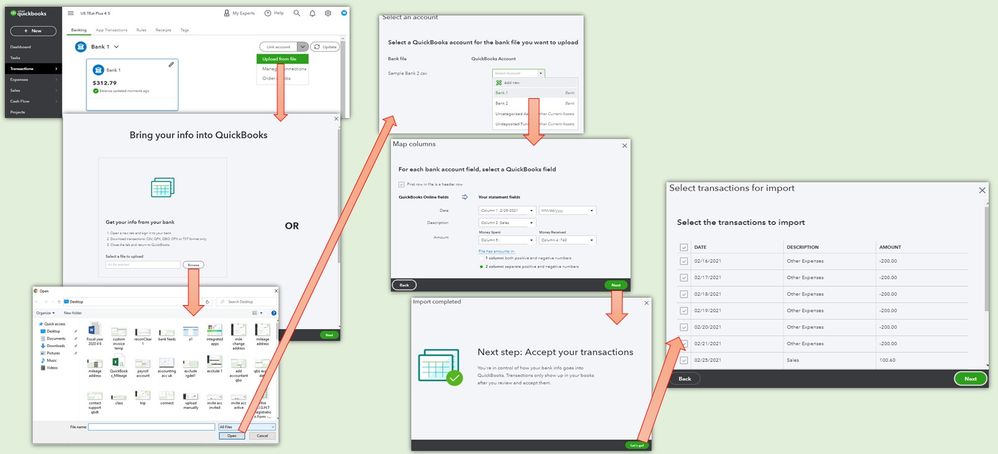
To know more about the next steps, check out Step 4 in this article: Manually upload transactions into QuickBooks Online. This also contains another set of steps for your future reference when you're ready to categorize and reconcile the transactions.
I'll be around if you have other questions. Please don't hesitate to let me know in the comment section. Take care.
