

- Mark as New
- Bookmark
- Subscribe
- Permalink
- Report Inappropriate Content
Employees and payroll
Hi there, Hrstar.
I'll share some information on how you can sort the employee's information by their first name when running Payroll Summary.
The option to sort by first name when running the Payroll Summary report isn't available in QuickBooks Online (QBO). As a workaround, you can export the report to Excel and manually rearrange its columns.
You can follow the steps provided by my colleague @ACH_22 on how to export reports to Excel. I've added screenshots for your reference.

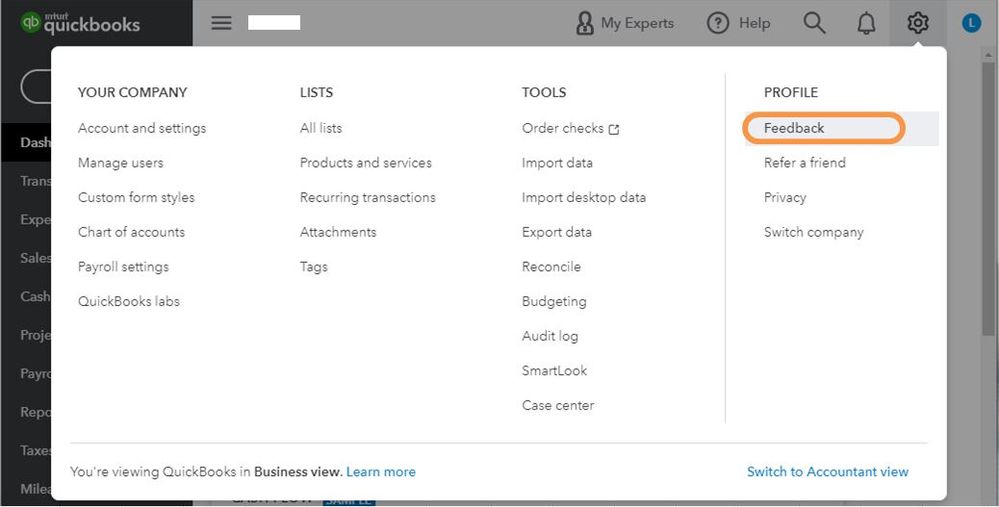
I can see that this would be a great feature for the program. I'd recommend sending feedback to our Product Development Team. They'll see your recommendation and may consider it for future updates.
Here's how:
- Select the Gear icon at the top, then Feedback.
- Enter your comments or product suggestions then select Next.
- You'll be provided a list of suggested Help articles related to your comment. You can read through them or select Skip and send a message.
- From the drop-down, choose the appropriate category, then select Send a message.
I've added this article to learn more about personalizing your reports, please see these resources:
You can swing by the Community anytime if you need assistance in running payroll reports. We're always here to back you up. Take care!
