

- Mark as New
- Bookmark
- Subscribe
- Permalink
- Report Inappropriate Content
Employees and payroll
It's nice to have you back, @EssentialPackMule,
There are a few ways to import your old payroll data into QuickBooks. First, you can consider looking for the most recent backup of the company file which includes the 6/1/20 until 8/26/20 data. You can use the steps provided by KlentB to find the .QBB file, then restore it in the upgraded file.
Restoring a backup will replace the data on the current file and will only display what information has been backed up previously.
However, if you don't want this option, you can use a third party importer tool to save the information in the software. Check out our apps website here to find the tool that works for you: https://desktop.apps.com/home
Another way is contacting our team to help find the file for data recovery. Our agents are currently available through messaging, to contact us, use the steps below:
- Open QuickBooks and click the Help menu.
- Select QuickBooks Desktop Help.
- On the pop-up screen select Contact us.
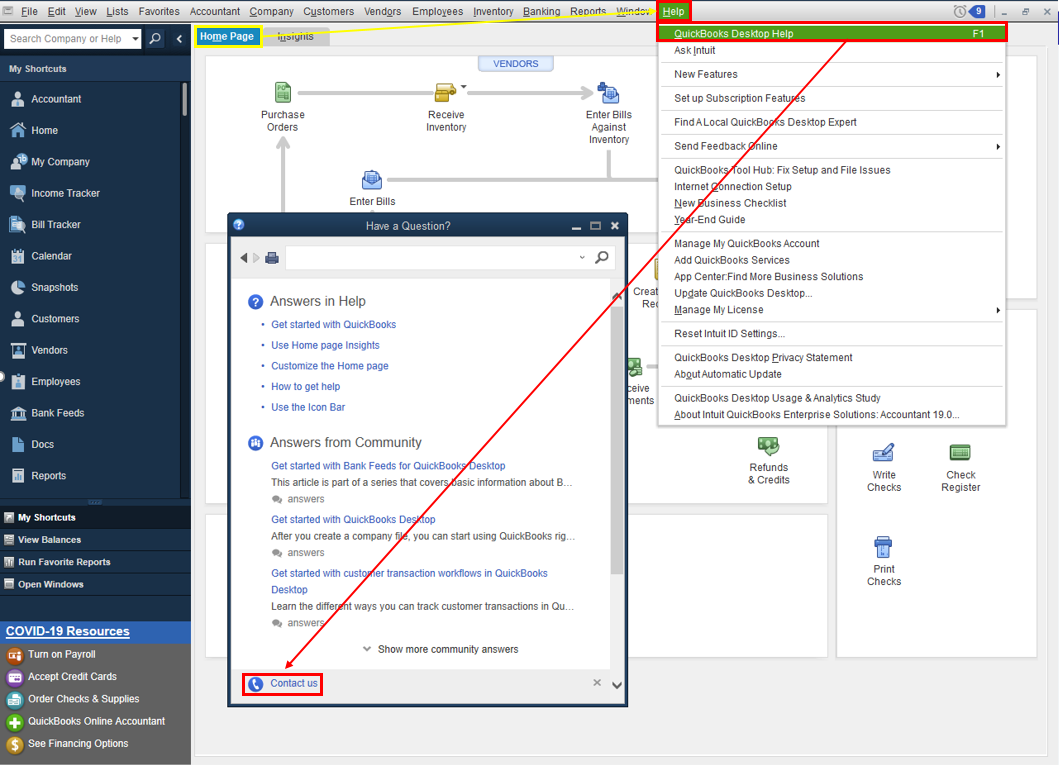
- Click the Search for Something else button then type your concern in the Ask us anything box.
- Hit Search then scroll down to get your contact options.
Another option to contact us is through the web. Here's how:
- Go to this link: https://help.quickbooks.intuit.com/en_US/contact
- Select QuickBooks Desktop then Continue as guest.
- Pick your QuickBooks version.
- The self-help topics are listed in the What can we help you with section.
- For live help use the Search for something else button.
Let me know how it goes. I'll be right here if you need anything else, as I want to make sure this is taken care of. Have a good one!
