

- Mark as New
- Bookmark
- Subscribe
- Permalink
- Report Inappropriate Content
Employees and payroll
I want to make sure you're able to get the State Mandated Retirement report in your QuickBooks Desktop, @Cyclewench.
Since you're still unable to get the data of the State Mandated Retirement report when following my peer's instructions, @ShiellaGraceA, I recommend reaching out to the Desktop Payroll Support Team. Our payroll representatives have advanced tools to look at your account closer, like screen-sharing to determine the issue in a secure environment.
Here's how to contact support:
- Press the F1 on your keyboard when the program is open.
- Select Contact Us.
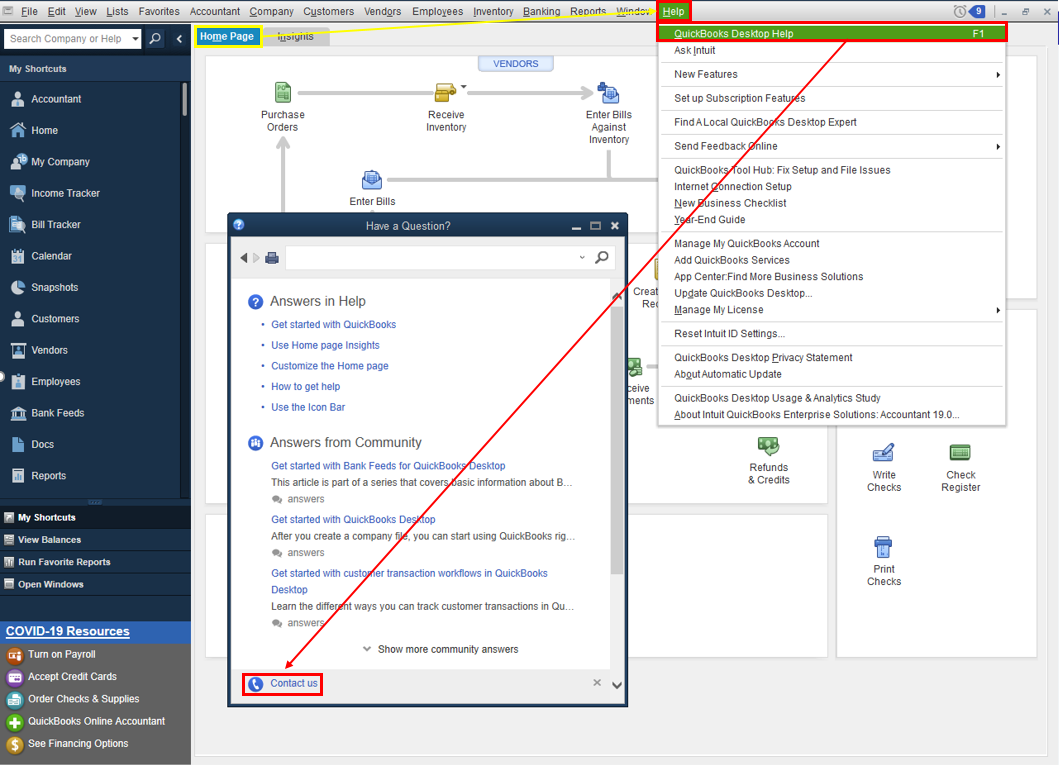
- Enter Support in the field and click Continue.
- From here, you can message an agent or get a call.
The following linked article provides additional info about contacting the QuickBooks Desktop Customer Support Team.
In addition, you can create other custom reports for payroll, take a look at this article: Customize payroll and employee reports. For effortless access to these personalized reports, you can memorize these reports.
Feel free to swing by and add a comment if you have other concerns. I'll get back to you as fast as I can. Take care!
