

- Mark as New
- Bookmark
- Subscribe
- Permalink
- Report Inappropriate Content
Employees and payroll
Hi there, langleybill1.
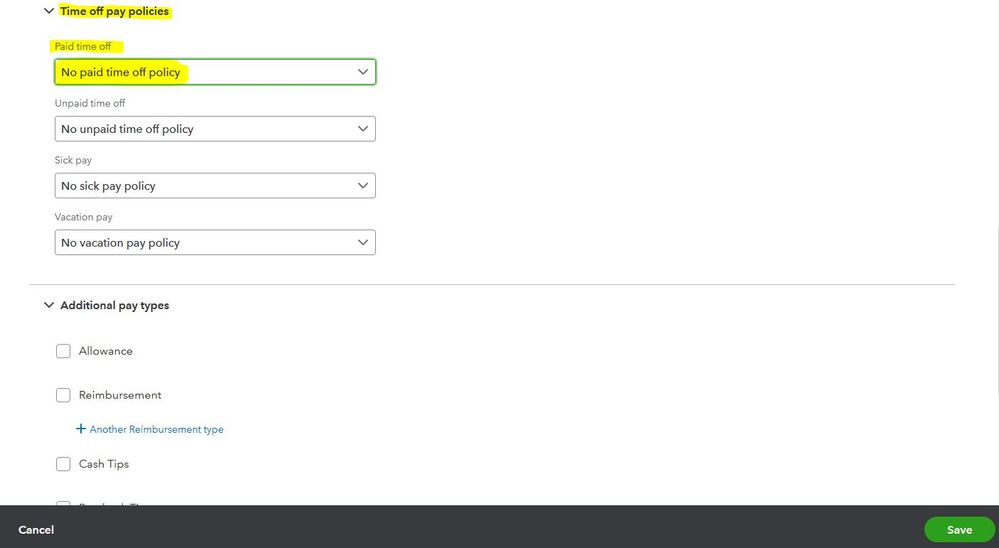
I’m happy to help exclude the overtime pay in QuickBooks. Let's just select the No paid time off policy option. That said, this will not automatically carry over the PTO hours when the worker works overtime.
Let me guide you further. Here's how:
- From the left menu, click Payroll.
- Select the Employees tab and tap the name of the employee.
- Press the pencil icon in the Pay section.
- From the How much do you pay employee? section, hit the pencil icon to Edit.
- In the Time off pay policies, select the No paid time off policy option
- Click Save once done.
You can also check out this related article for your reference: Set up and track time off in payroll.
In case you need to create reports showing your employee's used, available, accrued, and maximum vacation and sick time, here's a great article you can refer to: Run payroll reports.
Keep in touch with me if you have other questions about managing your employee’s payroll data. I’m always here to help. Take care!
