

- Mark as New
- Bookmark
- Subscribe
- Highlight
- Report Inappropriate Content
Other Questions
Hello, Bigcobe1,
It's sad to see you go, but I'm here to guide you on how to cancel your QuickBooks Online account.
First, the cancellation process depends on where you originally signed up for your subscription. If you subscribed through a mobile app store, you will need to cancel the subscription directly within that app store's settings.
However, if you purchased your subscription online, directly from Intuit, here are the steps you'll need to follow as the primary or company admin:
- To begin, please open a web browser on your computer (you cannot use a mobile device for this process).
- Next, sign in to your QuickBooks Online account as the primary or company admin.
- Once signed in, go to the Settings menu, which looks like a Gear icon ⚙.
- Then, select Subscriptions and billing under the Account and Settings column.
- After that, locate the QuickBooks section and select Cancel subscription or Cancel online. If you are ending a trial, select Cancel your trial.
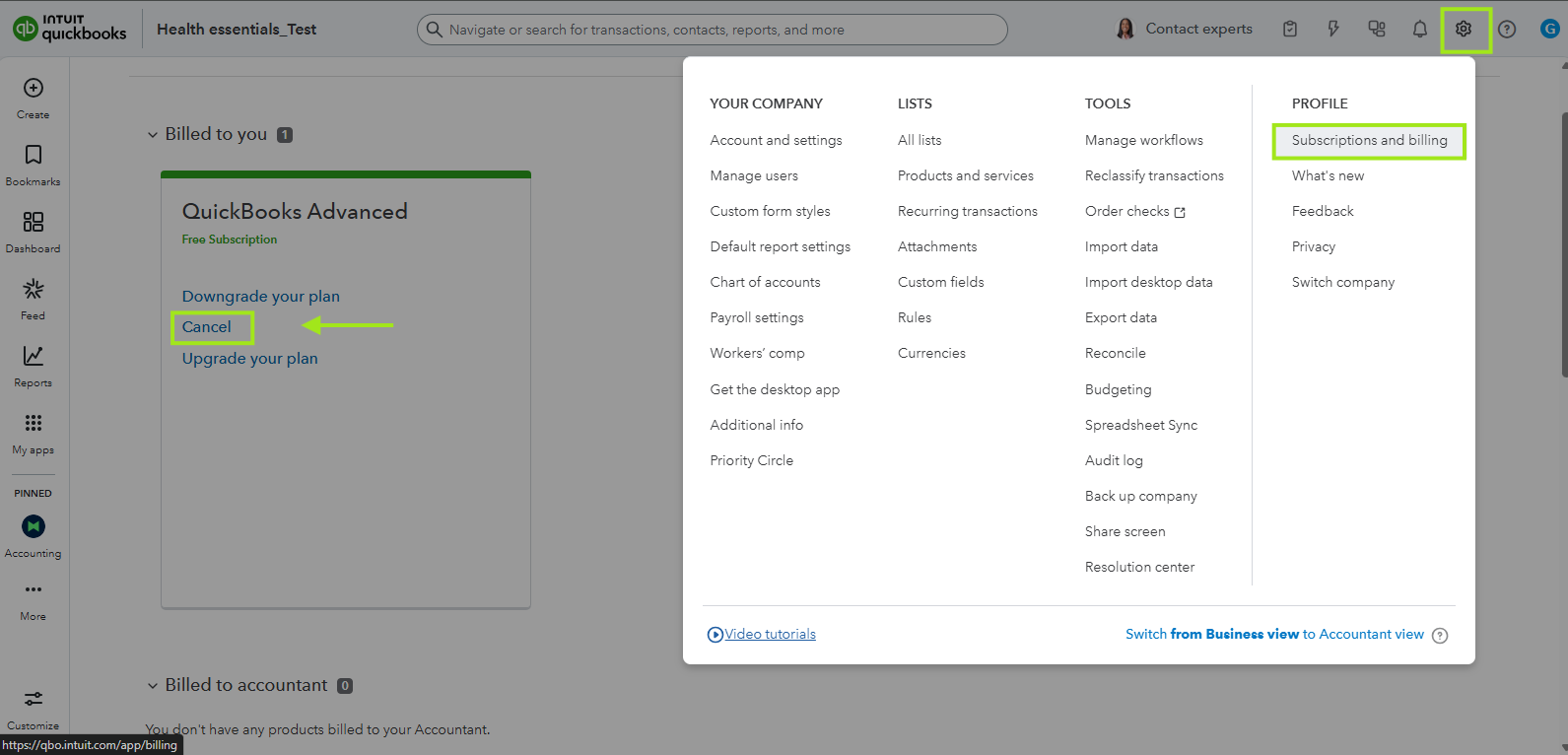
- Finally, follow the remaining on-screen steps to complete the cancellation process.
For a more comprehensive look at this process, you can review the article: Cancel your QuickBooks Online subscription or trial.
Also, to understand what happens to your company's data after cancellation, please refer to the article: What happens to my QuickBooks Online data after I cancel?
If you have any other questions about managing your QuickBooks Online account, please don't hesitate to ask! I'm here to help.
