- Mark as New
- Bookmark
- Subscribe
- Highlight
- Report Inappropriate Content
Starting Self Employment mid tax year
I have started Self Employment in October mid way through the tax year. I have been paying Tax and NI through the company I worked via PAYE from April to October 2019.
How do I adjust the quickbook system to recognise the TAX and NI that has been paid up to October 20th to give me the correct amount of TAX and Class 2 and 4 NI payments I have to pay when Self Employed.
I am based in Scotland in the UK.


- Mark as New
- Bookmark
- Subscribe
- Highlight
- Report Inappropriate Content
Other Questions
Welcome to the Communiity, @AW5.
You'll need to enter those taxes that you paid from April to October 2019 as Expenses. This way, QuickBooks Self-Employed will recognize the payments.
To do these:
- Hit the Transaction menu at the left pane and select Add Transaction.
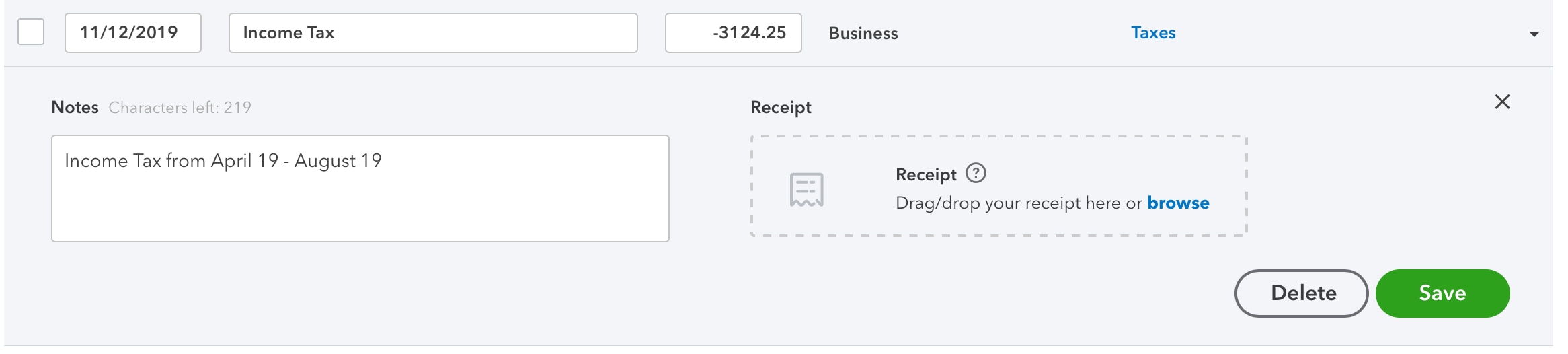
- Enter the date, amount, and a brief description.
- Browse the Select a category menu and choose the best option to organise your transaction. To help you on decide what category to select, please see this link: Categories in QuickBooks Self-Employed
- If you have a receipt, you can drag and drop it onto the form.
- When you’re ready, click Save.
I've outlined these steps through the snip below:
If you wish to add more transactions that are made outside QuickBooks, I recommend checking out this source: Manually add transactions in QuickBooks Self-Employed
To add up, the QuickBooks-Self-employed business expenses article includes information about managing your expenses, feel free to visit it.
It'd be my pleasure to help you if there's anything else you need. Just leave a reply below, and we'll take it from there. Have a lovely day!
- Mark as New
- Bookmark
- Subscribe
- Highlight
- Report Inappropriate Content
Other Questions
I have added the tax paid from April to October but it has made no difference at all with regards to registering the tax I owe from November onwards. I have entered my personal tax allowance of 12500 which I have surpassed from April 2019 to October 2019. I have attached to show what I have done
Also, what do I have to add to register the NI that has been paid to ensure that the Class 2 and Class 4 NI contributions are calculated properly? At present they are both saying 0 as it does not think that I have earned enough to start paying. Again I have surpassed the threshold when employed.
Please advise. Thanks


- Mark as New
- Bookmark
- Subscribe
- Highlight
- Report Inappropriate Content
Other Questions
Thanks for sharing the screenshot, AW5.
Tax payments are not considered deductible or allowable expenses. This is why it doesn't have impact the calculation for the month of November. See these links and articles for additional details:
Also, QuickBooks Self-Employed will automatically consider your National Insurance contributions when calculating your tax as long as they're recorded correctly. More info about NI contributions are discussed here: Self-Employed National Insurance Rates
I would recommend reaching out to our email support team for QBSE. They'll check on your account and review your records as well to determine why you're getting 0 amount for both Class 2 and Class 4 NI contributions.
Go to this link to send out an email: https://help.quickbooks.intuit.com/en_GB/contact.
Don't hesitate to post questions in the Community if you require additional guidance whilst working in QBSE.
- Mark as New
- Bookmark
- Subscribe
- Highlight
- Report Inappropriate Content
Other Questions
I have been told that there is not telephone support for Quickbooks self employed and the only support is via the community.
Is there anyway of doing a transaction that will allow the TAX and NI to be calculated?
Failing this there will be no point me using the system as it will not be able to do the correct calculations for me to enable me to put aside my TAX and NI payments.
Thanks

- Mark as New
- Bookmark
- Subscribe
- Highlight
- Report Inappropriate Content
Other Questions
We have Email Supports aside from the Community, AW5.
I have a link here that will route you to the page where you can send your concerns. Our Email Support Team can look into the setup you have and they'll walk you through how to correct them.
With regards to the tax calculations, QuickBooks will automatically calculate them depending on how you set them up. Let's also make sure that the transactions are correctly categorized. This way, the calculation will reflect in Class 2 and Class 4.
Always know the Community is around if you have further questions.

- Mark as New
- Bookmark
- Subscribe
- Highlight
- Report Inappropriate Content
Other Questions
This doesn't really answer AW5's question. I am having the same problem with entering previous PAYE employment in this tax year. The tax figure in QB's self employed isn't correct if you can't add these details.

- Mark as New
- Bookmark
- Subscribe
- Highlight
- Report Inappropriate Content
Other Questions
Thank you for joining the thread, @ECC2.
QuickBooks is dependent on the transactions you've recorded. If you've started QuickBooks later than April, you need to manually add the transactions prior from that month since estimated taxes calculate base on your QuickBooks records.
Also, I encourage consulting with a professional accountant to incorporate your National Insurance Contributions (NICs) accordingly.
For additional reference about NICs, check out this blog: Registering as self-employed with HMRC – the challenges explained.
Reach out to me if you have any other questions. I'm always here to help. Have a good day!