
- Mark as New
- Bookmark
- Subscribe
- Permalink
- Report Inappropriate Content
How add Yemen to Customer Adddress
How can add Yemen to Country Field?
I tried Iso 3 and Iso 1 but no success, "YE", "YEM" moved to address line instead of country


- Mark as New
- Bookmark
- Subscribe
- Permalink
- Report Inappropriate Content
Other questions
Hello, mahmoud.
I've come to share some insights regarding this concern with setting up your customer's country in QuickBooks Desktop.
We can utilize the Verify and Rebuild tool to verify if this is an issue within your company file. It helps resolve data issues and keep your program in optimum condition.
Before proceeding, let's ensure we always have our QuickBooks Desktop to the latest release to keep your software up-to-date, so you always have the latest features and fixes. Then, create a backup company file to secure your data if you ever encounter problems.
Follow these steps on how to verify data:
- Choose Window, then Close All.
- Go to the File menu, and then click Utilities.
- Select Rebuild Data.
- Follow the onscreen instruction to back up your data.
- When the tool finishes, select OK.
- Navigate to the File menu, then click Utilities.
- Click Verify Data, then choose Rebuild Now once QuickBooks finds an issue with your company file.
If the issue persists, I'd recommend contacting our QuickBooks Desktop Support Team. They will be able to access your account in a safe environment and investigate this matter further.
For future reference, I'm adding this article in case you want to use the multicurrency feature in QuickBooks Desktop. It also includes other important things to consider when utilizing it: Setting up and using Multicurrency.
You can tag me in your reply if you need more help with Multicurrency or managing your customers. Its' always my pleasure to back you up. Keep safe and happy holidays!
- Mark as New
- Bookmark
- Subscribe
- Permalink
- Report Inappropriate Content
Other questions
My point related to Country not currency!
Activated multicurrency / activate Yemeni Rial, go to Address add Country YE, or YEM and it moved to line2 instead of country field.
and here screenshot after press ok and re-open it

- Mark as New
- Bookmark
- Subscribe
- Permalink
- Report Inappropriate Content
Other questions
Let's find out why you're experiencing unexpected behavior when editing your customer's address to resolve the issue, mahmoud Salem.
I tried editing the same information under my customers' profile and it looks like it's saving the YEM information on the first line. Here's the screenshot:
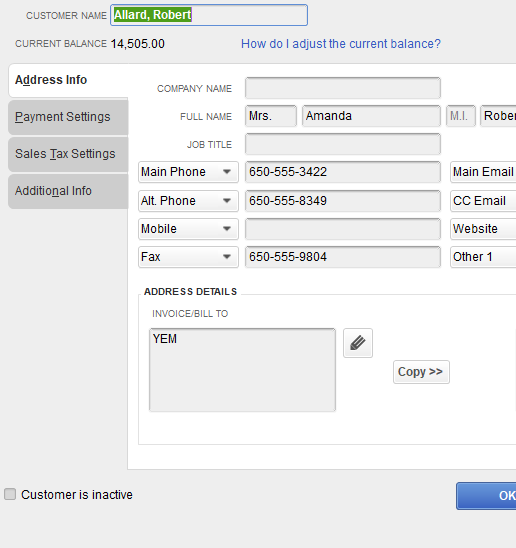
We can perform some steps so we can fix the issue. You can use the Verify and Rebuild Data tool. This tool identifies the most common data issues within your company file and resolves them after the diagnostic. To do so, follow the steps below:
To verify data
- Choose Window then Close All.
- Verify Data. Choose File then Utilities. Select Verify Data.
To rebuild data
- Choose File, Utilities then Rebuild Data.
However, if the issue persists, I recommend reaching out to our support team so they can double-check what's causing the issue. They also have the tools to pull up your account in a secure environment.
Furthermore, you'll want to use the add and edit multiple entries window to add and edit customers, vendors, services, inventory items, and non-inventory items in QuickBooks. Go through this article for your guide: Add And Edit Multiple Customers, Vendors, And Items.
Please get back to us if you have any questions when adding customer information. The Community is always right here to help.
- Mark as New
- Bookmark
- Subscribe
- Permalink
- Report Inappropriate Content
Other questions
Hello @MariaSoledadG,
Thank you for replying, I am expected when add country in country field it stores in same field not in 1st line as your mention, I am a developer and used SDK for Country field since it works for most countries.
I send to support also and wait for reply before telling my clients it's a limit from your side
- Mark as New
- Bookmark
- Subscribe
- Permalink
- Report Inappropriate Content
Other questions
Based in Support reply it's a limitation for US version can't add country out of USA


- Mark as New
- Bookmark
- Subscribe
- Permalink
- Report Inappropriate Content
Other questions
Thanks for getting back to the thread, mahmoud.
I appreciate you for giving us the information, and we're glad that you were able to identify the limitation for the US version after you contacted our live support team.
Please feel free to reach out to us again if you need further assistance adding customer information in QuickBooks Desktop. We're always available to help you. Have a wonderful day!


