Turn on suggestions
Auto-suggest helps you quickly narrow down your search results by suggesting possible matches as you type.
Showing results for
Get 50% OFF QuickBooks for 3 months*
Buy nowHow can add Yemen to Country Field?
I tried Iso 3 and Iso 1 but no success, "YE", "YEM" moved to address line instead of country
Hello, mahmoud.
I've come to share some insights regarding this concern with setting up your customer's country in QuickBooks Desktop.
We can utilize the Verify and Rebuild tool to verify if this is an issue within your company file. It helps resolve data issues and keep your program in optimum condition.
Before proceeding, let's ensure we always have our QuickBooks Desktop to the latest release to keep your software up-to-date, so you always have the latest features and fixes. Then, create a backup company file to secure your data if you ever encounter problems.
Follow these steps on how to verify data:
If the issue persists, I'd recommend contacting our QuickBooks Desktop Support Team. They will be able to access your account in a safe environment and investigate this matter further.
For future reference, I'm adding this article in case you want to use the multicurrency feature in QuickBooks Desktop. It also includes other important things to consider when utilizing it: Setting up and using Multicurrency.
You can tag me in your reply if you need more help with Multicurrency or managing your customers. Its' always my pleasure to back you up. Keep safe and happy holidays!
Let's find out why you're experiencing unexpected behavior when editing your customer's address to resolve the issue, mahmoud Salem.
I tried editing the same information under my customers' profile and it looks like it's saving the YEM information on the first line. Here's the screenshot:
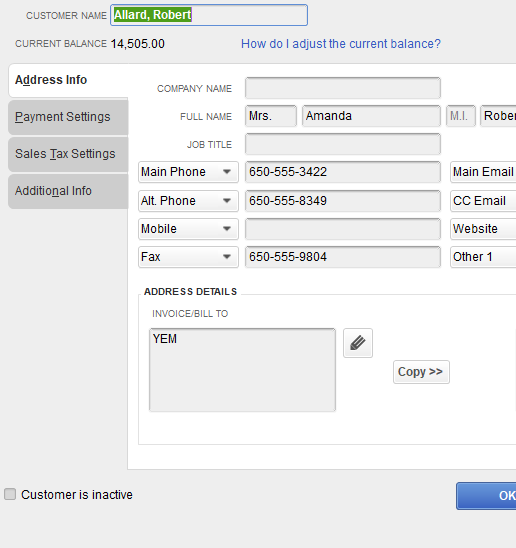
We can perform some steps so we can fix the issue. You can use the Verify and Rebuild Data tool. This tool identifies the most common data issues within your company file and resolves them after the diagnostic. To do so, follow the steps below:
To verify data
To rebuild data
However, if the issue persists, I recommend reaching out to our support team so they can double-check what's causing the issue. They also have the tools to pull up your account in a secure environment.
Furthermore, you'll want to use the add and edit multiple entries window to add and edit customers, vendors, services, inventory items, and non-inventory items in QuickBooks. Go through this article for your guide: Add And Edit Multiple Customers, Vendors, And Items.
Please get back to us if you have any questions when adding customer information. The Community is always right here to help.
Hello @MariaSoledadG,
Thank you for replying, I am expected when add country in country field it stores in same field not in 1st line as your mention, I am a developer and used SDK for Country field since it works for most countries.
I send to support also and wait for reply before telling my clients it's a limit from your side
Thanks for getting back to the thread, mahmoud.
I appreciate you for giving us the information, and we're glad that you were able to identify the limitation for the US version after you contacted our live support team.
Please feel free to reach out to us again if you need further assistance adding customer information in QuickBooks Desktop. We're always available to help you. Have a wonderful day!


You have clicked a link to a site outside of the QuickBooks or ProFile Communities. By clicking "Continue", you will leave the community and be taken to that site instead.
For more information visit our Security Center or to report suspicious websites you can contact us here


