

- Mark as New
- Bookmark
- Subscribe
- Permalink
- Report Inappropriate Content
Other questions
Hi there, @YESS LLC. I'd be happy to assist you in viewing your products by category in QuickBooks Online (QBO).
To view your products by category in QBO, you can apply filters to the Products and Services tab. By filtering the tab by category, you can easily see all the products that belong to a specific category. Here's how you can do it:
- Click on the Gear icon and select Products and Services.
- Click on the filter icon.
- Select Category and tick the categories that apply from the Category dropdown arrow.
- Hit Apply.
Please see the attached image below: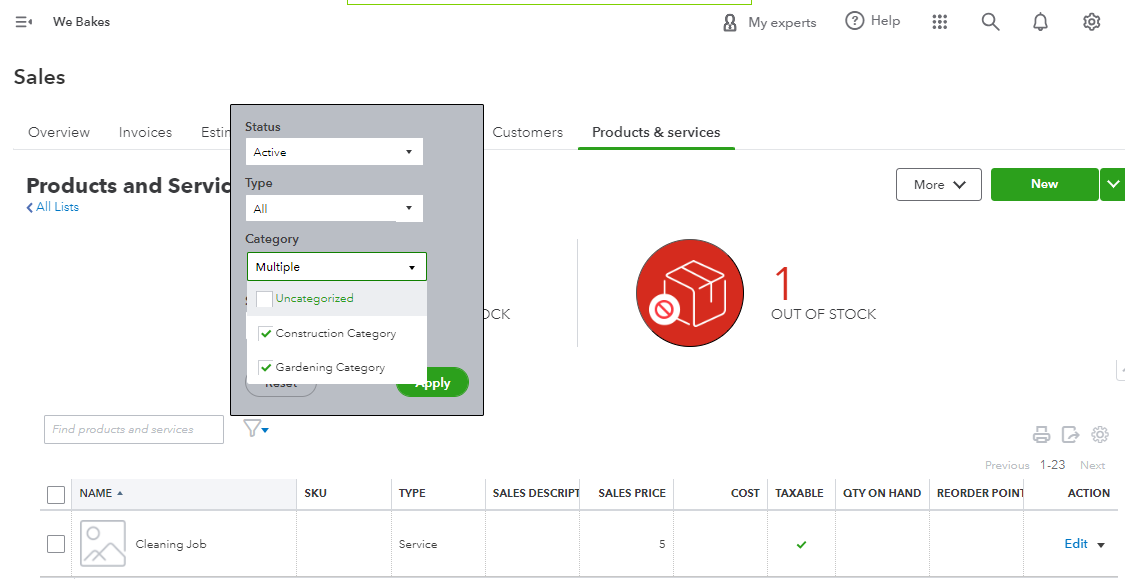
Alternatively, if you're pulling up the Product/Service List report, grouping it by category is not possible. However, you can export the report to Excel and then customize it further.
Additionally, if you want to learn how to see your best sellers, what's on hand, the cost of goods, and more, you can read our article guide. It will help you learn what reports to use to get helpful insights on the things you buy and sell, and the status of your inventory: Use reports to see your sales and inventory status
Please let me know if you have any further questions or concerns about the Products and Services category in QBO. Just reply to this post, and I will get back to you. This way, we can take a closer look and resolve it together.
