

- Mark as New
- Bookmark
- Subscribe
- Permalink
- Report Inappropriate Content
Other questions
The IFF files allow for the import and export of data, while Classes are functionalities that enable you to monitor various segments of your business in QuickBooks Desktop (QBDT). I will provide additional information below and guide you through the process to help you integrate it into your business operations.
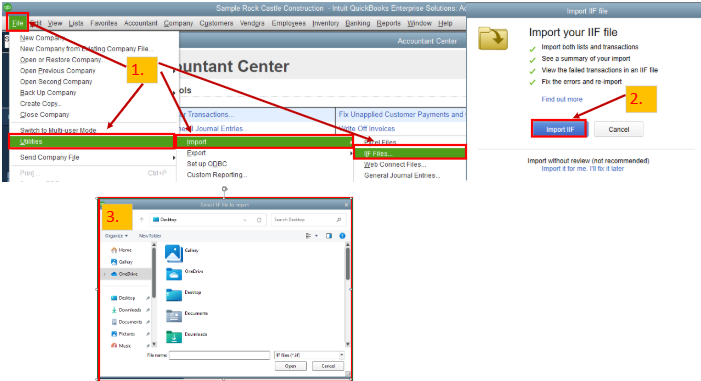
Intuit Interchange Format (.IIF) files are ASCII text files that utilize a Tab-Separated Value (TSV) format. These are files that you can use to import or export lists or transactions in or out of your company. To import this in QBDT, these are the steps:
- Go to the File menu, select Utilities then Import then IIF Files.
- Select Import IIF.
- Locate the file, then select OK. A reminder, we don't recommend the option Import it for me. I'll fix it later. Since this option bypasses data review, some of the info may not be correct or complete for your books. It also requires that you switch to a single user.
You'll need to follow the on-screen instructions, and once the import is successful, you'll see the numbers of lists and transactions imported, and you can press Done. Feel free to review the image below for seamless navigation.
To export the files out of your company, you can visit this page for more details: IIF Overview: import kit, sample files, and headers.
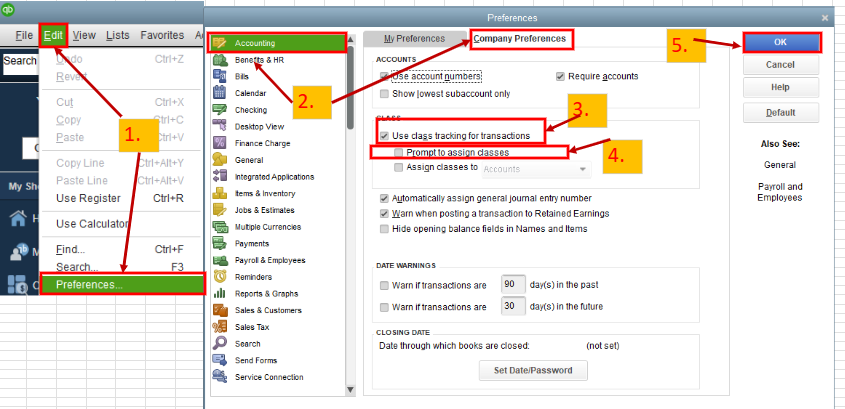
On the other hand, you'll need to turn on the Class feature from your company file and set it up before using it. To enable this option, these are the steps:
- Go to the Edit menu, then select Preferences.
- Select Accounting, then go to the Company Preferences tab.
- Click the Use class tracking for transactions checkbox.
- If you want a reminder when you haven't assigned a class, select the Prompt to assign classes checkbox.
- Select OK.
I've added a screenshot for visual reference.
For more information and further guidelines on how to use it, please see this article: Set up and use class tracking in QuickBooks Desktop.
In addition, here's an article to give you insights on what data can be exported or imported: Export, import, and edit IIF files.
Are you looking for assistance monitoring various aspects of your business through reports, or do you have additional inquiries related to QuickBooks? I'll be here to lend you a hand anytime. Feel free to click the Reply button below, and I will respond to your questions as soon as possible. Take care.
