
- Mark as New
- Bookmark
- Subscribe
- Permalink
- Report Inappropriate Content
Inventory Quantity Adjustment. I keep getting an error that states, "You need to activate this item before updating the quantity." How do I find the specific item?
I keep getting an error that states, "You need to activate this item before updating the quantity." How do I find the specific item? I cannot make all inactive items active again until I find the errored ones. There is nothing indicating which items need to be made active in order to save the inventory adjustment.


- Mark as New
- Bookmark
- Subscribe
- Permalink
- Report Inappropriate Content
Other questions
Hi there, Falcon29108.
The error occurs when the inventory item itself is inactive, or when it's part of a bundle and one of the bundle components is inactive.
To resolve the issue, go to the Product and Services page and search for the item. You can include inactive items in the filter (if inactive, click Make Active). Here's how:
- Navigate to the Gear icon and select Product and services.
- Click the Filter button in the upper part and select Inactive and Apply.
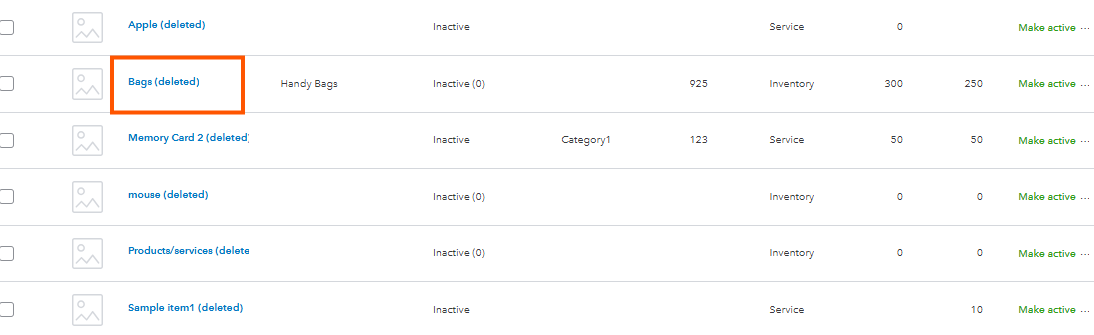
- Select those items that needs to be adjusted. Make sure to click Make active under the Action column.
Once items are activated, they will appear on the Inventory adjustment page, allowing you to proceed with the adjustment. For bundle, ensure that every component item in the bundle is active. You can filter the Type of your Product and services page to see Bundle to determine the inactive items.

However, if the issue persists, I recommend reaching out to our support team so they can take a look at your securely review your account and check why this is happening
Let me know if you have any other questions when adjusting inventory. We're always here to help you.


- Mark as New
- Bookmark
- Subscribe
- Permalink
- Report Inappropriate Content
Other questions
Hi @Falcon29108,
I just wanted to follow up to check if the resolution we provided helped resolve your issue.
Please let us know if everything is now working as expected or if you're still experiencing any problems.
We'll be glad to assist further if needed.
- Mark as New
- Bookmark
- Subscribe
- Permalink
- Report Inappropriate Content
Other questions
Thanks for checking back! No, the issue has not been fixed. I know how to make an inventory item active and / or inactive.
I was doing the year end inventory adjustment and, after entering all the changes, I get an error stating I have to make items active before I can save the adjustment. There is no where on the inventory adjustment page that shows me which item(s) need to be made active again. I cannot just make all inactive items active again as there are far too many -- then I'd have to make them inactive once the adjustment was saved.

- Mark as New
- Bookmark
- Subscribe
- Permalink
- Report Inappropriate Content
Other questions
Hi there, @Falcon29108.
I understand the challenge of finding a specific item among numerous inventory items. Let's work together to resolve this issue so you can start adjusting your inventory quantity.
To resolve this efficiently, I encourage you to contact our QuickBooks Online Live Support team. They have specialized tools to investigate this further and sort out your inventory quantity adjustment concern.
Here’s how:
- Go to the (?) Help button in the top-right corner.
- Select the Search tab and click Contact Us.
- Provide a brief description of your concern and Continue.
- Choose between Chat with us or Have us call you as your preferred option.
You can check our support hours to see when assistance is available and select a time that’s most convenient to you.
Feel free to add a reply below if you have additional questions or concerns about QuickBooks Online.
