
- Mark as New
- Bookmark
- Subscribe
- Permalink
- Report Inappropriate Content
Accounting for short term rentals
I work for a company that recently purchased 3 properties for short term rental. We use a company called Evolve for our bookings. They list the properties, collect payment and remit payment to us. They collect the nightly fee, a cleaning fee, and taxes. They withhold their 10% management fee from the total and remit the rest to us. We are responsible for remitting occupancy tax to the state and city. I am trying to figure out the best way to record the income, expense and tax liability. I think I need to create a sales receipt but am new to QBO and not quite sure how to do this. Any help would be greatly appreciated.


- Mark as New
- Bookmark
- Subscribe
- Permalink
- Report Inappropriate Content
Other questions
Hello @keyboardkyle,
Let me help you choose whats works best for you depending on your business needs.
First off, the sales receipt you mentioned is used to track business income and only a money-in transaction.
Now, we have Projects that are used to track the income, expenses, and profitability of a work in progress. On the other hand, we also have Tags used to label an income or expense and the money made for your business.
That being said, here are the references you can use to learn more about the difference between each feature:
Additionally, I've also included this helpful article to get a better view of your business financial status: Run basic financial reports.
If you have any other concerns, please let me know by leaving any comments below. I'll be here to help. Stay safe and well!
- Mark as New
- Bookmark
- Subscribe
- Permalink
- Report Inappropriate Content
Other questions
I don't think I want to use projects or tags. I am using classes to track the expense/income related to the properties. My problem is that I'm not sure how to record the funds received since it is not all income. For example: A typical deposit from Evolve (management co) for a 2 night stay would include:
Rental per night $400 * 2 nts = $800
+ Cleaning fee per stay $200
+ 7% Local Occ tax $70
+ 6% State Occ tax $60
- 10% Mgmt fee $100
Net deposit to our bank account $1030
The funds are typically deposited to our bank account 2 days after the guest checks out.
If I create a sales receipt with the gross amount less the amounts collected for taxes as a payable, will that record the income and liabilities for the taxes?

- Mark as New
- Bookmark
- Subscribe
- Permalink
- Report Inappropriate Content
Other questions
Thanks for adding more details about your concern, dmckinney1003.
Based on the information, we’ll have to create a sales receipt and expense to properly track the items. If you haven’t added the products, go to the Product and Services page to set them up.
To set up the rental and cleaning fee:
- Go to the Sales menu on the left panel to choose Products and Services.
- Then, click the New button to open the Product/Service information window.
- Next, hit the Service icon to display the Service window.
- From there, enter rental or cleaning fee in the Name box.
- Fill in the remaining fields.
- Hit Save and new to add the other item.
For the management fee, perform the recommended steps in this article: Add service fees manually to invoices.
In regard to the local taxes, QuickBooks automatically calculates the total tax rate for each sale based on the information below. Make sure to set up the Sales Tax feature to get the accurate rate for your sale.
- Your customer's tax-exempt status
- Where you sell and where you ship
- Your service or product's tax category
When you’re ready, create a sales receipt. Here’s how:
- Tap the New menu and choose Sales Receipt under Customers.
- Press the Deposit to drop-down and pick Undeposited Account.
- Enter the customer’s name and add the rental per night and cleaning fee as per line item.
- For the management fee, go to the other line and enter a negative amount.
- Then, tick the box for Tax to get the local Occ tax and State Occ tax.
- Fill in the remaining fields.
- Click Save and close.
I’ve included a screenshot of how it should look like.
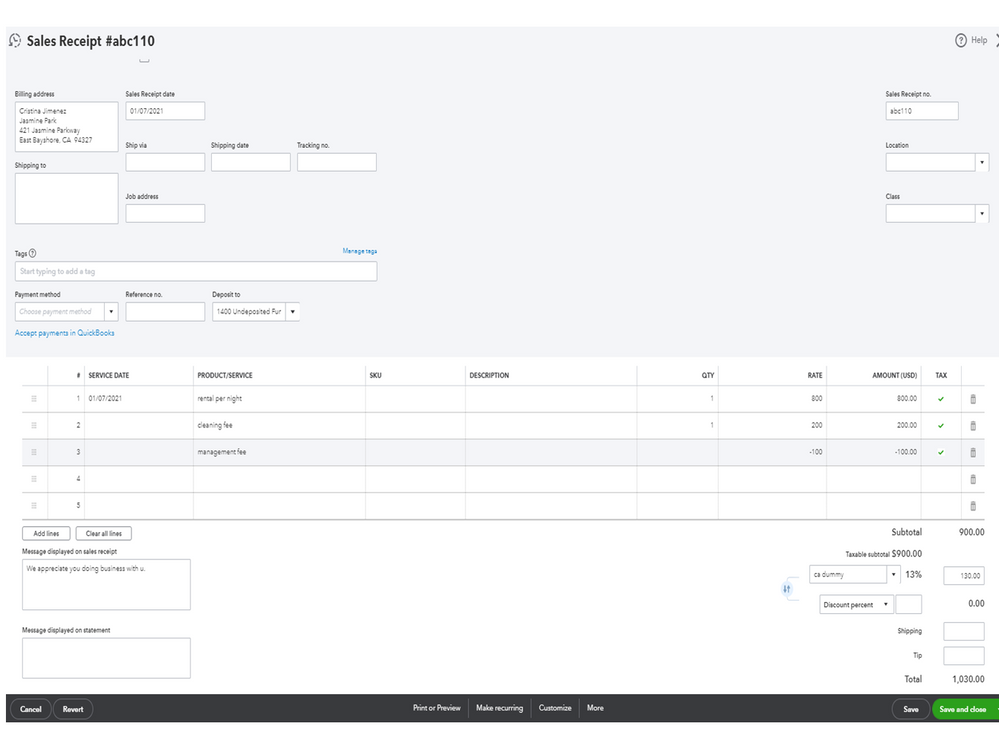
Performing these steps will record the income and liabilities for your taxes. You can also bookmark this article for future reference. It contains resources to help you easily use the Class Tracking feature in handling your business income, expenses, or profitability: Get started with class tracking in QuickBooks Online.
Stay in touch if you need further assistance with any of these steps. I’ll be right here ready to lend a helping hand. Enjoy the rest of the day.

- Mark as New
- Bookmark
- Subscribe
- Permalink
- Report Inappropriate Content
Other questions
@Rasa-LilaM are you able to share these directions for the Quickbooks desktop version?

- Mark as New
- Bookmark
- Subscribe
- Permalink
- Report Inappropriate Content
Other questions
Welcome to the thread, @JulieS3.
I'd be happy to convert the steps provided by my colleague Rasa-LilaM into the QuickBooks Desktop (QBDT) version.
To create an item in QBDT, here's what you'll need to do:
- Go to the Lists menu at the top.
- Select Item List.
- On the Item List window, select Item.
- Click New.
- Select the type of item you want to create.
- Fill out the item fields.
- Choose Save.
Once done, manually add the service item created to the transaction. Then, for you to create sales receipts, follow the below steps:
- Click the Customers menu at the top.
- Go to Create Sales Receipts/Enter Sales Receipts.
- Select a customer or job from the Customer: Job drop-down. If the customer is not on the list yet, click Add New.
- Enter the necessary information like the Date and Sale No.
- Choose the payment method.
- In the detail area, select the item(s) you propose to do or include as a sale.
- Click Save & Close.
For more details about the steps I've provided above, see the below articles:
Here's also an article about how class tracking works in QBDT: Set up and use class tracking in QuickBooks Desktop.
Don’t hesitate to click the Reply button if you have other concerns. I’ll get back to make sure you’re taken care of. Have a good one.

- Mark as New
- Bookmark
- Subscribe
- Permalink
- Report Inappropriate Content
Other questions
Hi, I'd like to get some additional clarification. We need to use the method for Quickbooks online. We use Guesty as the booking platform and Stripe as the payment processor. Every few days, Stripe deposits a batch sum into the bank account. When I go to add the invoices, how do I ensure that it is just putting the amounts into the right categories and not inadvertently doubling the income for accounting purposes?
- Mark as New
- Bookmark
- Subscribe
- Permalink
- Report Inappropriate Content
Other questions
We use Evolve and have the same issue. Did the resolution provided work for you and your short-term rental business? I have been struggling with how to classify the transactions that are deposited and account for the fees. What's the easiest way you have found?

- Mark as New
- Bookmark
- Subscribe
- Permalink
- Report Inappropriate Content
Other questions
When I try to create a sales receipt, it won't let me enter a negative amount (for the 3% airbnb service fee). Hum.. any ideas? Thank you.
- Mark as New
- Bookmark
- Subscribe
- Permalink
- Report Inappropriate Content
Other questions
Thank you for participating in this discussion, Cindy. I will share additional information to assist you in incorporating a service fee into a sales receipt within QuickBooks Online (QBO).
Please know the system isn't programmed to recognize a transaction amount less than 0. Thus, creating a sales receipt and adding a service fee with a negative amount won't be recorded in your company. Instead, you'll want to access the sales receipt you created and add another line for a service item named Service Fees to ensure your recordings are on point. I'll walk you through the process and address this on time:
- Access your QuickBooks Online company.
- On the top right corner, click the Gear icon and select Products and services.
- Click the New button and choose Service.
- Enter Airbnb Service fee or Service fee in the Name field and add the necessary information.
- When you're ready, click the Save and close button to save the service item.
Once done, enter a sales receipt and add the service item you created so the system can recognize it. For visual reference, see the screenshot below.

Moreover, here are some articles to help you create personalized sales forms and keep track of transactions you entered in QBO:
- Customize invoices, estimates, and sales receipts in QuickBooks Online
- Run a report in QuickBooks Online
Thank you for your engagement in the Community space! If you have questions about adding service fees or recording transactions in QBO, please don't hesitate to comment below. I'm always here to assist you as soon as possible. Stay safe.
