

- Mark as New
- Bookmark
- Subscribe
- Permalink
- Report Inappropriate Content
Other questions
I thank you for sharing a screenshot about your concern, @RKenshin2021.
I'm here to guide you in performing additional troubleshooting steps to ensure that you'll be able to manually sort your transactions in the Payments to Deposit window.
Let's start by making sure that your QuickBooks software is updated to the latest version. This way, you'd always have the latest features and fixes.
- Go to the Help menu.
- Choose Update QuickBooks Desktop.
- Select the Update Now tab.
- Click Reset Update.
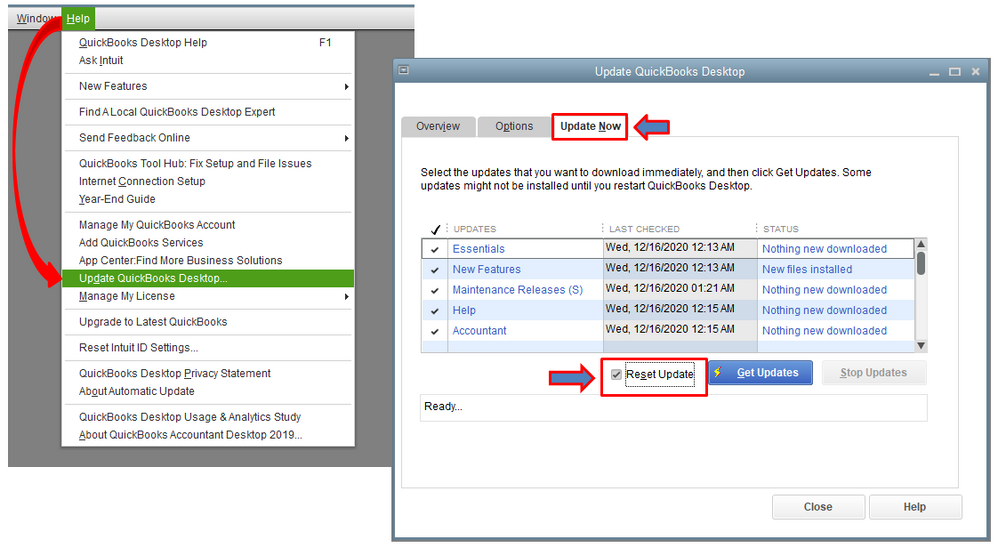
Once completed, let's make sure to reboot your device. This ensures that all component are updated. Now, you can try depositing your customers' payments again.

Also, you can read through these articles where you can get additional information on how to resolve unexpected behaviors when navigating around QuickBooks:
- Recommendations to resolve performance issues.
- Resolve QuickBooks Desktop performance issues: Manage your computers.
Get back to us here if you have other questions about navigating around QuickBooks. I'm always here to lend a hand.
