

- Mark as New
- Bookmark
- Subscribe
- Permalink
- Report Inappropriate Content
Payments
Hello, bcain00. If the payment is already linked to a Bank deposit, you will need to delete that deposit before making any changes. In QuickBooks Online, a payment is considered closed once it is associated with a bank deposit.
To delete the transaction that was already deposited, follow these steps:
- Navigate to My Apps and select Sales & Get Paid.
- Go to Sales transactions and locate the customer whose payment you want to remove.
- Select View/Edit next to the customer’s payment record.
- Scroll down and click Payment on with the date.
- In the Receive Payment page, choose the invoice you want to delete.
- Select the More option at the bottom of the page, then click Delete.
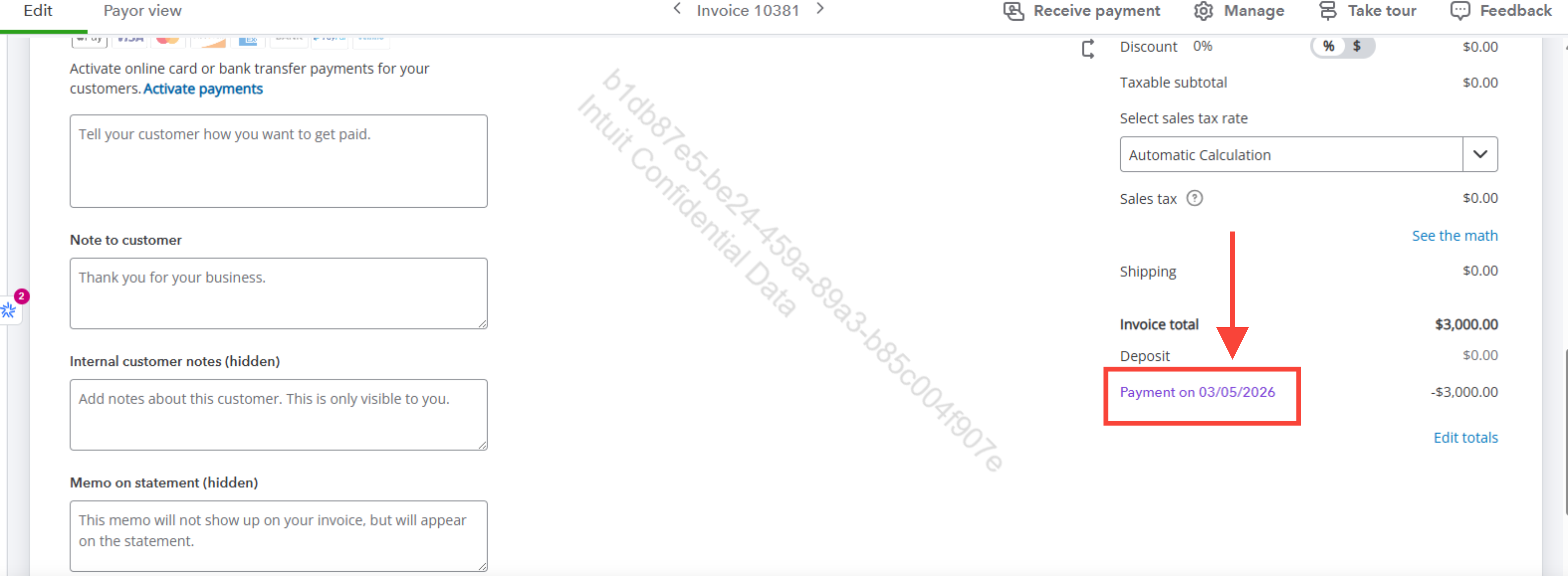
Once completed, you can return to your customer Invoices to record a received payment again and recreate the Bank deposit if necessary.
Before we finish, I suggest you explore QuickBooks Live Expert Assisted to streamline your accounting, maintain precise financial records, and access professional support. This could free up valuable time, allowing you to concentrate on expanding your business.
Please let us know if you need any further assistance.
