

- Mark as New
- Bookmark
- Subscribe
- Permalink
- Report Inappropriate Content
QuickBooks Time
Thanks for joining this thread and sharing your concern with us, Phil.
Reading through your post, it looks like you're using the desktop version of QuickBooks. If so, we want to make sure you're able to activate your license without any issues. Did you know that you can actually register the product manually. Just go to the Help menu then About QuickBooks Desktop. When you see the green logo, press CTRL + R + P on your keyboard.
If you're still unable to do it on your own, I recommend contacting our Support Team to generate a validation code for you. This code is used to automatically activate the software without going through the manual information entry.
Please note that our representatives are currently available through chat or messaging. Make sure to enable pop-up windows on your browser settings to launch the chat box and connect with our live agents. To get our Support, follow the steps below:
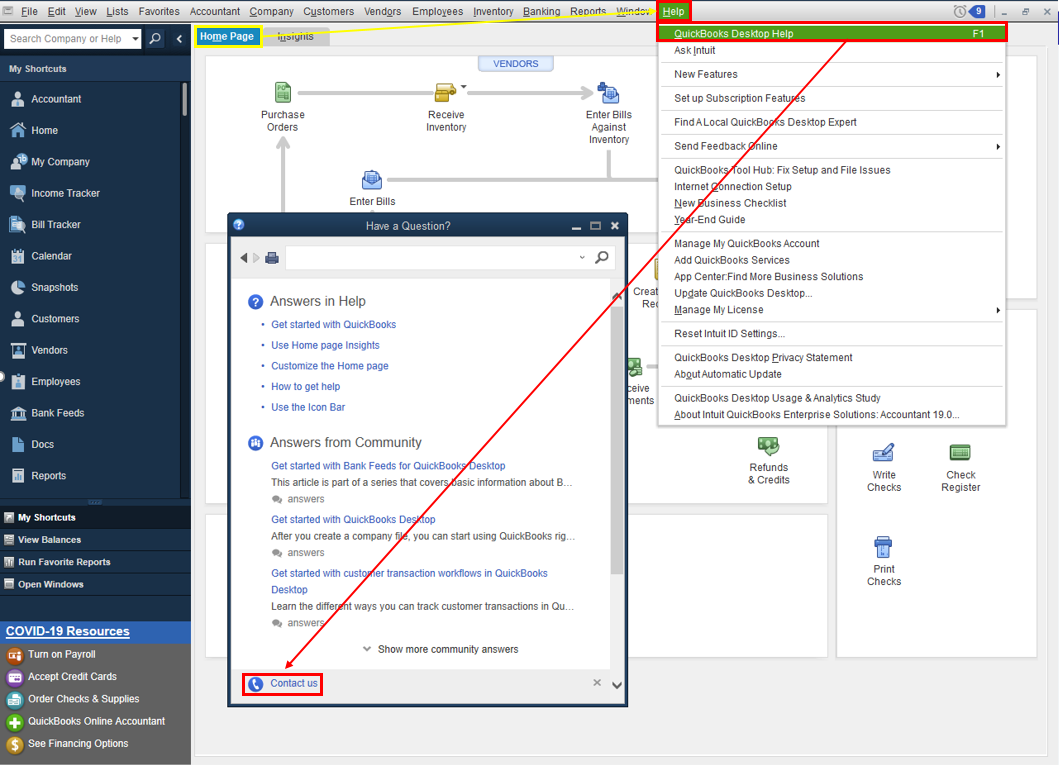
- Open QuickBooks and click the Help menu.
- Select QuickBooks Desktop Help.
- On the pop-up screen select Contact us.
- Click the Search for Something else button then type your concern in the Ask us anything box.
- Hit Search then scroll down to get your contact options.
When you're connected, our representative will ask the license and product number of the software you purchased.
I want to make sure this registration concern is resolved, so if you need further help, let me know in the comments. I'll be right here to assist you anytime. Have a good one!
