

- Mark as New
- Bookmark
- Subscribe
- Permalink
- Report Inappropriate Content
Tax
Thanks for posting in the Community, @Muz123.
Currently, we're unable to rearrange the columns when creating an invoice in QuickBooks Online (QBO). I'm here to provide two workarounds to help achieve your goal.
First, I'd suggest exporting the invoice to Excel so you can manually calculate the Item Wise VAT amount. Then, rearrange the columns based on your preference. I'll guide you how.
- Go to Sales from the left menu and select All Sales.
- Click Filter.
- Choose Invoices as the Type.
- Set the Status, Date, and Customer.
- Select Apply.
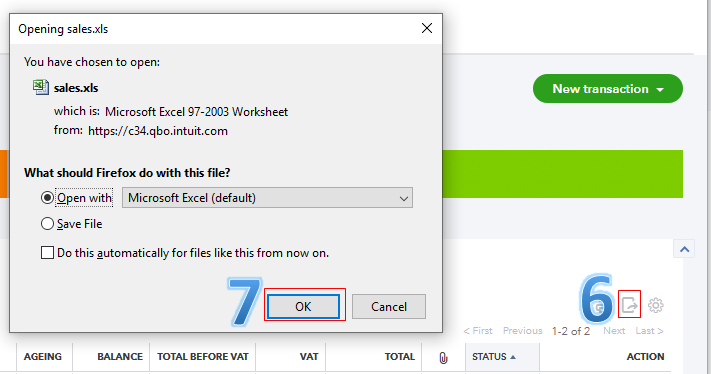
- Click the Export icon.
- Choose OK.
- Manually calculate your Item Wise VAT amount and rearrange the columns in Excel.
The screenshot below shows you the sixth to seventh steps.
Here's a sample screenshot of the result:

Second, I recommend looking for an application that's available in your region and can integrate with QBO.
In the meantime, you can visit this link to keep track of our product updates: Resource Centre.
I'd suggest running any VAT reports in the program from the Reports or Taxes menu. This way, we can ensure everything is correct before paying and filing your taxes to the appropriate agencies.
Don't hesitate to leave a comment below if you need anything else. We're always here to help you. Keep safe.
