

- Mark as New
- Bookmark
- Subscribe
- Permalink
- Report Inappropriate Content
Taxes
Thanks for joining this thread, usercuminotto.
I’m here to help run a report that shows all previous tax payments in QuickBooks Online (QBO). We’ll have to open the Transaction Detail by Account report and customize it. Let me guide you on how to build it.
Here’s how:
- In QBO, tap the Reports menu on the left panel and enter Transaction Detail by Account in the search field.
- Press the Report period drop-down to set the correct date range.
- Click the Customize button in the upper right to open the Customize report window.
- Navigate to the Filter section and tick the box for Transaction Type to select Tax Payment.
- Choose Run report to apply the changes.
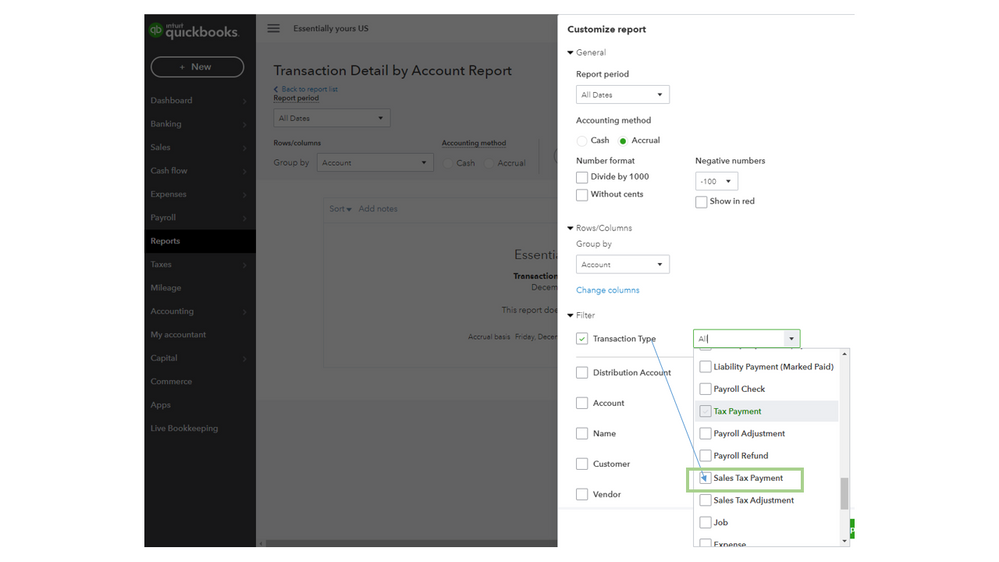
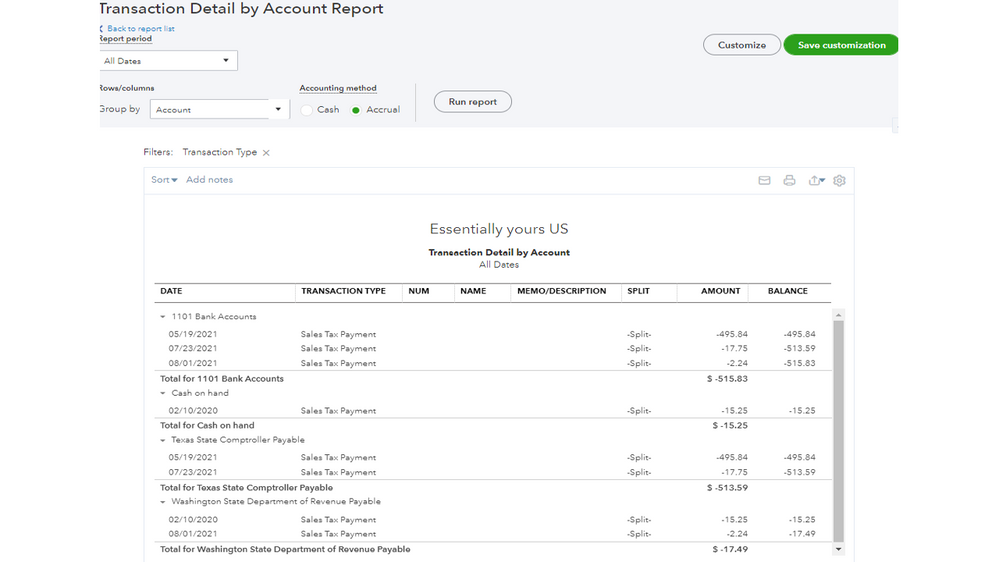
This resource contains instructions on how to personalize the data and layout of your reports: Customize reports in QuickBooks Online. From there, you’ll learn about sharing custom statements, automating one, and exporting it to Excel.
Additionally, the links below provide information about the Automated Sales Tax feature. These resources outline the complete steps on how to perform the following:
- Manage sales tax payments
- Check how much sales tax you owe in QuickBooks Online
- File your sales tax return and record tax payment
Feel free to let me know if you still need further assistance with running the sales tax payments report. I’ll get back to help and make sure this is taken care of for you. Have a great rest of your day.
