

- Mark as New
- Bookmark
- Subscribe
- Permalink
- Report Inappropriate Content
Taxes
I appreciate you for performing the rebuild process recommended by my colleague, jackpot.
I understand that the error seems have nothing to do with the inaccuracy of the Sales Tax Liability report. However, rectifying error 111 identified during the verification and rebuild process is crucial for resolving any potential issues affecting other data in your company file, such as the Sales Tax Liability report.
Given that there are no issues with the paycheck, let's make temporary changes like the date or amount. This approach allows us to address the problem and ensure that the accuracy of the data is maintained while resolving any related concerns.
- Open the paycheck and edit and make changes.
- Click Save & Close to reflect the changes.
- After all the changes are made, proceed to reopen the paycheck and re-enter the original figures and other information and save it.
Once done saving the original details, create a backup of your company file to have secure copy of your data.
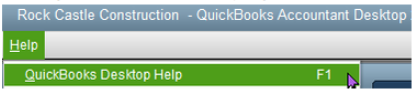
Afterward, close all the other running windows. Then, verify and rebuild your data again. If it doesn't fix the error, especially the calculation of the sales tax liability, please give us a short call. We'll need to further investigate this matter and look at the root cause of this odd behavior. Go to the Help menu and select QuickBooks Desktop Help F1.
Post anytime if you have any further questions or concerns about viewing correct data in the Sales Tax Liability and other reports.
