

- Mark as New
- Bookmark
- Subscribe
- Highlight
- Report Inappropriate Content
Transactions
Hi @lou8.
Right now, the option to exclude closed or rejected estimates within the balance total is unavailable in QuickBooks Online. However, you can export them to your excel and manually remove the transactions from there.
Here's how:
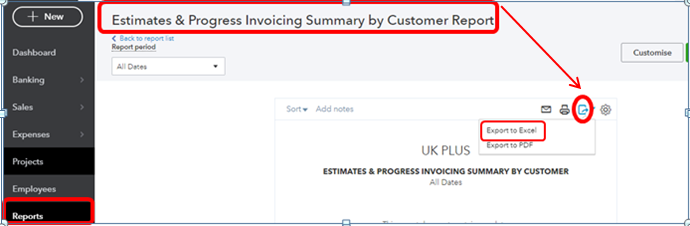
- Go to Reports and select Estimates & Progress Invoicing Summary by Customer Report.
- Click the Export icon.
- Select Export to Excel.
- From there, you can now delete the closed or rejected estimates transactions.
I know the importance of having this option in running your business. Allow me to send feedback to our developers and see if they can take a look at this.
Please let me know if you have other concerns. I'm always happy to help!
0 Cheers
