
- Mark as New
- Bookmark
- Subscribe
- Highlight
- Report Inappropriate Content
VAT shows gross sales not net
I am new to QuickBooks Online and am trying to submit my first VAT return. For Box 6, QB is showing the Gross value of sales and not the Net. How do I correct this before submitting my return?
Solved! Go to Solution.

- Mark as New
- Bookmark
- Subscribe
- Highlight
- Report Inappropriate Content
VAT
Hi there, Insole.
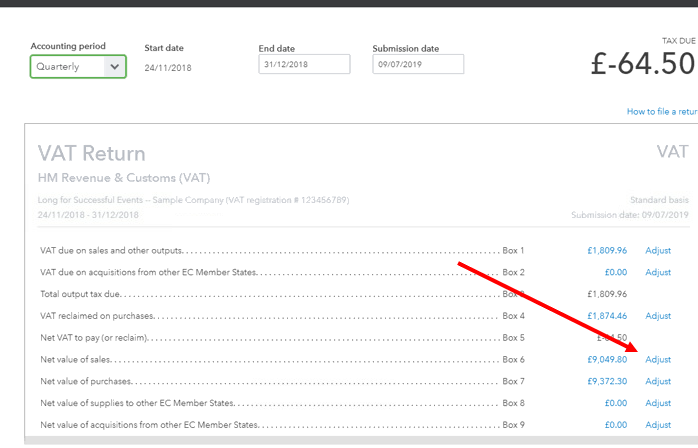
The box 6 in your VAT return should only show all your sales that are taxable excluding the VAT amount. To check if you’re having the right figures, you might want to run the VAT Detail Report and the transactions involve.
Though if the amount is still incorrect, you can click the Adjust link next to Box 6 in your VAT return. Just enter the exact amount that needs to be added or deducted (enter a negative amount if it’s a deduction) on the Adjustment amount field. Enter the Adjustment date and Reason then click Save.
Drop by again if you need anything else.
- Mark as New
- Bookmark
- Subscribe
- Highlight
- Report Inappropriate Content
VAT


- Mark as New
- Bookmark
- Subscribe
- Highlight
- Report Inappropriate Content
VAT
Thanks for drilling it down to the transactions, Insole.
At this point, I would suggest contacting our phone or chat team. That way, they can see your setup to check this further. They can request for a screen-sharing session to get to the bottom of this.
- Click on Help and choose Contact us.
- Enter a summary of the scenario and click on Let's talk.
- Choose from Chat or Get a callback.
If you have other questions on your return, please go back to this thread.

- Mark as New
- Bookmark
- Subscribe
- Highlight
- Report Inappropriate Content
VAT
Hi insole, was this resolved? I am having exactly the same issue
Lee
- Mark as New
- Bookmark
- Subscribe
- Highlight
- Report Inappropriate Content
VAT
Hi leeg75,
You can adjust the value of Box 6 to show the net sales. However, I would still recommend reaching out to Support, so they can check this using a screen-sharing tool and raise a ticket if necessary. That way, this won't happen on your return again. Just follow the steps I shared above. By the way, Supports are available during UK Business hours.
On the other hand, It tried looking for chat conversations with Insole to see what they've talked about with our Support. However, I couldn't find any using this username. Maybe, they have a different one which I couldn't ask from here for security reasons.
If you have other questions, please don't hesitate to go back to this thread.
- Mark as New
- Bookmark
- Subscribe
- Highlight
- Report Inappropriate Content
VAT
Thanks JessT,
Like Insole, that 'adjust' link isn't available for Box 6 in this case (it is present for other 'lines', so there must be a use case where this is not available.
I will reach out to UK support probably later tomorrow as I have a few commitments today. Thanks for the update
Lee


- Mark as New
- Bookmark
- Subscribe
- Highlight
- Report Inappropriate Content
VAT
HI Insole
We do not advise you to adjust box 6 as this is showing the correct amount, although we acknowledge the wording is incorrect. We presume that as you do not have an adjust icon next to box 6 you are using FRS.
On the Flat Rate Scheme, the box 6 value is supposed to show the gross (tax inclusive) amount of sales as per HMRC notice 733, section 6.1
When viewing the VAT detail report, you can add the values of box 6 which is the Net, and box 1, the VAT amount together and this will equal the same value displayed on the prepare return screen.
- Mark as New
- Bookmark
- Subscribe
- Highlight
- Report Inappropriate Content
VAT
Hi John,
Your tip on FRS was exactly right. Many thanks
Lee
