
- Mark as New
- Bookmark
- Subscribe
- Highlight
- Report Inappropriate Content
Splitting Payments and VAT
I need to find a way of splitting a transaction into "Income" and "100% VAT"
For example: Split: £2300 into £2000 income and £300 pure 100% VAT payment.
The company I am currently working for has me invoicing for VAT separately but due to payroll structure I will be payed Week 3s salary with week 2s VAT payment (for example). So far I have been unable to find a way to make QBO accept this structure though I confess I am fairly novice.
Any ideas or solutions would be greatly appreciated.
Solved! Go to Solution.


- Mark as New
- Bookmark
- Subscribe
- Highlight
- Report Inappropriate Content
VAT
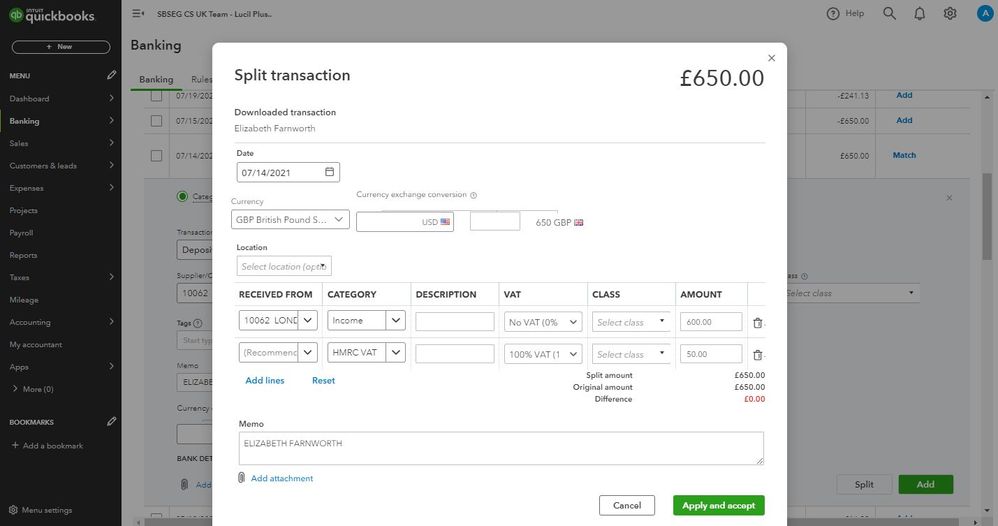
- On the left navigation bar, click Banking.
- Choose your bank account.
- Go to the For review tab.
- Select the payment.
- Choose Categorise.
- Press Split.
- Separate the income and the VAT.
- Enter the necessary information.
- Hit Apply and accept.
- Mark as New
- Bookmark
- Subscribe
- Highlight
- Report Inappropriate Content
VAT
Thank you very much for your reply, are you able to explain how you are able to select 100% VAT as a VAT category? From my dropdown menu I am not able to select that option.
Thanks!


- Mark as New
- Bookmark
- Subscribe
- Highlight
- Report Inappropriate Content
VAT
You're always welcome here with the VAT category concern, @BridgesJnr. I'll walk you through the steps of setting up so you can select it when splitting bank transactions.
You'll need to set up the 100% VAT from the Taxes section to select it when categorising transactions on the Banking page. Please know that VAT rates will show according to Tax Agency and Sales or Purchases field you specify. To proceed, follow the steps below:
- On the left pane, select Taxes.
- Press VAT, then click Add Tax.
- Determine what type of tax you want.
- Enter the necessary information on each field.
- Tap Save.
I'm adding some screenshots for reference:
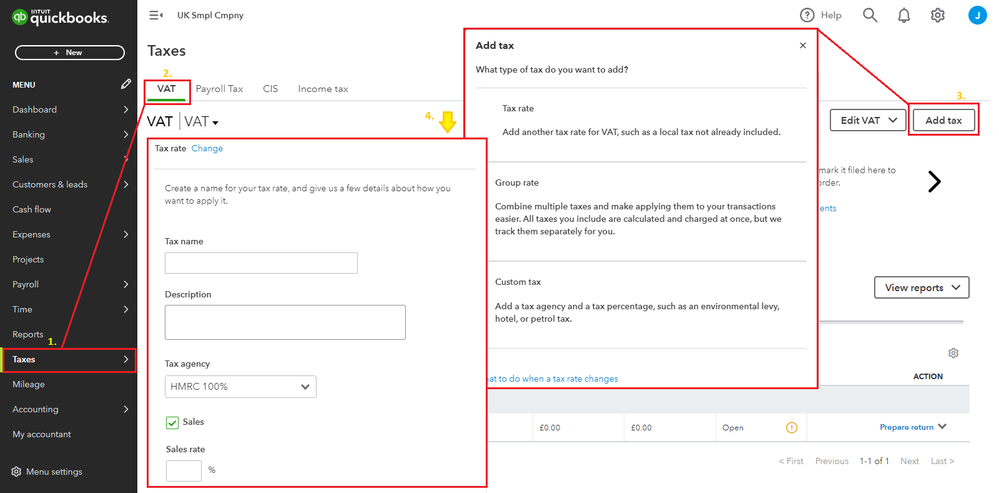
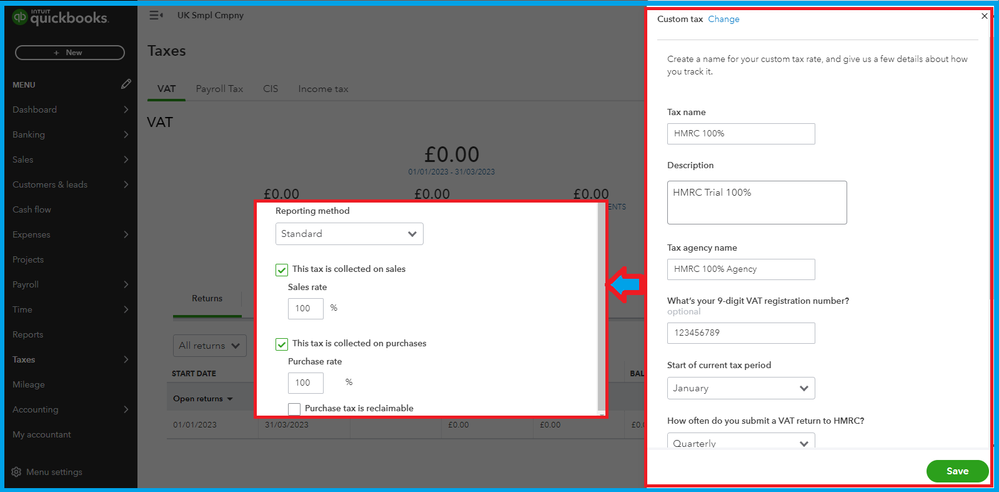
See this article to learn more about adding VAT and its calculation: Set up and edit VAT settings, codes, and rates in QuickBooks Online.
Feel free to check out these resources for more tips about matching and reconciling transactions in the program:
- Categorise and match online bank transactions in QuickBooks Online
- Reconcile an account in QuickBooks Online
This should help you select the 100% VAT rate on the banking page. If you need more help managing bank transactions, add a comment below. I'll be here to help you.
