 QuickBooksHelpIntuit
Troubleshooting EFILE errors in Pro Tax
by Intuit• Updated 6 days ago
Certain error messages may prevent a successful EFILE of a T1 or T2 return. These issues must be resolved before transmission can be completed.
Table of contents:
Resolve EFILE errors
- Double-click the error message.
- The return opens with the auditor tab selected. Review the error(s) indicated in red text.
- Select each error. The source of the error opens in the return. For example, selecting an error related to an incorrect SIN number takes you to the Info page where the SIN is entered.
- Resolve all outstanding errors in the auditor.
- Save the return.
- Attempt the electronic transmission again.

About EFILE exclusions
In certain cases, an EFILE rejection can be a result of an exclusion that requires a paper filing.
Select here to learn about EFILE exclusions for T1 returns.
Select here to learn about EFILE exclusions for T2 returns.
Pro Tax data entry fields
Upon EFILE you may receive a notification that the return was rejected. In some cases, it may be a result of overrides where the correct tax flow was not followed.
Select here to learn about entry types and overrides in Pro Tax.
List of T1 EFILE errors
Select here to review an updated list of T1 EFILE errors from CRA.
EFILE error #99173
This error is generally due to a missing or invalid element in the return.
The cause of the error will be listed in the first line of the error message:
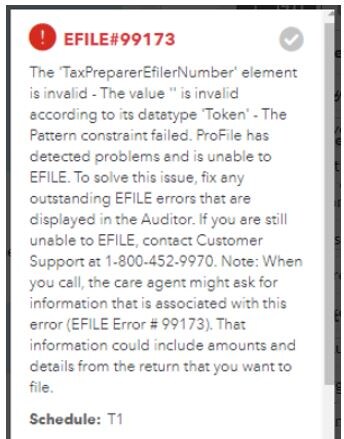
Causes may include:
- SIN not entered of invalid, including non-resident spouses. In this instance, enter SIN # 000000000 for the nonresident spouse.
- Preparer information has been entered incorrectly
- Missing EFILE Number and/or invalid password
What the Pro Tax support group can help with
The Pro Tax Care team can assist in troubleshooting rejected returns due to some EFILE error codes.
The Care team can’t help with EFILE errors that are tied to information or balances on CRA’s records—like issues with HBP balances. Pro Tax customers will need to contact CRA to get the correct amounts. If the details don’t match what CRA has, the return will be rejected.
Examples of these errors include:
| EFILE error | Description |
| 2130 | There is a current year immigration date recorded with the Canada Revenue Agency, but one was not entered on this return. |
| 2250 | The claim made for Home Buyers Plan repayment at field 246 of Schedule 7 and/or field 5883 of RC 383 exceeds the maximum repayable. |
| 2252 | The claim made for Home Buyers Plan (HBP) repayment at field 246 of Schedule 7 and/or field 5883 of RC 383 is less than the required repayment, or there is an entry at field 129 for HBP repayment, but no entry was made at field 5508. |
| 2302 | The claim for the Home Buyers tax credit at field 369 of Schedule 1 exceeds the maximum allowable. Confirm that all data has been entered correctly. If the return is correct, contact CRA and confirm that the data they have on file matches the information received by the tax preparer. |
What the CRA EFILE Helpdesk can help with
Certain error codes need to be handled with the CRA. For these codes, reach out to the CRA EFILE Helpdesk for help. You’ll find a list of some of the codes below that require you to contact the CRA directly.
- 40
- 43
- 57
- 72
- 2197
- 2250
- 2252
- 70127
More like this
- EFILE a T2 T1134 return in Pro Taxby QuickBooks
- Registering for electronic filing (EFILE) and entering EFILE credentials in a returnby QuickBooks
- How to file a return in Pro Taxby QuickBooks
- QuickBooks Online Accountant Pro Tax Billing FAQby QuickBooks