- Mark as New
- Bookmark
- Subscribe
- Highlight
- Report Inappropriate Content
Change Client's Email Address
My client has updated his invoicing email address and I want to change it now so I don't forget when I next send an invoice.
How do I change his email address so that it saves? I assume it's stored somewhere because of the autofill feature when creating a new invoice?
Thanks!
Solved! Go to Solution.


- Mark as New
- Bookmark
- Subscribe
- Highlight
- Report Inappropriate Content
Account Management
Hi Laurabelle,
To update your clients email address, go to Sales on the left navigation bar and then Customers. Locate the customer using the search toolbar and then click Edit.
This will bring up the Customer information panel where you can edit the email :)
Thanks!
- Mark as New
- Bookmark
- Subscribe
- Highlight
- Report Inappropriate Content
Account Management
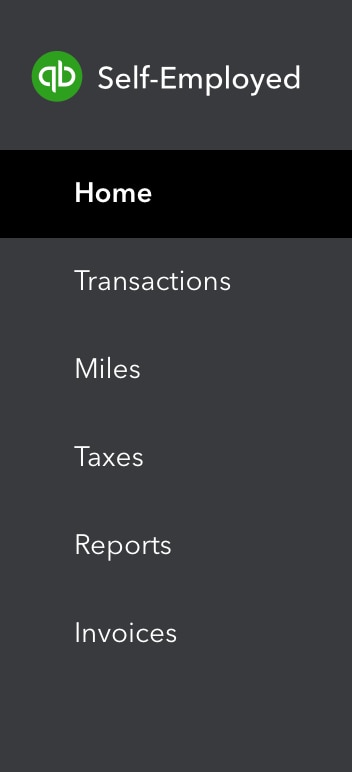
Thanks for your reply! Does that refer to the Self-Employed version? I don't have "Sales" as an option on my dashboard. I've attached a screenshot of what my navigation bar looks like. Where am I going wrong??
- Mark as New
- Bookmark
- Subscribe
- Highlight
- Report Inappropriate Content
Account Management
Thanks for getting back to us, @Laurabelle.
QuickBooks Self-Employed doesn't have a Customer Information page. To update your client’s email address, you'll have to manually enter it each time you create an invoice
In case you want to update your own email information, I'm also adding steps on how accomplish this task.
- Go to the Invoices menu located on the left panel of your QBSE company. In the upper right-hand, click on the Create invoice tab.
- Scroll down to the bottom of the page and choose the Edit Work Info tab.
- In the Your work info window, go to the Email section and enter the correct email address.
- Once done, click on the Save button.
To help you get started working in QBSE, I’m adding a link to view the list of our articles.
Moving forward, the new email address should show on the invoice.
Let me know the outcome after following these steps. I’m always here if you need more help
- Mark as New
- Bookmark
- Subscribe
- Highlight
- Report Inappropriate Content
Account Management
Thanks for your help @Rasa-LilaM ! But this seems to be a way to change my own email address, not the client's?

- Mark as New
- Bookmark
- Subscribe
- Highlight
- Report Inappropriate Content
Account Management
Thanks for the follow-up, @Laurabelle.
I'm here to help share some information about changing your client's email address.
You'll have to manually enter the client's email address on the invoice when changing their email. As long as you've updated the email address, the system will remember this eventually and will auto-fill the information when creating future invoices.
If you need other references for future use, you can check out this helpful link: QuickBooks Self-Employed Overview.
That should do it. Keep me posted if you have other questions about updating emails in your QBSE account. I'm here to help.

- Mark as New
- Bookmark
- Subscribe
- Highlight
- Report Inappropriate Content
Account Management
Is there a way to have Quickbooks, for example, remember the customer's email address ([email address removed]) for ESTIMATES, but know that when I want to create an INVOICE, to utilize a different email address ([email address removed])? I know I can enter two emails on a customer page, I'm just trying to avoid having to remember to delete the accounting one for estimates and the customer one for invoices.


- Mark as New
- Bookmark
- Subscribe
- Highlight
- Report Inappropriate Content
Account Management
Hi Xavier!
The transactions will only remember the items used from the previous transactions. The email used is not included.
This sounds like a unique setup on your customer’s email, and I believe this would really help you a lot. However, we can only enter two (or more) email addresses just like you do. It’s the easiest and fastest way to use different emails for their estimates and invoices.
I'll bring this idea to our product engineers, so they can consider adding options in future updates. I can see that this can also benefit other users who do the same thing for their transactions.
If you have other questions, please hesitate to go back to this thread.