
- Mark as New
- Bookmark
- Subscribe
- Permalink
- Report Inappropriate Content
How do I get a simple check register report with date, check number, payee name & amount? Nothing else! Modifying the check detail report doesn't work.
Solved! Go to Solution.


- Mark as New
- Bookmark
- Subscribe
- Permalink
- Report Inappropriate Content
Account management
Let me guide you on what report to use and how to customize it to get the information you need, sgray98660.
You can use the Transaction List By Date report and customize them so it will only show the columns that you want to view. Here's how:
- Go to the Reports menu, then locate the Transaction List By Date report.
- Select the correct Report period.
- Select Customize in the upper-right corner. Under the Layout section, select the columns that you don't want to show.
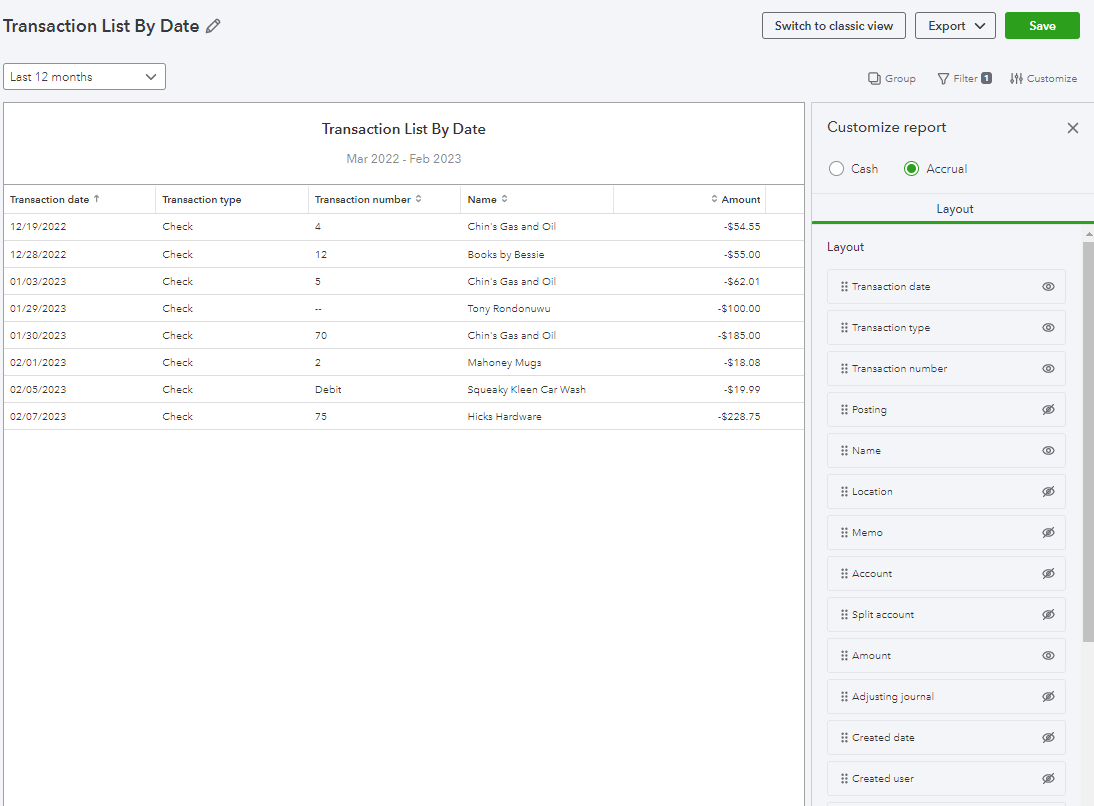
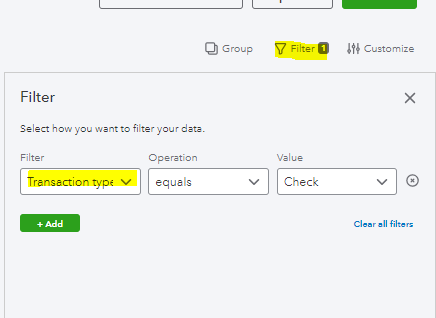
- Select Filter, then choose the Transaction type on the drop-down.
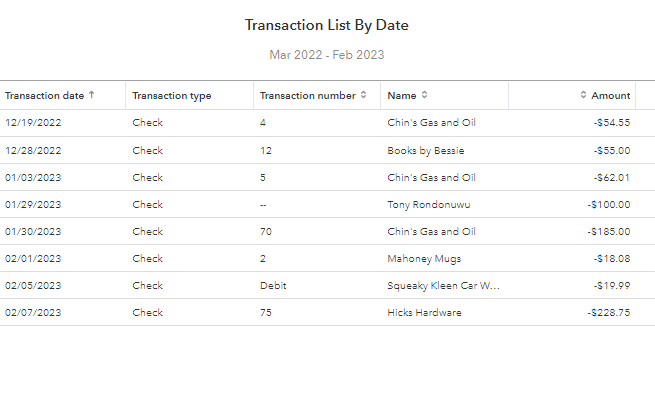
Once done, the report should show all the columns you want. I've attached a screenshot for your reference:
Furthermore, QuickBooks offers a variety of reports that are available for all QuickBooks Online (QBO) users. However, reports are only available for certain subscription levels. To know more, check out this article for your reference: Reports Included In Your QuickBooks Online Subscription.
Keep in touch if you have any concerns or questions about customizing reports. I'll always be right here to help you.
- Mark as New
- Bookmark
- Subscribe
- Permalink
- Report Inappropriate Content
Account management
Thanks so much!

- Mark as New
- Bookmark
- Subscribe
- Permalink
- Report Inappropriate Content
Account management
Hi there, sgray98660.
I'm happy that my colleague was able to help you get the report you need. Feel free to get back to us again if you need further assistance with getting your desired report. It's our pleasure to help.
Looking forward to hear from you again.

- Mark as New
- Bookmark
- Subscribe
- Permalink
- Report Inappropriate Content
Account management
This report is great, but I need a report with Payee Name, not Vendor name, which can be different.
Can I get that on a report to upload to my bank for Positive Pay?


- Mark as New
- Bookmark
- Subscribe
- Permalink
- Report Inappropriate Content
Account management
Hello there, @margaret2000.
I can see that you posted twice in this forum. Please click the link to get redirected to the original post answered by my colleague: https://quickbooks.intuit.com/learn-support/en-us/account-management/re-how-do-i-create-a-check-repo....
To keep the conversation streamlined, I ask that you leave any follow-ups there.
If you have any other questions, you can always visit us. Have a great day!
- Mark as New
- Bookmark
- Subscribe
- Permalink
- Report Inappropriate Content
Account management
Thank you Mirriam. Unfortunately the reply to my post doesn't answer my question yet.

- Mark as New
- Bookmark
- Subscribe
- Permalink
- Report Inappropriate Content
Account management
Hello there, margaret2000.
I can see that you posted twice in this forum. Please click the link to get redirected to the original post answered by my colleague: https://quickbooks.intuit.com/learn-support/en-us/account-management/re-how-do-i-create-a-check-repo....
Know that our door is open 24/7 if you need assistance performing specific tasks in QuickBooks. You can also utilize the REPLY button below if you have any additional QuickBooks-related concerns. Stay safe, and have a good one!
