

- Mark as New
- Bookmark
- Subscribe
- Highlight
- Report Inappropriate Content
Banking
Hi there, @dalesoden.
I understand the urgency of this matter. Allow me to direct you to the appropriate support team to assist you further in connecting your American Express to QuickBooks. Let me also share an alternative way in order to keep your record updated.
Are you using QuickBooks Online (QBO) or QuickBooks Self-Employed (QBSE)? I recommend reaching out to our Customer Care Support team. They can take a closer look at this banking issue and raise a ticket to our engineering team if necessary.
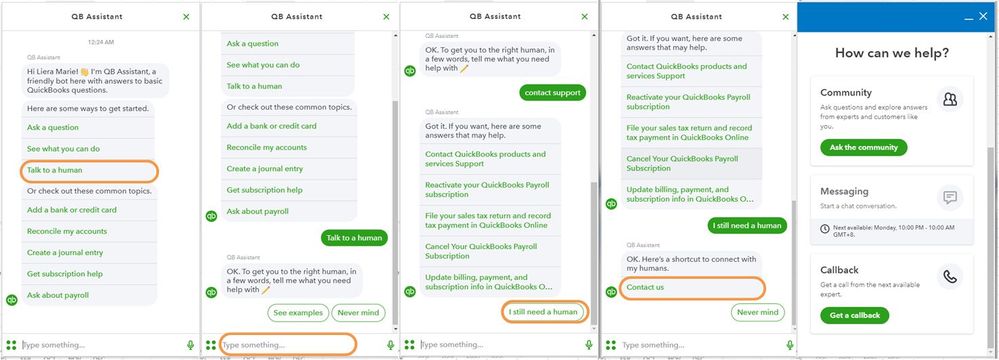
If you have QBO, here's how to reach them:
- Click the (?) Help icon in the upper right-hand corner of the Dashboard.
- Select Talk to a Human.
- Enter a short description of your concern and press Enter.
- Click I still need a human.
- Select Contact Us to connect with our live support.
- Choose Get a callback.
Otherwise, follow these steps if you have QBSE
- Select Assistant from the top bar.
- Type in "Talk to a human," then press Enter.
- Enter a short description of your concern. You can type in the investigation number here.
- Select Message an agent or Get a callback.
For more details about our support availability, refer to this article: Contact Support.
In the meantime, you'll want to download your transactions from your internet banking website into a CSV file. Then, upload it to QuickBooks. Refer to the following links for the detailed steps:
Please know that you're always welcome to post if you have follow-up questions about banking feeds. I'd be happy to help. Wishing you and your business continued success. Happy holidays!
