

- Mark as New
- Bookmark
- Subscribe
- Permalink
- Report Inappropriate Content
Banking
I appreciate what you've done so far, @mrtdg-ep. Could you please clarify what you mean by QuickBooks Self-Employed (QBSE) not accepting payments? This will allow me to provide a more accurate answer to your query.
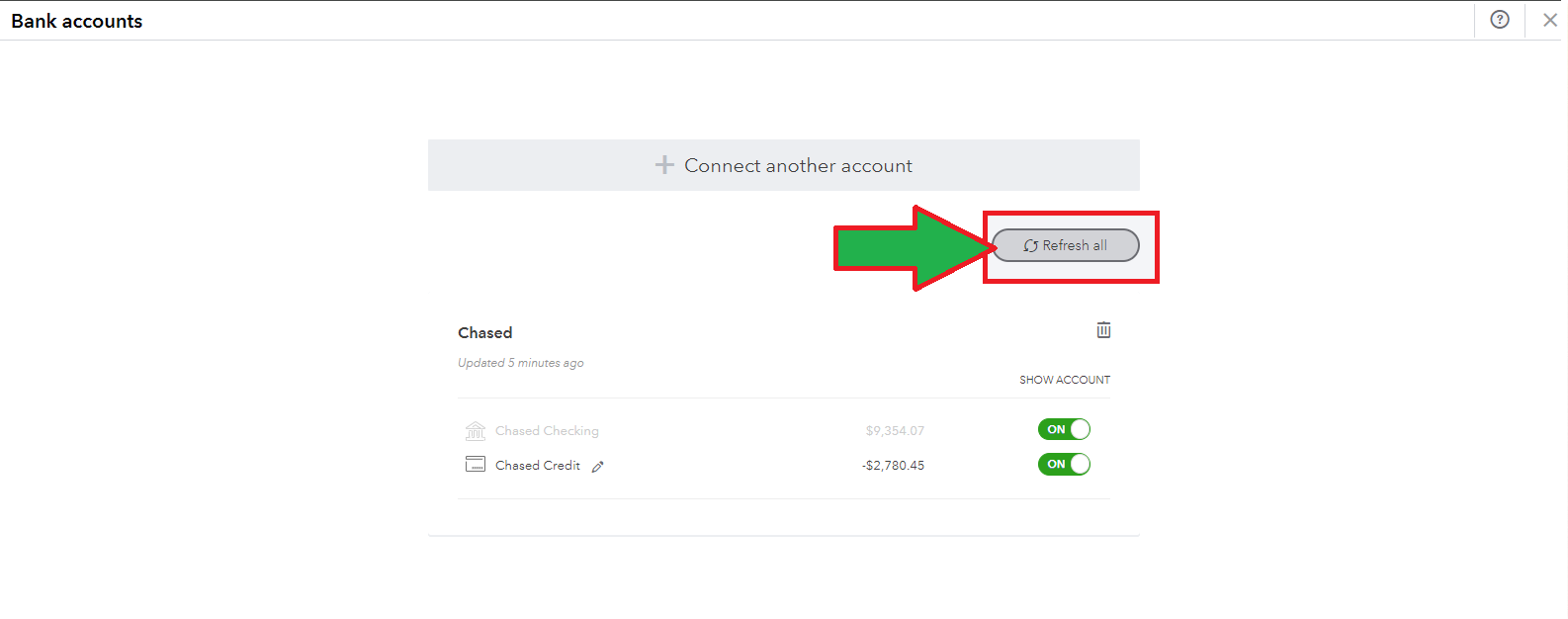
On the other hand, if you're referring to payments not downloading in your QBSE, I suggest refreshing your accounts.
Here's how:
- Go to the Gear icon.
- Select Manage account.
- Click the Refresh all radio button multiple times to update your banks.
If the issue persists, I recommend reaching out to our Technical Support Team. They have the necessary tools to securely check your account setup via screen-sharing sessions and provide solutions quickly.
Here's how:
- In your QBSE account, click the Help icon.
- Select Contact Us.
- Enter the question or topic you need help with.
- Click Continue.
- Choose a way to connect with us:
- Start a chat with a support expert.
- Get a callback from the next available expert.
You can also visit this article for the support hours schedule: Get help with QuickBooks products and services.
I've also attached this article for future reference on categorizing your transactions to ensure the accuracy of your books: Categorize transactions in QuickBooks Self-Employed.
Keep me posted for any clarification or additional information on managing your bank and payments in QBSE. I'm always here to help you.
