
- Mark as New
- Bookmark
- Subscribe
- Permalink
- Report Inappropriate Content
error while loading transactions manually
When i try to download bank transactions in format CSV, like this,
when I click next, I get a message
Solved! Go to Solution.


- Mark as New
- Bookmark
- Subscribe
- Permalink
- Report Inappropriate Content
Banking
Welcome back to the Community, @anonimus.
This error occurs when the mapping of your CSV file is incorrect. Make sure to enter the right columns in the mapping stage so that QuickBooks Online (QBO) will read the data.
QBO can import CSV files that use either a 3 (Date, Description, and Amount) or 4-column (Date, Description, Credit, and Debit) format. Change the names to match the titles in the system. Check out this article for the sample template format: Import bank transactions using Excel CSV files.
Just in case, I'll add this article for future reference: Common errors for importing bank transactions using CSV.
Please let me know in the comment below if you have any other issues or concerns. I'm always here to help. Have a good one!

- Mark as New
- Bookmark
- Subscribe
- Permalink
- Report Inappropriate Content
Banking
Hi,
I have the same CSV importing issue and have been trying all solutions without any success .
My file is set up as requested but I keep having the error message when I try to upload the csv file with my bank statement ...
Anyone can help ?
Thanks
- Mark as New
- Bookmark
- Subscribe
- Permalink
- Report Inappropriate Content
Banking
Hi,
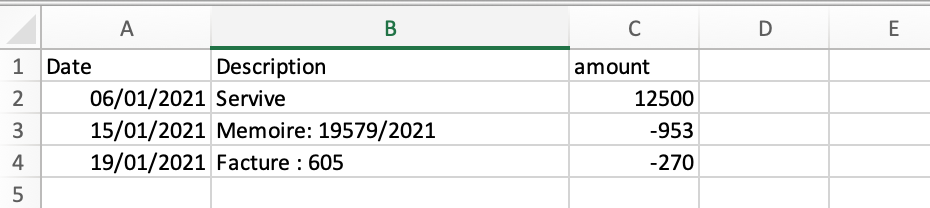
I have the same problem and despite trying all the suggestions on the community forum I am not able to upload my CSV file bank statement.
The following error has occurred: Your file does not contain the three required columns: transaction date, memo and amount.
Can anyone help ?
Thanks


- Mark as New
- Bookmark
- Subscribe
- Permalink
- Report Inappropriate Content
Banking
I appreciate your efforts in performing the steps shared above, @StephLux.
I've got additional steps that you can try so you can import your bank transactions as a .CSV file successfully.
Let's go ahead and fine-tune the formatting of your file to help verify the root cause of the error that you received.
These are the information that you need to check and try:
- Remove any zeros (0) from the file. Leave those cells blank.
- Correct any transactions that display numbers in the Description column.
- Remove the word "amount" if it appears in the Credit or Debit column header. They should only read "Credit" and "Debit" without the word "amount."
- Make sure the dates are in one format. We recommend you use: dd/mm/yyyy.
- Mac users must save the file as a Windows CSV file.
- Some banks add the day of the week in the Date column (for example, 20/11/2018 TUE). You need to remove the day of the week.
However, if your dealing with credit card accounts, you'll need to make sure that the transactions import correctly, select the corresponding credit card account (not a bank account) when you upload the file into QuickBooks Online.
Here's a link that you can scan through for more details about this process: Learn how to check the format of the CSV file you got from your bank.
On the other hand, if the problem continues, I'd suggest reaching out to our Customer Care Team. They have the necessary tools that can help check the reason behind this hurdle.
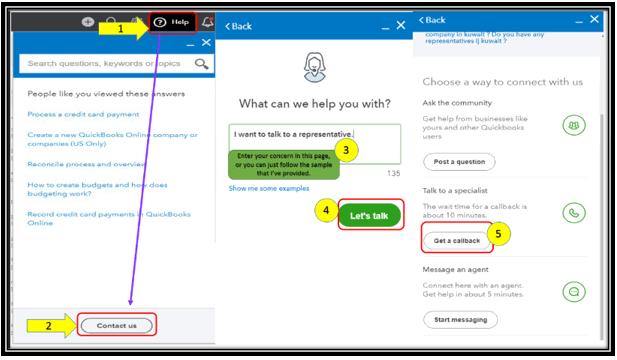
To contact them:
- Click on Help at the top menu bar.
- Hit on the Contact Us button.
- Enter a brief description of the issue in the What can we help you with? box.
- Press on Let's talk.
- Select on Get a callback.
- Key in your contact details, then tap on Confirm my call.
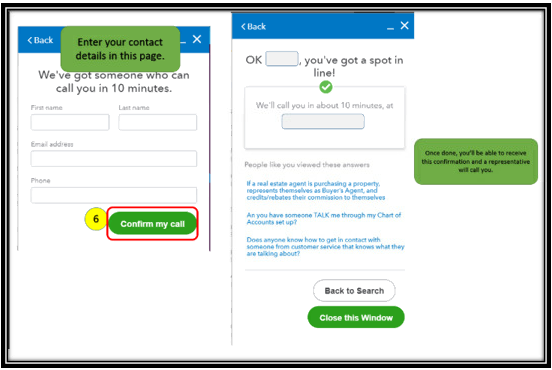
I'm just a few clicks away if there's anything else you need. I'll ensure you're all set. Wishing you all the best in everything that you do.
- Mark as New
- Bookmark
- Subscribe
- Permalink
- Report Inappropriate Content
Banking
Hi Betty,
Thanks for your reply.
Did all you said but still not working ...
Will call help desk
Kind regards
Steph

- Mark as New
- Bookmark
- Subscribe
- Permalink
- Report Inappropriate Content
Banking
Hello,
How did you salve the Problem finally?

- Mark as New
- Bookmark
- Subscribe
- Permalink
- Report Inappropriate Content
Banking
Hi,
Make sure your file is actually comma-separated and not semicolon-separated or otherwise.
