- Mark as New
- Bookmark
- Subscribe
- Permalink
- Report Inappropriate Content
Banking
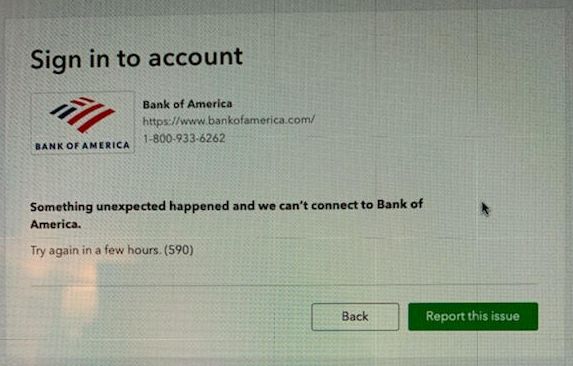
I have a QBO client who has been having trouble connecting to his BofA accounts within QBO for over a week now. Attached is an image with the error msg. that he receives. He has Business Advantage checking with BofA which, I understand, allows the user to have a connection to Quickbooks for no additional fees. He also has two BofA credit card accounts along with his checking. As of today, we have had zero success connecting any of his three BofA accounts.


- Mark as New
- Bookmark
- Subscribe
- Permalink
- Report Inappropriate Content
Banking
Some of our users reported the same issue, Matt.henterly. Rest assured that this is already under investigation.
While our bank engineers are working for a resolution, I'd suggest reaching out to our customer care support. We're taking notes of the customers who are affected by the issue. Here's how:
- Click Help inside QuickBooks Online.
- Select Contact Us.
- Enter "Bank of America error 590" in the description field, then click Let's talk.
- Select either Start messaging or Get a callback.
Let me add the article on what to do if bank transactions won’t download or there's a bank error as an additional reference.
Feel free to visit the Community if you have other banking concerns. We're just around to help you.
- Mark as New
- Bookmark
- Subscribe
- Permalink
- Report Inappropriate Content
Banking
Thanks Kristine - will do!
- Mark as New
- Bookmark
- Subscribe
- Permalink
- Report Inappropriate Content
Banking
Has this issue been resolved yet?


- Mark as New
- Bookmark
- Subscribe
- Permalink
- Report Inappropriate Content
Banking
This issue has been tag as resolved, @tim41.
Since you’re having difficulties connecting your bank account to your QuickBooks Online (QBO) account, let’s go through some steps to fix this.
Let’s start by manually updating your bank to refresh the connection between your bank and QuickBooks. Here’s how to do it in your QBO account:
- Go to the Banking or Transactions menu.
- Select the Banking tab and click Update a couple of times.
- Click Continue update if you’re prompt to enter your Multi-Factor Authentication (MFA) credentials.
You can also check this article for more troubleshooting steps: What to do if you see a bank error or bank transactions won’t download.
If the issue persists, I’d recommend contacting our Support Team. They’ll be able to look into your account securely and investigate the connectivity issue you’re having with. To reach out to them, you can refer to the steps share by my colleague Kristine Mae above.
In the meantime, you’ll want to upload your bank transactions to your QBO account. For the full instructions, check out this article: Manually upload transactions into QuickBooks Online.
If you have other follow up questions about connecting your bank account, simply leave a reply below. I’ll be around to lend a hand. Take care and keep safe.

- Mark as New
- Bookmark
- Subscribe
- Permalink
- Report Inappropriate Content
Banking
Two years later and QBO still hasn’t found a way to integrate with BofA CashPro. Will this ever be fixed???

- Mark as New
- Bookmark
- Subscribe
- Permalink
- Report Inappropriate Content
Banking
I agree that by now Quickbooks should have had a connection with CashPro. I saw that NetSuite and Sage both already have this.

- Mark as New
- Bookmark
- Subscribe
- Permalink
- Report Inappropriate Content
Banking
Has anyone been able to connect a BOA Cashpro account? Please share! Thanks!

- Mark as New
- Bookmark
- Subscribe
- Permalink
- Report Inappropriate Content
Banking
I appreciate you following up on this thread, Arodr2786.
To ensure you can connect your BOA Cashpro account, as an initial step, let's log in to the bank's website. Once signed in, copy the bank URL and use it for searching and linking the correct account in QuickBooks.
Here's how:
- From the left menu, click Transactions and choose Banking.

- On the Banking page, select the Link account.

- In the Search field, enter the bank's URL (example: http://www.chase.com).

- Select your bank. If you see multiple options, you may have to repeat these steps to find the correct one.
- Enter your bank login on your bank's website, then select Continue.
Once connected, QuickBooks will automatically download your most recent transactions. I recommend editing, assigning, and categorizing your transactions. Also, you can match them to the existing entries in the software. Just go to the For Review tab from the Banking menu. Doing so will help you ensure the accuracy of your financial records.
Alternatively, if you're still unable to connect the Cashpro account, as a workaround, you can add your bank in the chart of accounts and bring in the transactions using a WebConnect file.
Let me know the result of this troubleshooting in the comment below. I need to make sure this is resolved so you can start running your business processing. Have a good day!

- Mark as New
- Bookmark
- Subscribe
- Permalink
- Report Inappropriate Content
Banking
Have you explored SlickConnect? It is designed to import into any bank or credit card in QuickBooks Online, so there is no specific setting needed.
https://www.moneythumb.com/?ref=110