
- Mark as New
- Bookmark
- Subscribe
- Permalink
- Report Inappropriate Content
Hello! How do I change the bank account from which processing fees are taken? I use Quickbooks Simple Start.


- Mark as New
- Bookmark
- Subscribe
- Permalink
- Report Inappropriate Content
Banking
I’m more than happy to guide you through the steps on how to change the bank account for your processing fee, Cynthia.
With just a few steps and you’re all good to go. Let me show you how.
- Sign in to your QuickBooks Online (QBO) account.
- Go to the Gear icon.
- Select Account and Settings.
- Click Payments from the menu.
- In the Chart of Accounts section, select the pencil (edit) icon.
- For Where do you want to record payments?, choose the correct bank account.
- In the Where do you want to record processing fees?, choose the proper expense account for tracking processing fees.
- Then click Save.
You can also check this article for more details about the process: Choose where to record payments and processing fees for QuickBooks Payments.
In case you'll need to change the account where you deposit your customer payments, you can utilize this article for the detailed steps: Change the account QuickBooks deposits payments into.
You can always get back to me if you need further assistance managing your payments account or invoices. I’m always around ready to help you. Stay safe and have an awesome week!
- Mark as New
- Bookmark
- Subscribe
- Permalink
- Report Inappropriate Content
Banking
Thanks for your reply.
What I don't understand is the expense account situation.
I don't know what this means "expense account".
I do understand which BANK ACCOUNT it'll come from.
It is this bank account I would like to change where the fees come out of.
I don't see a bank account situation.
How does QB know which account is associated with QB payments fees in regard to an expenses?
Cynthia
- Mark as New
- Bookmark
- Subscribe
- Permalink
- Report Inappropriate Content
Banking
Thanks for your reply.
What I don't understand is the expense account situation.
I don't know what this means "expense account".
I do understand which BANK ACCOUNT it'll come from.
It is this bank account I would like to change where the fees come out of.
I don't see a bank account situation.
How does QB know which account is associated with QB payments fees in regard to an expenses?
Cynthia


- Mark as New
- Bookmark
- Subscribe
- Permalink
- Report Inappropriate Content
Banking
Hi, Cynthia.
The expense account is the account where you want to track your fees aside from the bank account. An example is when you record a deposit for your sales transactions. You set a bank account where you want to deposit the amount or sales, then the processing or bank fees (which is an expense account) deducting your sales.
I'm adding this screenshot for your visual reference.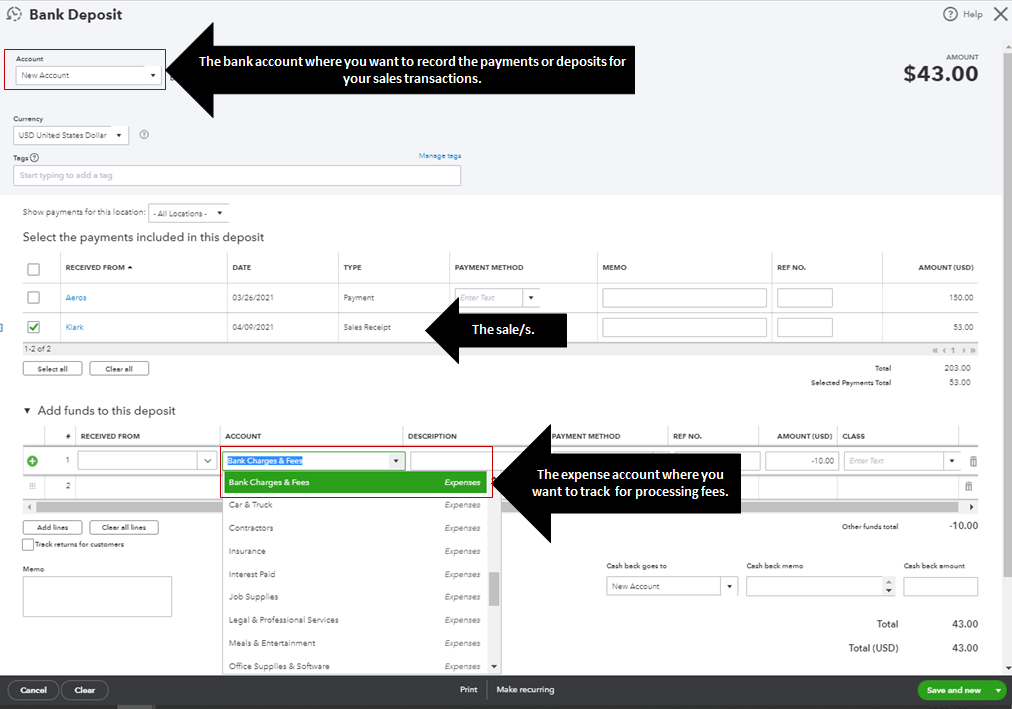
If you need help with setting up an expense account, here's how: Add an account to your chart of accounts in QuickBooks Online.
To learn more about processing online payments, I also recommend opening these articles:
- Choose where to record payments and processing fees for QuickBooks Payments
- Process a credit card payment in QuickBooks Online
If you have any other follow up questions about the accounts associated with your online payments, please let me know by adding a comment below. I'm always here to help. Have a good one!
