
- Mark as New
- Bookmark
- Subscribe
- Permalink
- Report Inappropriate Content
I was just overcharged by QB- for The processing fee for next-day ACH deposits is 1% (max $10) . Why was I charged $19 for a $1965.00 ACH deposit???


- Mark as New
- Bookmark
- Subscribe
- Permalink
- Report Inappropriate Content
Banking
Hi there, @mckinnon-m.
We were alerted to a third-party issue with direct deposit processing this morning that has delayed the deposit of employees' paychecks into their accounts. The issue has been resolved and your employees should expect to see the funds available in their bank account by end of the day today.
We know how critical each paycheck is to your team. This is, even more, the case in our current environment. Thank you for your patience as we focus to ensure your employees’ funds are available as soon as possible.
I'm just a few clicks away if there's anything else you need. Have a good one!
- Mark as New
- Bookmark
- Subscribe
- Permalink
- Report Inappropriate Content
Banking
This has nothing to do with payroll. I don't even use QB for payroll- THANK GOD- after this ridiculousness of trying to speak to someone!!!
QB charged me $19 for a $1900.00 ACH payment to our bank account for a customer payment. It was not to exceed $10.00. Why were we charged $19???
- Mark as New
- Bookmark
- Subscribe
- Permalink
- Report Inappropriate Content
Banking
I appreciate the clarification that you gave, @mckinnon-m.
Let me provide some insights regarding the payment processing in QuickBooks Online.
When processing payments in QBO, it has corresponding charge per transaction. Fees may vary depending on the transaction made.
Know that fees are subject to change. Always refer to the QuickBooks Payments website for the most up-to-date info.
However, to verify the reason behind the charge that you received, I recommend reaching out to our QuickBooks Payments Team. They have the tools to access your account and provide details about the fees.
To do that:
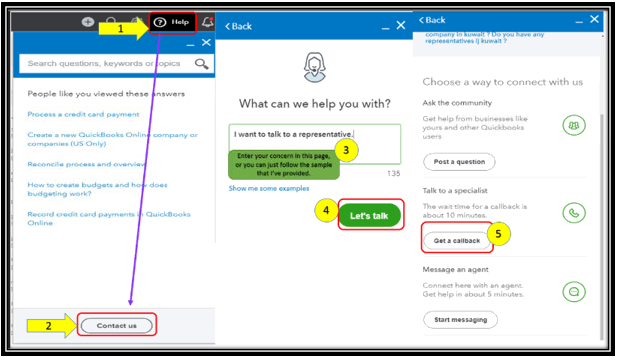
- Click on Help at the top menu bar.
- Hit on the Contact Us button.
- Enter a brief description of the issue in the What can we help you with? box.
- Press on Let's talk.
- Select on Get a callback.
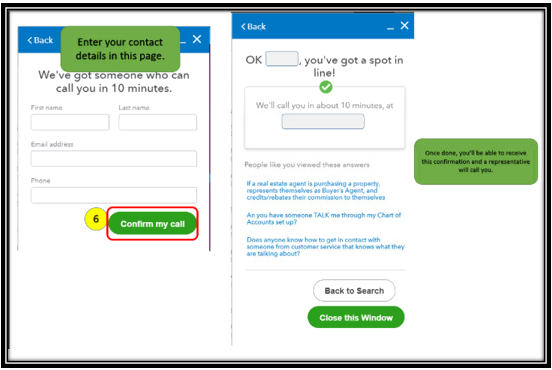
- Key in your contact details, then tap on Confirm my call.
To add up, you can always check out this reference to learn more about the processing fees: Credit Card Processing Fees & Rates Explained.
Keep me posted if you have any other concerns. I'd be pleased to help.

- Mark as New
- Bookmark
- Subscribe
- Permalink
- Report Inappropriate Content
Banking
I just noticed that I was overcharged as well. I didn't want to pay for the expedited transfer in the first place, but wasn't given a chance. Now Quickbooks just takes whatever it wants from my account freely and over the $10 max... They are essentially stealing from me. I am about to find new bookkeeping software. This is unacceptable for a $40 per month service. I have reached out them four different times about this extra fee and they will not call back, pick up the phone or respond to six emails I have sent. I do not think they care.


- Mark as New
- Bookmark
- Subscribe
- Permalink
- Report Inappropriate Content
Banking
I am starting to get some new weekly fee of $10 with no explanation of what it is for from qbo. Some new transaction fee on top of the numerous other transaction fees. It is getting worse than dealing with government. It is making NetSuite look far more promising at the moment.
- Mark as New
- Bookmark
- Subscribe
- Permalink
- Report Inappropriate Content
Banking
@muenstermann wrote:It is making NetSuite look far more promising at the moment.
How is it more promising? Do they offer ACH payment for free? Afaik, you still need an additional app to do so.


- Mark as New
- Bookmark
- Subscribe
- Permalink
- Report Inappropriate Content
Banking
Hey muenstermann,
Thank you for chiming in on the thread. Those fees you are receiving could be ACH bank transfer fees. You can refer to this article for which breaks it down even more. However, if you are not using QuickBooks Payment, I recommend calling our Support Team. They will be able to pull up your account and see exactly why you are being charged and the amounts for each. Here's how:
- Go to Help.
- Choose QuickBooks Desktop Help.

- Click on the Contact us link.
- Choose Search for something else.
- Type in a keyword about your concern.
- Hit Submit.
- Click on the Start a Message button.
Please touch base with me here for all of your QuickBooks needs, I'm always happy to help. Have a great day.
- Mark as New
- Bookmark
- Subscribe
- Permalink
- Report Inappropriate Content
Banking
The reply from admin SashaMC does not address the fact that QB has started charging for the ACH payments to hit your bank quicker. I'd rather wait three to four more days and get 100% of my money. QB is already expensive for a small business. And, no I'm not just going to start upcharging my clients to make up for the greed of QB. The end user (clients) are getting hit for every price increase on materials and services and the blanket corporate response is silence. With others saying, "Just pass the additional expense down." The people at the bottom are feeling it hard from every angle. Not cool.

- Mark as New
- Bookmark
- Subscribe
- Permalink
- Report Inappropriate Content
Banking
We are also being overcharged beyond the scope of QBO's new ACH 'policy'. Trying to get a hold of customer service to discuss the matter is impossible. Was extremely unhappy to learn that QBO no longer offers the free 5-7 ACH transfers, and will no longer offer that payment method as an option to our customers that have not signed up for it yet, but was enraged to learn that not only was the $10 cap not applying, but that we are being charged something closer to 2% per transaction. We'll switch to promoting bill.com to our customers for all ACH transactions asap.

- Mark as New
- Bookmark
- Subscribe
- Permalink
- Report Inappropriate Content
Banking
I was charged $145. I signed up for the qb checking account because it claimed there would be no transaction fee, so the charge was a shock. I'm trying to get what's left of my money so I can cancel my subscription. I feel scammed.

- Mark as New
- Bookmark
- Subscribe
- Permalink
- Report Inappropriate Content
Banking
Thank you. Switching to bill.com is a good suggestion.

- Mark as New
- Bookmark
- Subscribe
- Permalink
- Report Inappropriate Content
Banking
I also have been raked over by QB today. $80 on ACH. What a crock!
