
- Mark as New
- Bookmark
- Subscribe
- Permalink
- Report Inappropriate Content
How do I change the currency in QuickBooks Desktop - Enterprise?
How do I change the currency in QuickBooks Desktop - Enterprise? For some strange reason when we opened our QuickBooks program yesterday the currency started showing up in UK Pounds instead of US Dollars. All of the discussions describe how to correct the issue in QuickBooks Online but not in the Desktop version. I don't have the same options and screens being described in the existing discussions and am hoping someone can help me fix this issue.
Solved! Go to Solution.


- Mark as New
- Bookmark
- Subscribe
- Permalink
- Report Inappropriate Content
Banking
Let me ease your confusion and help you from there, @KAS21.
Once you select the home currency during the initial setup of your QBDT software, the option to change it is currently unavailable. As a workaround, you can consider utilizing the Multicurrency feature to set US dollars (USD) as your home currency.
Before we start, please know that you can no longer deactivate the feature once it's turned on. In this case, I'd suggest creating a backup copy of your company file before activating Multicurrency.
Meanwhile, here are the steps to activate Multicurrency:
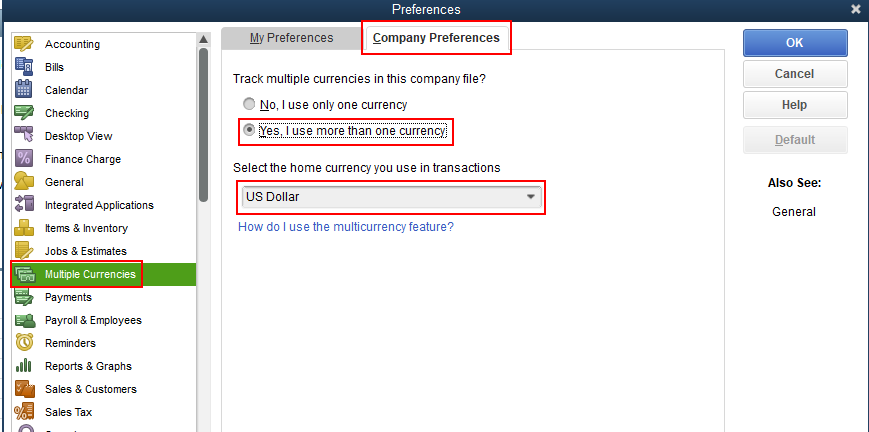
- Go to the Edit menu, then choose Preferences.
- Select Multiple Currencies on the left menu.
- Choose the Company Preferences tab.
- Toggle the Yes, I use more than one currency radio button.
- Then, choose US Dollar from the drop-down.
- Click OK, then select OK and Yes to confirm your action.
I'm adding this article to learn more about setting up and using multicurrency: Set up and use Multicurrency.
Please let me know if you need clarification about this, or there's anything else I can do for you. I'll be standing by for your response. Have a great day.
- Mark as New
- Bookmark
- Subscribe
- Permalink
- Report Inappropriate Content
Banking
The main confusion is that it was US Dollars until my boss opened his file this afternoon. His is in Pounds while the rest of us are still showing US Dollars. (We use the Multi-user setting) Our company has the Enterprise: Manufacturing & Wholesale


- Mark as New
- Bookmark
- Subscribe
- Permalink
- Report Inappropriate Content
Banking
Thank you for the additional information, @KAS21. I'm determined to ensure everything is parallel so you can all work seamlessly.
Your boss may have opened a different company file. I'd suggest closing it and restore the correct one. You can take note of the file location from the other workstation. Doing this will help us ensure that we're opening the right one.
To see the file location, follow these steps below:
- Go to a workstation that is showing US dollars.
- Open QuickBooks.
- Press F2 on your keyboard to see the product information.
- Take note of the location under the File Information section.
Once done, go back to the other computer that shows UK pounds. You can use the location details to restore the company file.
- Make sure to close the current company file.
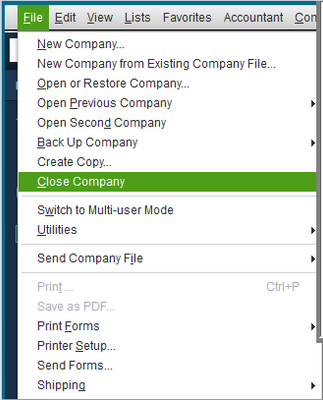
- Go to the File menu and select Close Company.
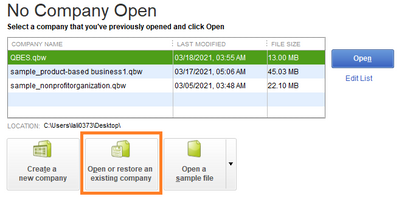
- In the No Company Open window, click Open or restore an existing company.
- Select Next.
- Find your company using the location details.
- Select Open, then enter the password.
I've added some articles that contain more information about restoring your company file and how to locate it if you forgot where you saved it:
Feel free to visit us again should you require further assistance. I'm always here to help. Have a great day.

- Mark as New
- Bookmark
- Subscribe
- Permalink
- Report Inappropriate Content
Banking
Hi there I switched to multicurrency but it still sent the invoice in CDN which was our original billing system.
I'm not sure how to fix this - and I have invoices I have to send out right away....
What to do?

- Mark as New
- Bookmark
- Subscribe
- Permalink
- Report Inappropriate Content
Banking
You have to create a new profile for your customer and assign USD as their currency. Then you will be able to create an invoice for that customer in USD.
- Mark as New
- Bookmark
- Subscribe
- Permalink
- Report Inappropriate Content
Banking
do I have to make a new account all over -
I already have a profile - so how would I change it?
- Mark as New
- Bookmark
- Subscribe
- Permalink
- Report Inappropriate Content
Banking
Just to clarify your case. Are you using QB Desktop US version or CA version? Do you only need to send invoices in USD for some of your customers, or do you need to replace the currency for all of your customers to USD?
- Mark as New
- Bookmark
- Subscribe
- Permalink
- Report Inappropriate Content
Banking
I'm using the desktop version which was originally set up in CDN -
Now I need to - do some clients in US and others in CDN.
How do I set that up?
Thanks Tina
- Mark as New
- Bookmark
- Subscribe
- Permalink
- Report Inappropriate Content
Banking
Prepare your new Customer list with USD and utilize the importer feature
https:// quickbooks.intuit.com/learn-support/en-us/manage-lists/import-or-export-ms-excel-files/00/203724
