

- Mark as New
- Bookmark
- Subscribe
- Permalink
- Report Inappropriate Content
Employees and payroll
The W-2 is actually right, as is the tax forms worksheet.
To duplicate this, I set up a deduction with the Other tax tracking type, forced it to reduce Federal withholding, and bypassed the warning I got. Then I used it on a paycheck for -111.11. Then then I ran the Tax form worksheet to see the result.
I got both the the correct number for Box 1, which didn't include the item, and the correct number for Federal taxed wages, which was different.
And also the report showed me the issue with my data/ showed the item that was excluded from Box 1 based on its tax tracking type. I expect you will see this as well when you run your report:
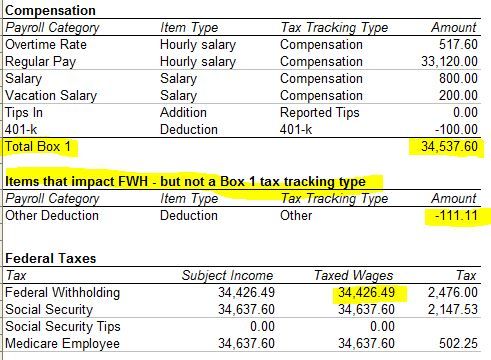
When comparing the actual W-2 with the tax form worksheet, use the number on the line "Total Box 1" not, Taxed Wages, which do not appear on the W-2.
-----------------------------------------
The weird thing about Box 1 is that it correctly does not show wage base (taxed wages) the way the other boxes do, per the W-2 instructions.
Instead it shows the sum of the amounts of various tax tracking types like Compensation and 401k deductions and so on, regardless of their tax settings. You can see the details of how that works on the worksheet, but not on the W-2 form where you see only summaries.
An item with "Other" as the tax tracking type ill now impact Box 1, regardless of its tax settings.
Items with the following tax tracking types will impact Box 1, adding to or reducing it:
Compensation
Reported Tips
457 Distribution
Non-Qualified Plan Distribution
Fringe Benefit
Other Moving Expense
Taxable Group Term Life
SCorp Medical Premium
Simple IRA
401-k
403-b
408-k
457
Dependent Care Flex Spend
Premium Only Plan
Medical Care Flex Spend
HSA Company Taxable
HSA Employee NonTaxable
They will impact the box whether or not they are set up to impact Federal Withholding tax.
