

- Mark as New
- Bookmark
- Subscribe
- Permalink
- Report Inappropriate Content
Employees and payroll
Thanks for posting here with this Direct Deposit concern, @CdSecretary.
I know how it can be frustrating to be held up like this when you just want to get this payroll concern resolved. We want to make sure this is taken care of by the correct department. Please note that this is a public forum and we do not handle account-related concerns to protect our customer's data.
The best team to help you out with this is our Payroll Support people. I know you already called several times for this, but only them can open your payroll history and help with money movement.
When you call, ask the representative to do a Direct Deposit trace. They will give you a transaction number that you can give to the employee's bank so they can locate the funds.
Use these steps to contact us:
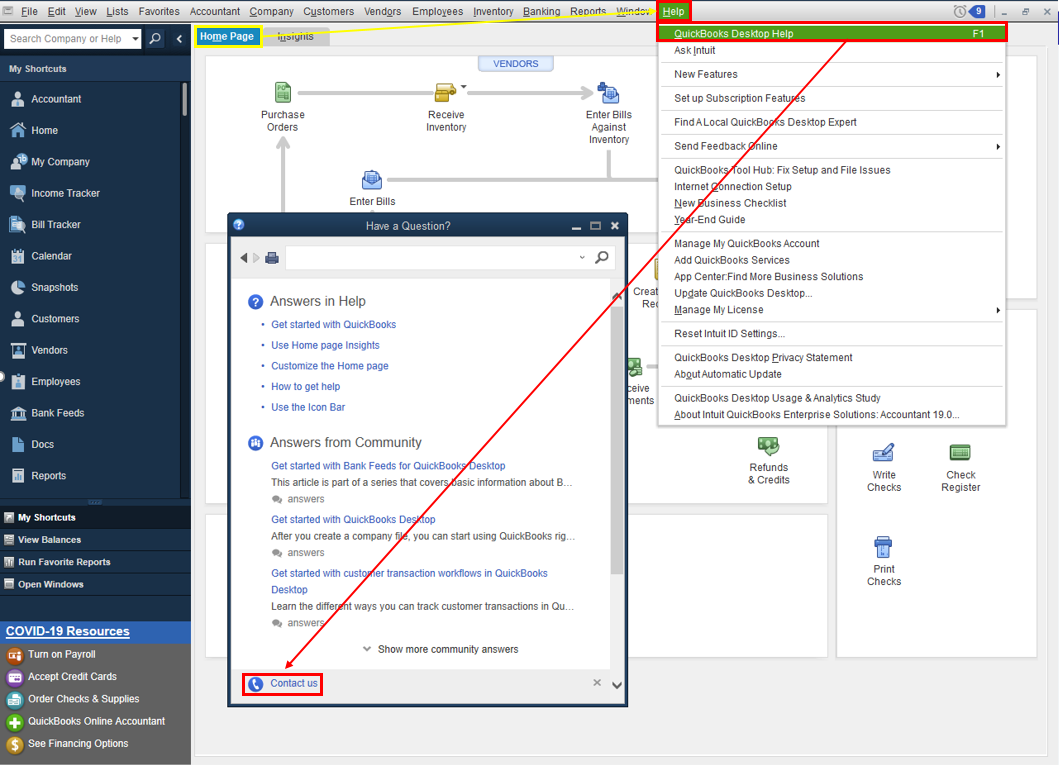
- Open QuickBooks and click the Help menu.
- Select QuickBooks Desktop Help.
- On the pop-up screen select Contact us.
- Click the Search for Something else button then type your concern in the Ask us anything box.
- Hit Search then scroll down to get your contact options.
Refer to this article to learn more about our contact options and support availability: Contact QuickBooks Desktop support
Here are a few reasons why an employee's check is not deposited to the employee's account:
- The employee's bank account information was entered incorrectly or invalid.
- Unable to locate account.
- Employees bank account details was updated by the bank.
- Issue with the employee's bank.
- The check date falls on a weekend or holiday.
- Payroll was submitted after the cut-off time which is every 5 PM Pacific Standard Time. When it happens, the payroll will be processed on the next banking day.
You can also request for a reversal to return the funds to your account. For the complete instructions and how it is done, see this link here: Reverse a direct deposit
Please update this thread on how the call goes. I want to make sure you're taken care of, and I'll be right here if you need other help with QuickBooks. Have a good one.
