
- Mark as New
- Bookmark
- Subscribe
- Permalink
- Report Inappropriate Content
Email a sales invoice from Quickbooks
Hi
we recently moved our Quickbooks file from one server to a brand new server (Windows 11 compliant). A short while later we changed from Microsoft 365 to a Microsoft Exchange account
After this we noticed we can send a sales order via email from Quickbooks but we can't send a sales invoice via email from Quickbooks.
Does any body have any ideas?
Do we need to also setup an email account on the server maybe? When you log in to quickbooks on the server there is no outlook option. only webmail whereas on the persona PC they have webmail or outlook as an option
Thanks in advance for your help


- Mark as New
- Bookmark
- Subscribe
- Permalink
- Report Inappropriate Content
Install
Thanks for reaching out to us, NewtonB.
You'll need to set up webmail or Outlook to work with QuickBooks. This will verify your webmail servers and port settings with your ISP and lets you send invoice via email.
For webmail, here's how you can do it:
- Navigate to the Edit menu in QuickBooks and select Preferences.
- Select Send Forms.

- Choose Web Mail and then click Add.
- Fill out the Add Email Info and select OK.
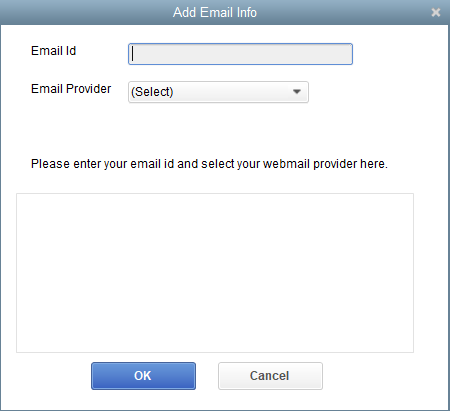
- Click OK to save your changes.
On the other hand, for Outlook configuration, you'll have to contact your internet or email provider to get the username, password, incoming email server address, server type and outgoing email server address. For more information on how to connect your email, read this article for your reference: Connect Your Email to QuickBooks Desktop.
Feel free to let us know if you need additional assistance when sending invoices. We're always right here to help.
- Mark as New
- Bookmark
- Subscribe
- Permalink
- Report Inappropriate Content
Install
Hi NewtonB.
I just wanted to follow up to check if the resolution we provided helped resolve the issue.
Please let us know if everything is now working as expected or if you're still experiencing any problems. We'll be glad to help.

- Mark as New
- Bookmark
- Subscribe
- Permalink
- Report Inappropriate Content
Install
No. This issue is still unresolved, because the option to send sales invoice via Outlook App is no longer available. Using the webmail only sends the invoice from my personal email box instead of under the header for the company itself. Are you all working on this?

- Mark as New
- Bookmark
- Subscribe
- Permalink
- Report Inappropriate Content
Install
Hey there, @LDR Const.
Thanks for reaching out on this thread about emailing a sales invoice from QuickBooks.
If you're not seeing Outlook as an option on the screen anymore within your QBDT account, one of these reasons might be why you're not able to see the option:
- You're using a QuickBooks version that doesn't support Outlook.
- There's an issue with Outlook installation.
- Your profile is not set up in Microsoft Outlook.
- Outlook is not the default email program.
- Your QuickBooks is hosted on the Cloud and your service provider doesn't have Office installed as a hosted application.
If any of these could possibly be why, I recommend reviewing this guide that has some steps to help resolve this issue: Fix Outlook when missing.
If you're still having issues in the end after performing those actions, feel free to reach back out. We want to ensure that you're getting this taken care of as soon as possible!
