
- Mark as New
- Bookmark
- Subscribe
- Highlight
- Report Inappropriate Content
How to transfer data from existing quick book online to new QB online.
Solved! Go to Solution.


- Mark as New
- Bookmark
- Subscribe
- Highlight
- Report Inappropriate Content
Other Questions
Glad to have you here in the Community, @ben-jbpaccountin.
Let me walk you through the process of how to transfer your existing QuickBooks data to your new account. You can export your old data to Excel and save it to your computer. Then, import it to your new QuickBooks account to transfer your files. Here's how:
- In your existing QBO account, click the Gear icon and select Export data.
- In the Reports tab, select the date range and choose the report you want to export.
- Click Export to Excel.
- Then, go to the Lists tab and select Customers, Employees, and Suppliers, then click Export to Excel.
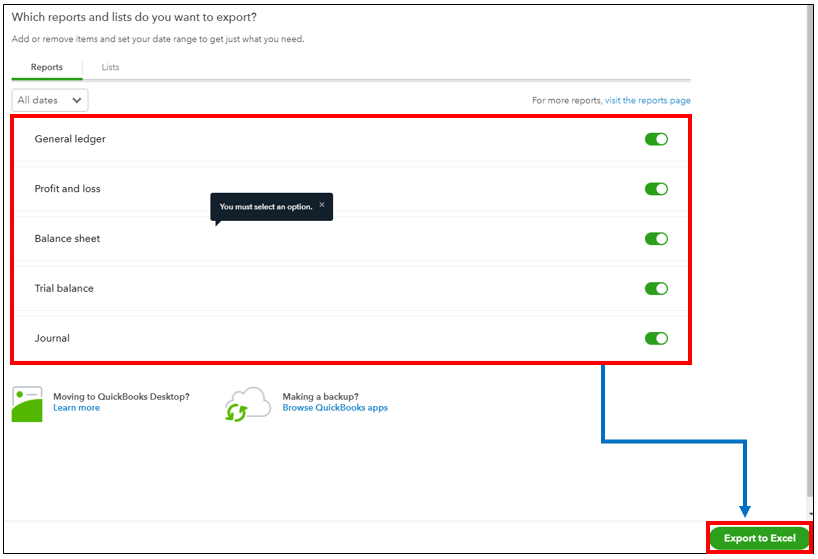
Here's an article you can read for more details: Export reports, lists, and more.
Once done, save the data to your computer and import it to your new QBO account.
- Click the Gear icon, then select Import data.
- Select the data you want to import.
- Hit the Browser button and select the file you export.
- Click Next, then follow the onscreen instruction.
You can check out this article for further guidance: Common questions about importing data to QuickBooks Online.
Please keep in touch if there's anything else I can do to help you succeed with QuickBooks. I've got your back. Have a great day and be safe.

- Mark as New
- Bookmark
- Subscribe
- Highlight
- Report Inappropriate Content
Other Questions
Open a new blank QBO account
then you may have 2 options:
1. Utilize a migration tool
https://transactionpro.grsm.io/qbo
2. Purchase a 3rd party migration service.

- Mark as New
- Bookmark
- Subscribe
- Highlight
- Report Inappropriate Content
Other Questions
when we do an export in this way does it delete the data from QuickBooks?
- Mark as New
- Bookmark
- Subscribe
- Highlight
- Report Inappropriate Content
Other Questions
No. You must delete the data on your old QBO account yourself or cancel your account and let Intuit delete your data after one year.

- Mark as New
- Bookmark
- Subscribe
- Highlight
- Report Inappropriate Content
Other Questions
Hi there, @chazza.
Fiat Lux - ASIA is right you can delete your old account or let Intuit delete your data within a year. I’m here to add some information.
If your account has been active for more than 90 days, your data can't be deleted. Thus, we can cancel your account and start a new subscription. Here's how you can do it:
- Go to Settings and select Account and settings.
- Choose Billing & subscription.
- Then, select Cancel subscription.
- Follow the on-screen prompts to complete the process.
If your QBO account is less than 90 days old, you have the option to purge your account if you're using QBO Plus Essentials and Advanced versions. The system deletes all data entered into the company, and you're unable to restore or reverse it. I'd be glad to show you how:
- Sign in to your QuickBooks Online Company.
- Change the URL to include /purgecompany
- Example: Change https://app.qbo.intuit.com/app/homepage to https://app.qbo.intuit.com/app/purgecompany
- The next screen will provide a summary of the items to delete. Type YES to delete the data, then select OK.
Furthermore, you can visit this handy article for more details about this process: Delete your data and start over in QuickBooks Online.
For future reference, you can read through these resources to learn more about managing your data:
If you have any trouble with any transactions in QuickBooks Online, please let me know and I’ll do everything I can to help here in the Community!
- Mark as New
- Bookmark
- Subscribe
- Highlight
- Report Inappropriate Content
Other Questions
I’d like to know how to transfer all the data from one company to another as I just set up a new license for this company and need to move data over. Thanks

- Mark as New
- Bookmark
- Subscribe
- Highlight
- Report Inappropriate Content
Other Questions
Hi there, @AGI Avant Group.
To clarify, are you trying to move from one QuickBooks Online company to another? To do so, you can follow these steps:
Export data from the original company:
- Log in to QBO for the original company.
- Go to the Gear icon and select Export Data.
- Choose the data you want to export, such as customers, vendors, chart of accounts, products, services, etc.
- Click Export to Excel. QBO will create a .zip file containing the exported data.
Import data into the new company:
- Log in to QBO for the new company.
- Go to the Gear icon and select Import Data.
- Choose the data you want to import from the .zip file, such as customers, vendors, chart of accounts, products, services, etc.
- Follow the prompts to import the data.
However, if you need to transfer from QBO to QuickBooks Desktop, you can refer to this article for detailed steps: Migrate Data.
I’ll keep an eye out if you have more questions about managing your data. Just let me know in the comments. Have a wonderful rest of your day!
- Mark as New
- Bookmark
- Subscribe
- Highlight
- Report Inappropriate Content
Other Questions
You can purchase a 3rd party migration service or use a migration tool.
https://get.transactionpro.com/qbo

- Mark as New
- Bookmark
- Subscribe
- Highlight
- Report Inappropriate Content
Other Questions
Hello, I just followed your instruction and exported all data and then go to new QBO (Accoutant version).
But when go to Import data page (Bring your existing data into quickbooks) but I can't find balance sheet /P&L/Trial balance....etc) other icon to import.
So now I have all excel file for old account data but don't know how import.
Please advise thanks.
Regards
Franky4
- Mark as New
- Bookmark
- Subscribe
- Highlight
- Report Inappropriate Content
Other Questions
You need to import starting from CoA, Lists (e.g Customer, Supplier, Item), and finally Transactions (e.g Bills, Bill Payments, Invoice, Receive Payments, Sales Receipt, Journal Entry).
Another option, purchase a 3rd party conversion service.

- Mark as New
- Bookmark
- Subscribe
- Highlight
- Report Inappropriate Content
Other Questions
According to this help article https://quickbooks.intuit.com/learn-support/en-uk/help-article/import-export-files/common-questions-... the data import must be performed in the following order
1. Customers
2. Suppliers
3. Products and services
4. Invoices
5. Bills
Assuming the specific order of imports is followed, does the migration of this data also include all previously entered Journal Entries, Bills (including attachments), Bill payments etc.? So that the end result is a 100% replica of the original account?
Thanks
- Mark as New
- Bookmark
- Subscribe
- Highlight
- Report Inappropriate Content
Other Questions
Customers, Suppliers, Product & Service = List
Invoices, Bills = Transactions
Other transaction data (e.g Receive payments, Bill payments, Sales Receipt) = you can use a migration tool
https://get.transactionpro.com/qbo
Another option, buy a 3rd party migration service.

- Mark as New
- Bookmark
- Subscribe
- Highlight
- Report Inappropriate Content
Other Questions
The files I am able to export do not seem to match up with the options to import. For example, there isn't an option to export products and services, but you can import. I cannot seem to export invoices, but can import them. Help!
- Mark as New
- Bookmark
- Subscribe
- Highlight
- Report Inappropriate Content
Other Questions
I understand the importance of having a seamless process for exporting and importing your data. I can share some insights about transferring your QuickBooks data from one account to another, @brittney d.
In QuickBooks Online (QBO), we're unable to entirely transfer your data and transactions between accounts. If you signed up for a new account, you can start transferring your data manually. In order to do so, you'll need to meet the requirements to complete the process.
On the otherhand, while the direct option to export products and services is currently unavailable, you can still access your products and services from the sales tab within the platform and manually export the transaction details to Excel. Once exported, you can edit the Excel format as needed to suit your requirements.
See screenshot below for your reference.

As for the export of invoices, while this option is not directly available within our platform, you may consider utilizing a third-party app that supports the import of invoices into our system. There are several third-party apps that offer seamless integration with our platform and can facilitate the import of invoices from external sources.
To confirm, you can visit QuickBooks Online App Store then, search the app name on the search bar.
For more information about importing or exporting data, you can check out these articles:
Know that the Community is here if you need further help with the process of importing and exporting data. You can always count me in. Have a good one.

- Mark as New
- Bookmark
- Subscribe
- Highlight
- Report Inappropriate Content
Other Questions
You can purchase a 3rd party migration service. Another option, use a migration tool as mentioned earlier.
https://get.transactionpro.com/qbo
- Mark as New
- Bookmark
- Subscribe
- Highlight
- Report Inappropriate Content
Other Questions
Can you still use the old account to record transactions?
- Mark as New
- Bookmark
- Subscribe
- Highlight
- Report Inappropriate Content
Other Questions
Can you recommend one?
- Mark as New
- Bookmark
- Subscribe
- Highlight
- Report Inappropriate Content
Other Questions
Can you recommend one?
If you need to purchase a 3rd party migration service, you can contact @Fiat Lux - ASIA
- Mark as New
- Bookmark
- Subscribe
- Highlight
- Report Inappropriate Content
Other Questions
Will the steps described here transfer ALL data? For example, will inventory be included? I have a nonprofit that has been with QBO for many years but wants to use a tech soup subscription. I am nervous about getting all of their data transferred correctly.
- Mark as New
- Bookmark
- Subscribe
- Highlight
- Report Inappropriate Content
Other Questions
I appreciate you joining this thread to ask about your concern about moving data to another QuickBooks account, LMatters. I can lay out information about it in QuickBooks Online (QBO).
There are only selected transferrable data that you can import to your other QuickBooks account. Included in them are your inventory items.
Here's the complete list of importable data:
- Bank Data
- Customers
- Suppliers
- Chart of Accounts
- Product and Services
- Invoices
- Credit Notes
- Sales Receipts
- Journal Entries
- Bills
Moreover, to ensure a seamless data importation, please refer to this article for complete guidance: Move your lists to QuickBooks Online.
Meanwhile, for other data or transactions that aren't transferrable, you may consider using a migration tool so you can move everything. You can find it in the QuickBooks App Store or look for one outside the program.
On the other hand, if you're using QBO Advanced, you can use the backup and restore feature to move your company data. For the detailed instructions, check out this article: Back up and restore your QuickBooks Online Advanced Company.
You may also review these articles that provide further details on the importing process so you're well-equipped when proceeding with the task:
This thread is always open for more data migration or other concerns around QuickBooks features. Just reply on this thread, and I'll be around to lend a hand.

- Mark as New
- Bookmark
- Subscribe
- Highlight
- Report Inappropriate Content
- Mark as New
- Bookmark
- Subscribe
- Highlight
- Report Inappropriate Content
Other Questions
US.
- Mark as New
- Bookmark
- Subscribe
- Highlight
- Report Inappropriate Content
Other Questions
Do you need to migrate data from QBO UK to QBO US? You can purchase a 3rd party service to do so.

- Mark as New
- Bookmark
- Subscribe
- Highlight
- Report Inappropriate Content
Other Questions
