
- Mark as New
- Bookmark
- Subscribe
- Highlight
- Report Inappropriate Content
UK trial version of QB Desktop
I have been using QB Desktop 2014 and now want to move to Online, but need to upgrade the company file first. The support article suggests downloading a trial version, but when I try to open my company file with QB Desktop Pro 2020 I get the message This company file was not created with the US version of QuickBooks. How can I get a trial version of QB Desktops that will open a UK company file and allow me to upgrade to online?
Solved! Go to Solution.

- Mark as New
- Bookmark
- Subscribe
- Highlight
- Report Inappropriate Content
Other Questions
Download the trial license for UK version from the following link
One you are ready to proceed, open your new QBO UK version
Good luck!

- Mark as New
- Bookmark
- Subscribe
- Highlight
- Report Inappropriate Content
Other Questions
How do I purchase the UK version of QB PRO 2020 (download) and get the license and product number mailed to me. I reside in South Africa.
- Mark as New
- Bookmark
- Subscribe
- Highlight
- Report Inappropriate Content
Other Questions
You have to purchase the QB Desktop subscription thru a reseller
https://quickbooks.intuit.com/uk/desktop/
If your company is not located in the UK, consider using QBD US version with a one time license instead.
- Mark as New
- Bookmark
- Subscribe
- Highlight
- Report Inappropriate Content
Other Questions
Thank you. I downloaded the US version but id did not work in South Africa. Hence me wanting to download the UK version. Your assistance is appreciated.

- Mark as New
- Bookmark
- Subscribe
- Highlight
- Report Inappropriate Content
Other Questions
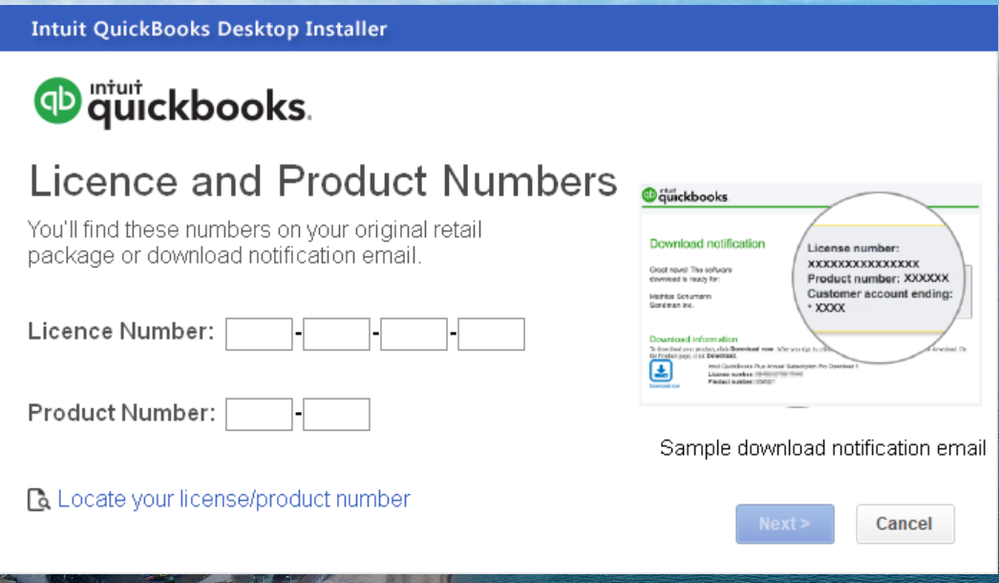
Hi. When installing and running the uk trial version it asks me for a license number & product code. I see the US version gets these listed on the download page for access to the trial version, but the UK trial version does not?
How can I access the UK trial version?
For your info, I'm looking to upgrade from running the 2013 pro QB.
Many thanks!


- Mark as New
- Bookmark
- Subscribe
- Highlight
- Report Inappropriate Content
Other Questions
Let me help download the QuickBooks Desktop trial account, Dart2309.
You can use this link to download the trial version: QuickBooks Desktop Pro 2021. This won't require a product and license key.
I've added this article for additional information: Download a trial of QuickBooks Desktop.
To help you navigate those features in the program, check out this link a guide: Get started with QuickBooks Desktop.
Stay in touch with me if you need additional information while downloading the trial version. I'll be right here to help you.
- Mark as New
- Bookmark
- Subscribe
- Highlight
- Report Inappropriate Content
Other Questions
Apologies, but that link does require a product & license key.
The only download I've seen that doesn't require a key was the US version, but that one wouldn't accept my UK backup file.
It seems my only choice is to purchase a new UK license?


- Mark as New
- Bookmark
- Subscribe
- Highlight
- Report Inappropriate Content
Other Questions
Thanks for your swift response, @Dart2309.
As an additional insight, You may need to use the converter kit.
Download and install the upgrader's kit (QuickBooks 2006)
Click here to download our upgrader's kit and save the .exe file in a temporary location on your computer. This upgrader's kit is a special trial version of QuickBooks 2006. It'll ask you to install SimpleStart, Regular, Pro, or Premier Accountant edition.
Install the same edition you are currently using. After installing, you'll have two months and six uses before the software acts you to activate. In Windows Explorer, navigate to the file and double-click the .exe file that you just downloaded. Follow the on-screen instructions.
When asked for an installation code, use the following: 26512-85587-55550-710133. This code will allow you to use the trial version of QuickBooks for 60 days, but you will not be able to activate it.
When asked where you want to install QuickBooks, choose a different location than your current version of QuickBooks. Do not install on top of your old version.
If you encounter problems updating, please contact QuickBooks support to get more assistance and other options.
Let me know if you have more questions about upgrading. We're always here to guide.
- Mark as New
- Bookmark
- Subscribe
- Highlight
- Report Inappropriate Content
Other Questions
The first two download links on this page are the same and they are not the trial version.
The third link (for accountants) does appear to be a trial version, as it even has the word trial in the file name.

- Mark as New
- Bookmark
- Subscribe
- Highlight
- Report Inappropriate Content
Other Questions
I had the same issue as you. Found the free trial license number & product code, but it only works for the US version. I eventually spoke to a v helpful desktop support consultant called Ashley Horne who confirmed that the UK website is currently not linking to a free trial version, as a free trial should never ask for a licence key. Instead he gave me a link to download an ACTUAL free trial of Desktop Pro 2021 which has now worked. I'm not allowed to post a weblink here, but Ashley can be contacted on the Desktop Support Line: [phone number removed]

- Mark as New
- Bookmark
- Subscribe
- Highlight
- Report Inappropriate Content
Other Questions
Do you have 2022 trial version now? If yes, please help send the link. I can't find it in Intuit's site. Thank you!
- Mark as New
- Bookmark
- Subscribe
- Highlight
- Report Inappropriate Content
Other Questions
Is your company located in UK?
- Mark as New
- Bookmark
- Subscribe
- Highlight
- Report Inappropriate Content
Other Questions
Hi! Our company is located in Philippines but I am not the one who installed but I saw that in history they installed the UK Version.
- Mark as New
- Bookmark
- Subscribe
- Highlight
- Report Inappropriate Content
Other Questions
They discontinued QB Desktop UK version. Consider switching to QB Desktop US version or migrating to QBO Global version for Philippines.
https://quickbooks.grsm.io/Philippines
- Mark as New
- Bookmark
- Subscribe
- Highlight
- Report Inappropriate Content
Other Questions
Hi, do you have link for US Quickbooks trial versions so we can try it out?
- Mark as New
- Bookmark
- Subscribe
- Highlight
- Report Inappropriate Content
Other Questions
We have replied your post in US Community about it and share the download link.
- Mark as New
- Bookmark
- Subscribe
- Highlight
- Report Inappropriate Content
Other Questions
Hi, I have not seen your reply in US community. Can you send it here?
- Mark as New
- Bookmark
- Subscribe
- Highlight
- Report Inappropriate Content
Other Questions
Link is broken
- Mark as New
- Bookmark
- Subscribe
- Highlight
- Report Inappropriate Content
Other Questions
Which link do you mean? The trial version for QB Desktop 2022 US version, or else?
- Mark as New
- Bookmark
- Subscribe
- Highlight
- Report Inappropriate Content
Other Questions
I have downloaded the trial version of QBDT UK Premier 2021, but it wants a licence key. I thought the trial version didn't require a licence key?
@Fiat Lux - ASIA wrote:Which link do you mean? The trial version for QB Desktop 2022 US version, or else?
@Fiat Lux - ASIA wrote:Which link do you mean? The trial version for QB Desktop 2022 US version, or else?
@Fiat Lux - ASIA wrote:Which link do you mean? The trial version for QB Desktop 2022 US version, or else?
@Fiat Lux - ASIA wrote:Which link do you mean? The trial version for QB Desktop 2022 US version, or else?
- Mark as New
- Bookmark
- Subscribe
- Highlight
- Report Inappropriate Content
Other Questions
It seems the file you have downloaded is only the installer. Afaik, trial version for QB Desktop UK version does not require any code. Why do you need to try QB Desktop 2021 UK version? We may share the trial version for QB Desktop 2020 UK version if required.
- Mark as New
- Bookmark
- Subscribe
- Highlight
- Report Inappropriate Content
Other Questions
yes, please do so.
- Mark as New
- Bookmark
- Subscribe
- Highlight
- Report Inappropriate Content
Other Questions
Click our username and you can send a private message to us.
